Reff Editor - Video Editor
Updated
Current Version
1.0
Offered By

Stop worrying about high battery drain when using Reff Editor - Video Editor on your phone. Free yourself from the tiny screen and enjoy the app on a much larger display. From now on, get a full-screen experience of your app with the convenience of a keyboard and mouse. MEmu offers you all the surprising features you’d expect: quick installation and easy setup, intuitive controls, and no more worries about battery life, mobile data, or unexpected calls. The all-new MEmu 9 is the choice for using Reff Editor - Video Editor on your computer. With the MEmu multi-instance manager, you can run two or more accounts at the same time. Most importantly, our exclusive emulation engine unlocks your PC’s full potential, delivering smooth and enjoyable performance.
Show more
Enjoy superb experience of using Reff Editor - Video Editor on PC with MEMU App Player. It's a powerful free Android emulator which provides you with thousands of android apps for their desktop version. Enjoy connecting with friends and polishing your work with higher efficiency! Reff Editor - Video Editor APPWonder how creators go viral with stunning videos?

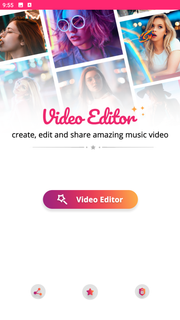
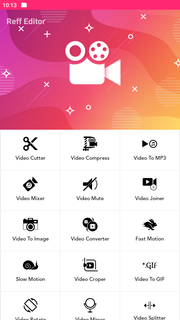
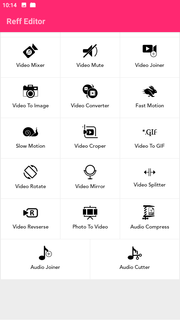
Reff Editor - Video Editor APPWonder how creators go viral with stunning videos? Try Reff Editor and find out how easy it is to create your own masterpiece only by using your phone!The performance of pro-level desktop editing, optimized for your mobile device. Just a few taps to trim clips, add music, adjust speed, and create beautiful movies and slideshows you’ll love to share. Watch your followers go crazy for your gorgeous video edits. Quick, simple, stunning. It’s never been faster or easier to edit on the go like a pro.Reff Editor - Video Editor: make stunning videos in a snap! COMPLETE MOVIE MAKER: EDITING MADE SIMPLE+ Reff Editor offers the best tools for making videos and movies on mobile.+ Trim, cut, and merge your photos and video clips in seconds.+ Adjust speed for fast or slow motion.+ Quickly add music choosing from our library of 400+ songs.+ Add titles and text overlays. PROFESSIONAL VIDEO MAKER AND EDITOR APP+ Import photos & videos and set the perfect length.+ Quickly organize & combine your pictures and clips within our intuitive timeline: Video making has never been easier.+ PRO Trimmer & Cutter: Trim and cut your videos to split them into more clips.+ PRO Merger & Joiner: Merge your clips and join photos in seconds to create an incredible montage, slideshow, or stop motion video.+ Fit the right aspect ratio: Create masterpieces with the perfect size for your favorite social media such as Instagram (posts, stories, and Reels), TikTok, and YouTube.⏱️ VIDEO MAKING WITH SPEED EFFECTS+ Change speed to slow down clips or make fast motion edits.+ Stand out on social media with timelapse and hyperlapse. PICK THE PERFECT SOUNDTRACK+ Add the perfect background song to your videos and slideshows.+ Choose from a huge library of free music.+ Trim and mix multiple audio tracks with precision.+ Adjust the volume of your songs.✍️ ADD CUSTOM TEXT+ Add text to photo and video and communicate with your audience.+ Customize your project by choosing the best font, color, and size and add fade-in and fade-out effects.+ The quick, easy, fun way to build a connection with your social media followers. SHARE & SAVE YOUR VIDEO+ Export videos in high quality.+ Easily select the right aspect ratio for each social media channel.+ Share to YouTube, Instagram, Tik Tok, Facebook, Mail, and more.+ Save videos to your camera roll.Subscribe or to have unlimited access to all the premium features as well.• Subscription length: weekly, monthly, yearly• Your payment will be charged to your Google Account as soon as you confirm your purchase.• You can manage your subscriptions and turn off auto-renewal from your Account Settings after the purchase.• Your subscription will renew automatically, unless you turn off auto-renew at least 24 hours before the end of the current period.• The cost of renewal will be charged to your account in the 24 hours prior to the end of the current period.• When canceling a subscription, your subscription will stay active until the end of the period. Auto-renewal will be disabled, but the current subscription will not be refunded.• Any unused portion of a free trial period, if offered, will be forfeited when purchasing a subscription.The best mobile video editor you can find! Try Reff Editor for free and create your 5-star video: Edit with text, music, and fast/slow motion speed effects!Have a feature request you’d love to see in a future version of the app? Contact us at [email protected].
Show more

1. Download MEmu installer and finish the setup

2. Start MEmu then open Google Play on the desktop

3. Search Reff Editor - Video Editor in Google Play
Install
4. Download and Install Reff Editor - Video Editor
5. On install completion click the icon to start

6. Enjoy using Reff Editor - Video Editor on PC with MEmu
MEmu Play is the best Android emulator, and 100 million users already enjoy its superb Android app experience. Powered by advanced virtualization technology, it lets you enjoy thousands of Android apps smoothly on your PC—including the most graphics-intensive ones.
Bigger screen with better graphics; Long duration, without limitation of battery or mobile data.
Full Keymapping support for precise control of keyboard and mouse or gamepad.
Multiple game accounts or tasks on single PC at one time with Multi-Instance manager.
Use Reff Editor - Video Editor on PC by following steps: