SBB Mobile
Updated
Current Version
12.34.0.117.master
Offered By

Stop worrying about high battery drain when using SBB Mobile on your phone. Free yourself from the tiny screen and enjoy the app on a much larger display. From now on, get a full-screen experience of your app with the convenience of a keyboard and mouse. MEmu offers you all the surprising features you’d expect: quick installation and easy setup, intuitive controls, and no more worries about battery life, mobile data, or unexpected calls. The all-new MEmu 9 is the choice for using SBB Mobile on your computer. With the MEmu multi-instance manager, you can run two or more accounts at the same time. Most importantly, our exclusive emulation engine unlocks your PC’s full potential, delivering smooth and enjoyable performance.
Show more
Enjoy superb experience of using SBB Mobile on PC with MEMU App Player. It's a powerful free Android emulator which provides you with thousands of android apps for their desktop version. Enjoy connecting with friends and polishing your work with higher efficiency! SBB Mobile: your personal travel companion for public transport.
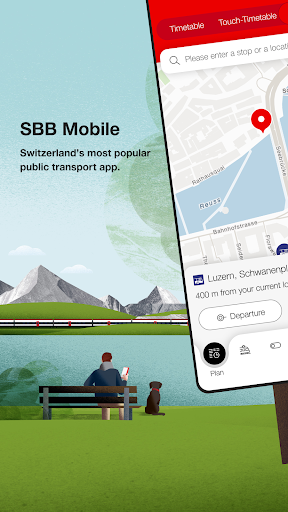
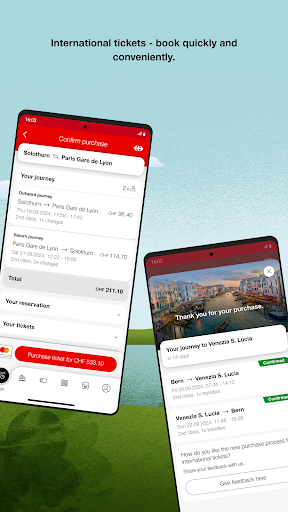
SBB Mobile: your personal travel companion for public transport.
Want to know ahead of time if your train will arrive on time? Want to have quicker access to your ticket during ticket inspection? Want to be able to find your way better at the station and have reliable map information? We have good news for you! SBB Mobile can do it all. And much more.
The heart of the app is the new navigation bar with the following menu points and content.
Plan
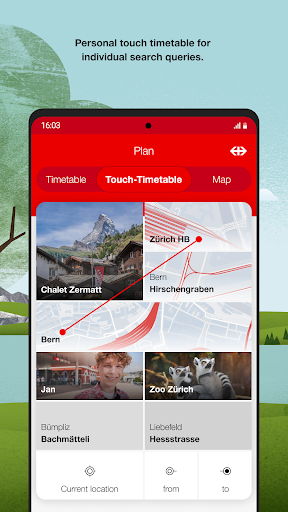
• Plan your journey with a simple timetable search via the touch timetable or use your current position as the origin or destination, locating it on the map.
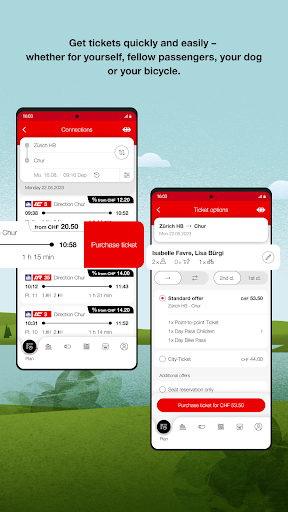
• Buy your ticket for the whole of Switzerland in just two clicks. Your travelcards on the SwissPass are applied.
• Travel particularly affordably with supersaver tickets or Saver Day Passes.
Trips
• Save your trip and we will provide you with all the information you need during your journey under ‘Single Trips’: everything from departure and arrival times, platform information and service disruptions to train formations and walking routes.
• Set up your personal commuter route under ‘Commuting’ and receive push notifications about rail service disruptions.
• The app accompanies you from door to door as you travel and you will receive information about delays, disruption and interchange times via push notification.
EasyRide
• Check in, hop on and head off – across the entire GA Travelcard network.
• EasyRide calculates the right ticket for your journey on the basis of the routes you travelled and charges you the relevant amount subsequently.
Tickets & Travelcards
• Show your public transport travelcards digitally with SwissPass Mobile.
• It also gives you an overview of your valid and expired tickets and travelcards on the SwissPass.
Shop & Services
• Buy regional transport tickets and Day Passes for the GA Travelcard area of validity quickly and easily without searching the timetable.
• In the ‘Services’ section, you can find lots of useful links about travel.
Profile
• Straightforward access to your personal settings and our customer support.
Contact us.
If you have any questions, feel free to get in touch:
https://www.sbb.ch/en/timetable/mobile-apps/sbb-mobile/contact.html
Data security and authorisations.
What permissions does SBB Mobile need and why?
Location
For connections from your current location, the GPS function must be activated so that SBB Mobile can find the nearest stop. This also applies if you want to have the nearest stop displayed in the timetable.
Calendar and e-mail
You can save connections in your own calendar and send them by e-mail (to friends, an external calendar). SBB Mobile requires read and write permissions to be able to import your desired connection into the calendar.
Access to the camera
SBB Mobile requires access to your camera to take pictures directly in the app for your personalised touch timetable.
Internet access
SBB Mobile requires internet access to search the timetable as well as for ticket purchases.
Memory
To support offline functions, e.g. station/stop list, connections (history) and purchased tickets, SBB Mobile requires access to your device’s memory (saving app-specific settings).
Show more

1. Download MEmu installer and finish the setup

2. Start MEmu then open Google Play on the desktop

3. Search SBB Mobile in Google Play
Install
4. Download and Install SBB Mobile
5. On install completion click the icon to start

6. Enjoy using SBB Mobile on PC with MEmu
MEmu Play is the best Android emulator, and 100 million users already enjoy its superb Android app experience. Powered by advanced virtualization technology, it lets you enjoy thousands of Android apps smoothly on your PC—including the most graphics-intensive ones.
Bigger screen with better graphics; Long duration, without limitation of battery or mobile data.
Full Keymapping support for precise control of keyboard and mouse or gamepad.
Multiple game accounts or tasks on single PC at one time with Multi-Instance manager.
Use SBB Mobile on PC by following steps: