
FamilienMomente by Kaufland
Updated
Current Version
1.0.4
Offered By

Stop worrying about high battery drain when using FamilienMomente by Kaufland on your phone. Free yourself from the tiny screen and enjoy the app on a much larger display. From now on, get a full-screen experience of your app with the convenience of a keyboard and mouse. MEmu offers you all the surprising features you’d expect: quick installation and easy setup, intuitive controls, and no more worries about battery life, mobile data, or unexpected calls. The all-new MEmu 9 is the choice for using FamilienMomente by Kaufland on your computer. With the MEmu multi-instance manager, you can run two or more accounts at the same time. Most importantly, our exclusive emulation engine unlocks your PC’s full potential, delivering smooth and enjoyable performance.
Show more
Enjoy superb experience of using FamilienMomente by Kaufland on PC with MEMU App Player. It's a powerful free Android emulator which provides you with thousands of android apps for their desktop version. Enjoy connecting with friends and polishing your work with higher efficiency! Beschreibung .
Beschreibung
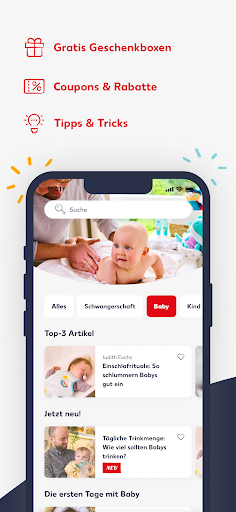
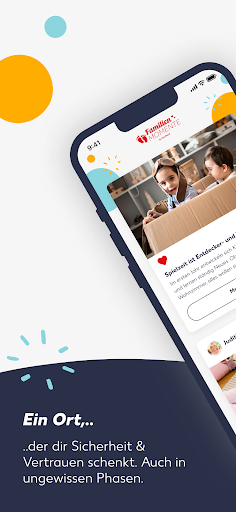
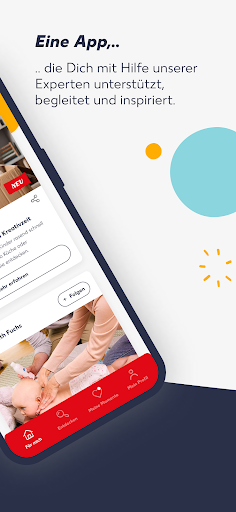
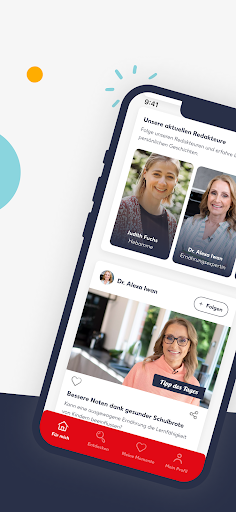
Mit der Familien Momente App von Kaufland, wollen wir euch als junge Familie ermöglichen, euch gut, gesund und nachhaltig zu entwickeln. Wir schaffen einen Ort, der euch Sicherheit und Vertrauen schenkt - auch in ungewissen Phasen. Eine App, die euch mit hilfe unserer Experten unterstützt, begleitet und inspiriert.
VORTEILE:
- Kostenlose Geschenke zur Geburt und den ersten vier Geburtstagen – per Post
- Zugang zu exklusiven Coupons und Rabatten
- Von Experten geprüfte Ratgeber für euren Alltag
SO GEHT’S:
Einfach die FamilienMomente App herunterladen, im Kaufland Kundenkonto einloggen und die Inhalte entdecken, die du gerade brauchst. Informiere dich von der ersten SSW bis hin zum Alltag mit Kind über aktuelle Familienthemen, stöbere durch unsere Mediathek, entdecke tolle DIY-Ideen und Ratgeber. Like Beiträge, um sie für später zu speichern oder teile eine unserer Bastelideen mit deinen Freunden.
Für mich: Im Bereich Für mich informieren wir dich über aktuelle Themen und schlagen dir die Inhalte vor, die zu deinem Familienalltag mit Schwangerschaft, Baby und Kind passen. Ob wertvolle Tipps zu verschiedenen Schwangerschaftswochen, Geburtsratgeber oder Ideen rund um den Alltag als Familie: Die FamilienMomente App von Kaufland Ratgeber und Inspiration für dich bereit.
Entdecken: Im Bereich Entdecken findest du unsere über 200 aktuellen Beiträgen rund um das Thema Familie. Unsere Ratgeber wurden mithilfe von Expertinnen und Experten verfasst und von diesen geprüft. Entdecke unsere FamilienMomente by Kaufland Mediathek mit vielen Video- und Audiobeiträgen. Erhalte außerdem Zugang zu exklusiven Coupons.
Meine Momente: Im Bereich Meine Momente findest du die von dir gemerkten Beiträge sowie die Experten, denen du folgst.
Mein Profil: Im Bereich mein Profil findest du neben einigen Einstellungsmöglichkeiten und rechtlichen Informationen auch dein Profil. Hier kannst du deine Daten jederzeit einsehen und anpassen.
Du hast Lust auf mehr oder willst uns Feedback geben? Wir freuen uns von dir zu hören! Schreibe uns einfach an service@kaufland.dekundenmanagement@kaufland.de
Mehr von FamilienMomente findest du hier:
- Website: www.kaufland.de/familienmomente
- Facebook: https://de-de.facebook.com/familienmomente_by_kaufland
- Instagram: https://www.instagram.com/familienmomente_kaufland/
- Youtube: https://www.youtube.com/kaufland
Show more

1. Download MEmu installer and finish the setup

2. Start MEmu then open Google Play on the desktop

3. Search FamilienMomente by Kaufland in Google Play
Install
4. Download and Install FamilienMomente by Kaufland
5. On install completion click the icon to start

6. Enjoy using FamilienMomente by Kaufland on PC with MEmu
MEmu Play is the best Android emulator, and 100 million users already enjoy its superb Android app experience. Powered by advanced virtualization technology, it lets you enjoy thousands of Android apps smoothly on your PC—including the most graphics-intensive ones.
Bigger screen with better graphics; Long duration, without limitation of battery or mobile data.
Full Keymapping support for precise control of keyboard and mouse or gamepad.
Multiple game accounts or tasks on single PC at one time with Multi-Instance manager.
Use FamilienMomente by Kaufland on PC by following steps: