Secure messenger SafeUM
Updated
Current Version
1.1.0.1640
Offered By

Stop worrying about high battery drain when using Secure messenger SafeUM on your phone. Free yourself from the tiny screen and enjoy the app on a much larger display. From now on, get a full-screen experience of your app with the convenience of a keyboard and mouse. MEmu offers you all the surprising features you’d expect: quick installation and easy setup, intuitive controls, and no more worries about battery life, mobile data, or unexpected calls. The all-new MEmu 9 is the choice for using Secure messenger SafeUM on your computer. With the MEmu multi-instance manager, you can run two or more accounts at the same time. Most importantly, our exclusive emulation engine unlocks your PC’s full potential, delivering smooth and enjoyable performance.
Show more
Enjoy superb experience of using Secure messenger SafeUM on PC with MEMU App Player. It's a powerful free Android emulator which provides you with thousands of android apps for their desktop version. Enjoy connecting with friends and polishing your work with higher efficiency! SafeUM is a comprehensive solution for secure communication.
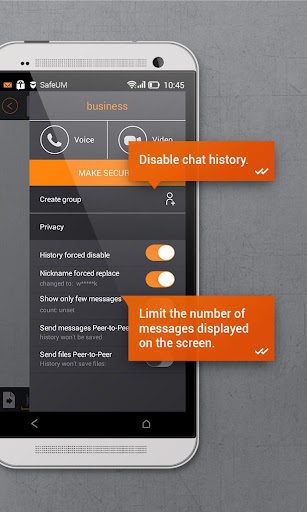
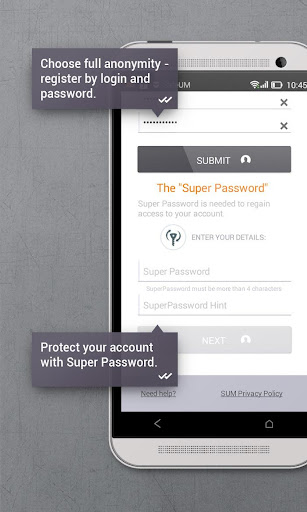
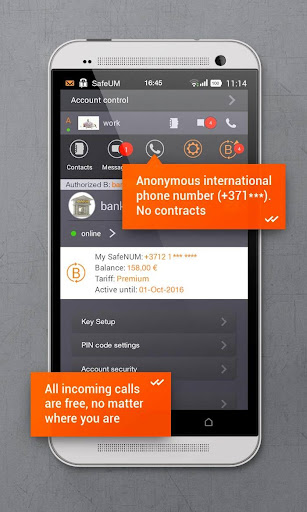
SafeUM is a comprehensive solution for secure communication. It strongly encrypts instant text messages, voice, and video calls, group chats and files.
We made it our mission to provide the best security among communication apps for mass usage.
An ElGamal Elliptic Curve Cryptographic algorithm with 256-bits key provides a high level of security that meets modern standards and requirements and protects your confidential information.
SafeUM is the best solution for private and business secure communications.
Why Switch to SafeUM?
The secure messenger's features:
- encrypted group chats
- registration without a SIM card, using only login and password
- usage of 3 accounts simultaneously on one device
- chat history can be disabled on both sides simultaneously
- displayed messages number limitation
- cross-platform
- account access control
- account authorization history
- free encrypted audio- and video- calls inside SafeUM network
- technical support
Security:
- local data is not stored on your device. You can always securely access your data. Never lose your data again
- “enhanced encryption” mode
- verification of your interlocutor’s encryption keys with QR-code
- three levels of account access with three PIN-codes
- your personal information is not available when in public networks (e.g. Wi-Fi)
- security alerts of account hacking attempts
- dynamic secret key generation for each message
- additional protection: digital signature ensures the integrity of the transmitted data as well as the authenticity of the interlocutor
SafeUM heavily encrypts all your data with time-tested algorithms.
Be sure to check our website for a list of SafeUM apps for different platforms: https://SafeUM.com/
-------------------------------------
When registering in SafeUM, a User is given a telephone number in a +3712 ХХХ-ХХХХ format (further - The Number).
In case of a User:
- doesn’t recharge The Number through 2 weeks (14 days) from the registration date
and/or
- from the last activity with the Number (incoming/outcoming call) have past 14 days or more, and the balance on the account is 0.00 EUR
SafeUM reserves the right to withdraw The Number.
Withdrawing The Number doesn’t impact on the User’s account functionality (including chats and calls within SafeUM to other SafeUM’s Users).
The recovery of The Number is technically IMPOSSIBLE.
When the balance is positive The Number will NOT be withdrawn.
-------------------------------------
SafeUM - the most secure messenger for Android - in Social Networks:
Facebook page "Multimedia secure messenger: https://www.facebook.com/safeum.en"
LinkedIn: "Multimedia secure messenger: https://www.linkedin.com/company/safeum"
Twitter: "Secure Messenger: https://twitter.com/SafeUM"
"The best secure messenger Support 2018" Email: tech@SafeUM.com
Online tech support: "SafeUM Support" in the App
Show more

1. Download MEmu installer and finish the setup

2. Start MEmu then open Google Play on the desktop

3. Search Secure messenger SafeUM in Google Play
Install
4. Download and Install Secure messenger SafeUM
5. On install completion click the icon to start

6. Enjoy using Secure messenger SafeUM on PC with MEmu
MEmu Play is the best Android emulator, and 100 million users already enjoy its superb Android app experience. Powered by advanced virtualization technology, it lets you enjoy thousands of Android apps smoothly on your PC—including the most graphics-intensive ones.
Bigger screen with better graphics; Long duration, without limitation of battery or mobile data.
Full Keymapping support for precise control of keyboard and mouse or gamepad.
Multiple game accounts or tasks on single PC at one time with Multi-Instance manager.
Use Secure messenger SafeUM on PC by following steps: