Shelly Smart Control
Updated
Current Version
1734963082
Offered By

Stop worrying about high battery drain when using Shelly Smart Control on your phone. Free yourself from the tiny screen and enjoy the app on a much larger display. From now on, get a full-screen experience of your app with the convenience of a keyboard and mouse. MEmu offers you all the surprising features you’d expect: quick installation and easy setup, intuitive controls, and no more worries about battery life, mobile data, or unexpected calls. The all-new MEmu 9 is the choice for using Shelly Smart Control on your computer. With the MEmu multi-instance manager, you can run two or more accounts at the same time. Most importantly, our exclusive emulation engine unlocks your PC’s full potential, delivering smooth and enjoyable performance.
Show more
Enjoy superb experience of using Shelly Smart Control on PC with MEMU App Player. It's a powerful free Android emulator which provides you with thousands of android apps for their desktop version. Enjoy connecting with friends and polishing your work with higher efficiency! Shelly Smart Control is the successor of Shelly Cloud.
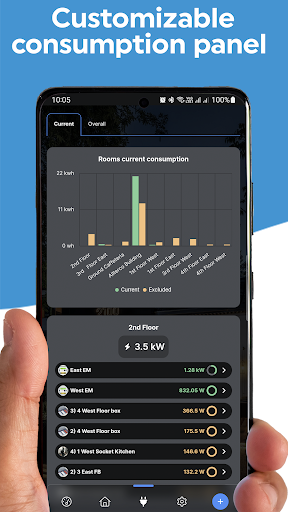
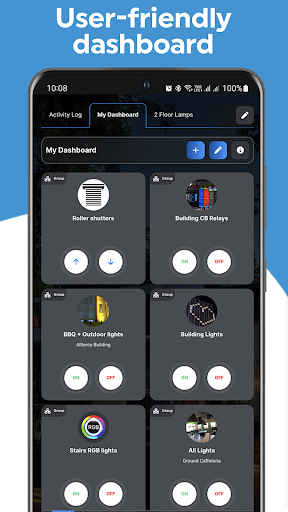
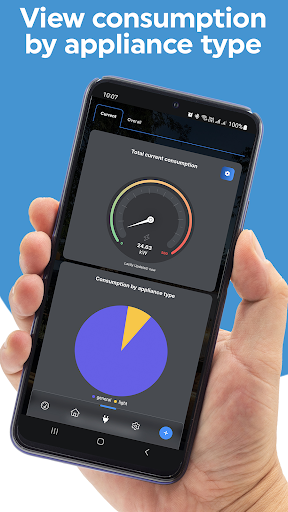
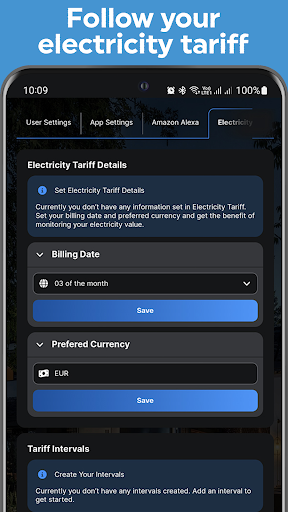
Shelly Smart Control is the successor of Shelly Cloud. We've added a number of new features to help you monitor and control your devices, look at your current consumption and even add cost periods, so you can see your monthly electricity bill prognosis.
The new features include but are not limited to:
- Dashboards - create and organise your own dashboards with custom cards for your favourite devices, scenes or groups;
- New space for real-time measuring of energy consumption;
- Detailed statistics - for your house, a room, or each device;
- Electricity tariff;
- Information screens.
This app offers the possibility to remotely control your Shelly devices. It is the neccessary hub to initially install your Shelly devices.
We are constantly working on providing support for new devices. The updates are provided to you via a seamless update technology that works all on its own - you will only need to update the application manually for major updates.
The Shelly Home Automation portfolio includes a variety of relay switches, sensors, plugs, bulbs, and other controllers, all connected and controlled through your Wi-Fi network. The new Shelly Plus and Shelly Pro lines of products additionally support Bluetooth connectivity for faster and more stable device communication, and the new Shelly Pro line offers LAN and Wi-Fi usage simultaneously. The entire Shelly portfolio is available at https://shelly.cloud/
With Shelly you can control your lights, garage doors, curtains, window blinds, or other appliances, as well as trigger actions based on certain conditions.
All Shelly devices provide:
- Embedded Web server
- Wi-Fi control and connectivity
- APIs for observation and control
A user account is required to access, include, and control Shelly devices through the application or via the upcoming Wear OS applet.
Shelly devices are compatible with other widely used both local- and cloud-based home automation platforms like Google Home and Alexa.
Please note that on Android 9 and earlier an update to "Chrome" and "Android System WebView" might be necessary, as this app depends heavily on libraries provided by these two and you may encounter a black screen if they are not updated.
Show more

1. Download MEmu installer and finish the setup

2. Start MEmu then open Google Play on the desktop

3. Search Shelly Smart Control in Google Play
Install
4. Download and Install Shelly Smart Control
5. On install completion click the icon to start

6. Enjoy using Shelly Smart Control on PC with MEmu
MEmu Play is the best Android emulator, and 100 million users already enjoy its superb Android app experience. Powered by advanced virtualization technology, it lets you enjoy thousands of Android apps smoothly on your PC—including the most graphics-intensive ones.
Bigger screen with better graphics; Long duration, without limitation of battery or mobile data.
Full Keymapping support for precise control of keyboard and mouse or gamepad.
Multiple game accounts or tasks on single PC at one time with Multi-Instance manager.
Use Shelly Smart Control on PC by following steps: