Socolive
Updated
Current Version
1.1.1
Offered By

Stop worrying about high battery drain when using Socolive on your phone. Free yourself from the tiny screen and enjoy the app on a much larger display. From now on, get a full-screen experience of your app with the convenience of a keyboard and mouse. MEmu offers you all the surprising features you’d expect: quick installation and easy setup, intuitive controls, and no more worries about battery life, mobile data, or unexpected calls. The all-new MEmu 9 is the choice for using Socolive on your computer. With the MEmu multi-instance manager, you can run two or more accounts at the same time. Most importantly, our exclusive emulation engine unlocks your PC’s full potential, delivering smooth and enjoyable performance.
Show more
Enjoy superb experience of using Socolive on PC with MEMU App Player. It's a powerful free Android emulator which provides you with thousands of android apps for their desktop version. Enjoy connecting with friends and polishing your work with higher efficiency! Socolive suits fans who need quick football updates while commuting, studying, or working.
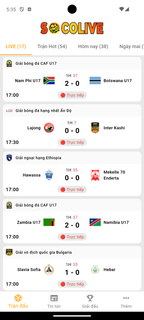
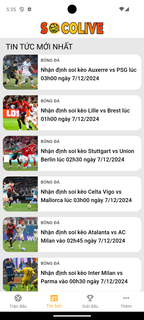
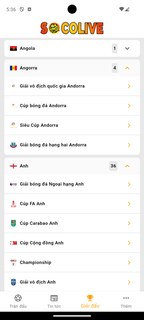
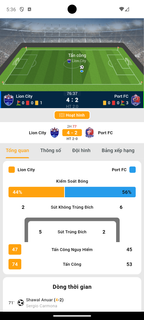
Socolive suits fans who need quick football updates while commuting, studying, or working. You can check scores, then go back to your day without browsing multiple sites. Coverage includes domestic and international competitions, so club and national fixtures sit together in one place. News and notifications center on your selected teams and players, and quick match updates help you spot turning points soon after they happen. With Socolive APK on your phone, match tracking stays close at hand all week. Socolive FeaturesReal time scores and timelinesSocolive posts minute by minute events for each match, including goals, cards, substitutions, stoppage time, and timeline entries. Opening a match page shows momentum as it changes, so you can catch up in seconds during a commute.Detailed match statisticsFor context beyond the score, Socolive displays lineups, shots, possession, and key moments. This layout helps you see where pressure builds and which players are influencing the game.Personalized news and notificationsYou follow clubs and players to build a focused feed across leagues. Enable alerts for kickoffs, goals, and full time, then adjust followed teams to reduce noise when notifications feel too frequent.TV links, highlights, and smart filtersWhen available, match pages include external TV links to Vietnamese streams and post match highlight clips. Availability and quality depend on providers, and performance can vary by network and device. To find what matters fast, filters surface live, trending, or upcoming games, and day toggles move between today and tomorrow. Coverage spans more than 375 football tournaments, with additional live scores for basketball, tennis, and esports. Get started with SocoliveSocolive focuses on fast scores, detailed stats, and alerts built around teams you follow. Set favorites, choose notifications, and use filters to track live or upcoming matches quickly. Update to the Socolive latest version when available to keep features and coverage current.
Show more

1. Download MEmu installer and finish the setup

2. Start MEmu then open Google Play on the desktop

3. Search Socolive in Google Play
Install
4. Download and Install Socolive
5. On install completion click the icon to start

6. Enjoy using Socolive on PC with MEmu
MEmu Play is the best Android emulator, and 100 million users already enjoy its superb Android app experience. Powered by advanced virtualization technology, it lets you enjoy thousands of Android apps smoothly on your PC—including the most graphics-intensive ones.
Bigger screen with better graphics; Long duration, without limitation of battery or mobile data.
Full Keymapping support for precise control of keyboard and mouse or gamepad.
Multiple game accounts or tasks on single PC at one time with Multi-Instance manager.
Use Socolive on PC by following steps: