
Speechify Text to Speech Voice
Updated
Current Version
4.3.1375
Offered By

Stop worrying about high battery drain when using Speechify Text to Speech Voice on your phone. Free yourself from the tiny screen and enjoy the app on a much larger display. From now on, get a full-screen experience of your app with the convenience of a keyboard and mouse. MEmu offers you all the surprising features you’d expect: quick installation and easy setup, intuitive controls, and no more worries about battery life, mobile data, or unexpected calls. The all-new MEmu 9 is the choice for using Speechify Text to Speech Voice on your computer. With the MEmu multi-instance manager, you can run two or more accounts at the same time. Most importantly, our exclusive emulation engine unlocks your PC’s full potential, delivering smooth and enjoyable performance.
Show more
Enjoy superb experience of using Speechify Text to Speech Voice on PC with MEMU App Player. It's a powerful free Android emulator which provides you with thousands of android apps for their desktop version. Enjoy connecting with friends and polishing your work with higher efficiency! Introducing Speechify - Your Ultimate Text-to-Speech and Speech-to-Text Solution!
Introducing Speechify - Your Ultimate Text-to-Speech and Speech-to-Text Solution!
Join over 30 million people and experience the power of Speechify, the leading application that revolutionizes the way you interact with text, speech, and images. With our cutting-edge AI technology, we offer an array of services that will enhance your productivity and make your digital content truly accessible.
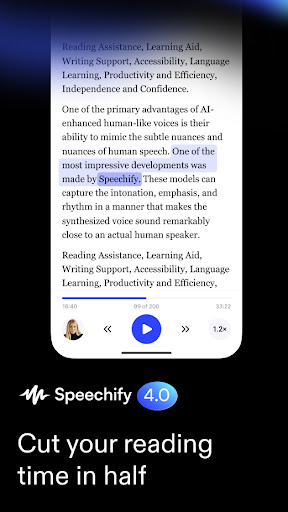
Elevate your reading experience with Speechify's exceptional text-to-speech capabilities. Whether it's your favorite books, important documents, captivating web articles, emails, or even images, our advanced AI-generated natural human voices bring them to life. Sit back, relax, and let Speechify read it all aloud to you effortlessly.
Key Features:
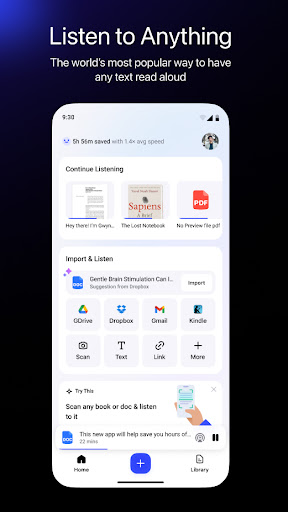
Books: Dive into a world of literary wonders as Speechify transforms your books into captivating audio experiences. Our AI voices infuse life into every page, making your reading sessions truly immersive and enjoyable.
Docs: Say goodbye to endless scrolling and eye strain. With Speechify, your important documents are intelligently converted into clear and articulate speech, allowing you to absorb information effortlessly and multitask efficiently.
Web: Unleash the power of the internet with Speechify's web reading feature. Whether you're researching, browsing articles, or catching up on the latest news, let Speechify's AI voices be your personalized reading companion, making web content accessible anytime, anywhere.
Email: Tired of staring at your inbox? Let Speechify transform your emails into spoken words. Stay connected and productive while on the go, as our AI voices read your emails aloud, allowing you to manage your inbox effortlessly.
Image: Break down barriers between visuals and audio with Speechify's image-to-speech functionality. Simply upload an image, and our AI technology will generate a descriptive audio rendition, making visual content accessible to everyone.
PDF: Enjoy the convenience of having your PDF files read aloud to you. Speechify seamlessly converts PDFs into audio format, enabling you to absorb information efficiently and access your documents hands-free.
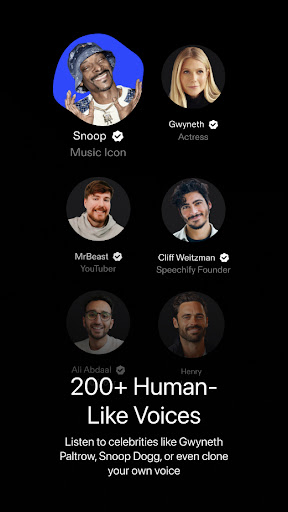
Experience the pinnacle of AI-driven text-to-speech and speech-to-text technology with Speechify. With a user-friendly interface, customizable options, and an extensive library of natural human voices, we guarantee an unparalleled audio experience tailored to your preferences.
Unlock the full potential of your digital content and embrace a new era of accessibility. Download Speechify now and let our AI voices captivate your senses!
Install Speechify today, for free!
Privacy Policy:
https://speechify.com/privacy/
Terms of Service: https://speechify.com/terms/
Show more

1. Download MEmu installer and finish the setup

2. Start MEmu then open Google Play on the desktop

3. Search Speechify Text to Speech Voice in Google Play
Install
4. Download and Install Speechify Text to Speech Voice
5. On install completion click the icon to start

6. Enjoy using Speechify Text to Speech Voice on PC with MEmu
MEmu Play is the best Android emulator, and 100 million users already enjoy its superb Android app experience. Powered by advanced virtualization technology, it lets you enjoy thousands of Android apps smoothly on your PC—including the most graphics-intensive ones.
Bigger screen with better graphics; Long duration, without limitation of battery or mobile data.
Full Keymapping support for precise control of keyboard and mouse or gamepad.
Multiple game accounts or tasks on single PC at one time with Multi-Instance manager.
Use Speechify Text to Speech Voice on PC by following steps: