
SportzFy TV : Live Football TV
Updated
Current Version
1.0
Offered By

Stop worrying about high battery drain when using SportzFy TV : Live Football TV on your phone. Free yourself from the tiny screen and enjoy the app on a much larger display. From now on, get a full-screen experience of your app with the convenience of a keyboard and mouse. MEmu offers you all the surprising features you’d expect: quick installation and easy setup, intuitive controls, and no more worries about battery life, mobile data, or unexpected calls. The all-new MEmu 9 is the choice for using SportzFy TV : Live Football TV on your computer. With the MEmu multi-instance manager, you can run two or more accounts at the same time. Most importantly, our exclusive emulation engine unlocks your PC’s full potential, delivering smooth and enjoyable performance.
Show more
Enjoy superb experience of using SportzFy TV : Live Football TV on PC with MEMU App Player. It's a powerful free Android emulator which provides you with thousands of android apps for their desktop version. Enjoy connecting with friends and polishing your work with higher efficiency! SportzFy helps fans follow matches without juggling multiple sources when games are on.
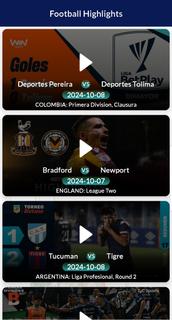
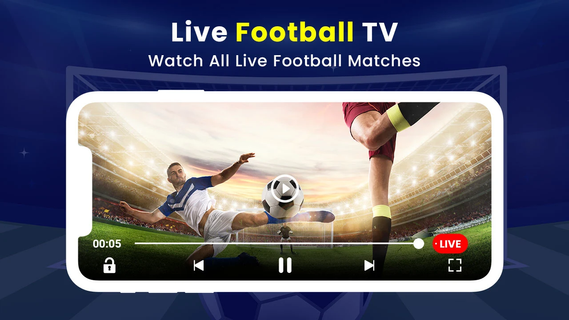
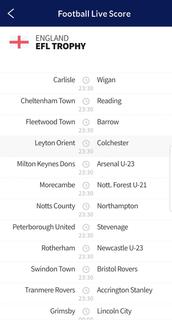
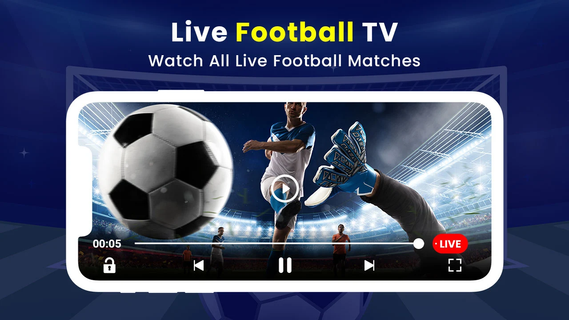
SportzFy helps fans follow matches without juggling multiple sources when games are on. It brings score updates and match information together in one place, so you can check what matters in seconds. The layout is straightforward, which makes browsing fixtures and standings quick during busy matchdays. For users who prefer a simple hub for scores and stats, it fits everyday use on the go. If you need an installation file, SportzFy APK can be used on Android phones.SportzFy featuresLive scores and instant alertsSportzFy focuses on real-time match tracking. You can receive goal alerts and updates for cards, substitutions, and other key moments as they happen. This keeps you informed during league play and international tournaments, even when you are away from a TV.Match center with stats and lineupsThe SportzFy app presents detailed match insights on a single screen. You can view possession, shots, passes, and other live stats, along with confirmed lineups and benches. League pages include tables and upcoming fixtures, so you can switch from one match to a wider competition context smoothly.Favorites and personalized notificationsYou can mark teams and competitions as favorites to filter the feed around what you care about. Notification settings then let you choose which alerts to receive, such as goals or kickoff reminders. This way, the SportzFy app reduces noise and makes it easier to track multiple teams on a busy day.Streaming availability varies by buildSome distributions of SportzFy TV include live sports streaming modules in addition to scores. Where available, users report in-built IPTV playback, a floating player to watch multiple games, and swipe gesture controls. Video quality in those builds typically adapts to your internet speed. If your installation is the scores-only edition, you will still get real-time updates, fixtures, and stats without live video.Designed for quick browsing on mobileThe interface prioritizes fast access to fixtures, standings, and match centers on phones. Text and controls are kept simple, which helps during halftime checks or while commuting. Some users also access Sportzfy TV on larger screens, but the core layout is optimized for handheld viewing.About editions of SportzFy TVThere are builds focused on scores and stats only, and there are builds promoted elsewhere that add live streaming and an IPTV player. Before installing, check which feature set your build provides to match your needs. If you only require match tracking, the scores edition is sufficient. If you are seeking live video, look for a build that explicitly mentions streaming features.Coverage and regional interestSportzFy TV is used to follow major competitions such as the Premier League, UEFA Champions League, La Liga, and international events like the FIFA World Cup. Match hubs, schedules, and alerts help during busy periods, including qualifiers and tournament knockout stages. Many fans in Bangladesh and India follow updates closely, and users who prefer Bangla, Hindi, or English can still track teams and scores without changing how the app works.Using SportzFy on TV devices or PCSome user guides mention setups for Android TV, Smart TV, and FireStick, and others refer to using a PC via Android emulation. Actual experience can vary by device and by build. If your goal is live video on a TV screen, confirm that your installed build includes the streaming module and player controls before planning a viewing setup.How to use SportzFy TVAfter you download SportzFy, setup is straightforward on an Android phone. You can move from installation to live tracking in a short sequence and return to it whenever matches start.Open the app and allow notifications if you want instant score and event alerts during games.Browse the competitions list and pick the leagues or tournaments you follow most closely.Mark your favorite teams to personalize the home feed and filter upcoming fixtures.Tap any live or upcoming match to enter the match center, then review lineups, stats, and minute-by-minute events.Adjust notification preferences for goals, cards, and kickoff times. If your build includes a streaming module, use the built-in player options to watch and continue browsing other matches.Start tracking matches todaySportzFy TV : Live Football TV provides real-time scores, match centers, and personalized alerts for major competitions. To get started quickly, download SportzFy latest version APK from APKPure and set your favorites before the next kickoff.
Show more

1. Download MEmu installer and finish the setup

2. Start MEmu then open Google Play on the desktop

3. Search SportzFy TV : Live Football TV in Google Play
Install
4. Download and Install SportzFy TV : Live Football TV
5. On install completion click the icon to start

6. Enjoy using SportzFy TV : Live Football TV on PC with MEmu
MEmu Play is the best Android emulator, and 100 million users already enjoy its superb Android app experience. Powered by advanced virtualization technology, it lets you enjoy thousands of Android apps smoothly on your PC—including the most graphics-intensive ones.
Bigger screen with better graphics; Long duration, without limitation of battery or mobile data.
Full Keymapping support for precise control of keyboard and mouse or gamepad.
Multiple game accounts or tasks on single PC at one time with Multi-Instance manager.
Use SportzFy TV : Live Football TV on PC by following steps: