Sprouty
Updated
Current Version
1.32
Offered By

Stop worrying about high battery drain when using Sprouty on your phone. Free yourself from the tiny screen and enjoy the app on a much larger display. From now on, get a full-screen experience of your app with the convenience of a keyboard and mouse. MEmu offers you all the surprising features you’d expect: quick installation and easy setup, intuitive controls, and no more worries about battery life, mobile data, or unexpected calls. The all-new MEmu 9 is the choice for using Sprouty on your computer. With the MEmu multi-instance manager, you can run two or more accounts at the same time. Most importantly, our exclusive emulation engine unlocks your PC’s full potential, delivering smooth and enjoyable performance.
Show more
Enjoy superb experience of using Sprouty on PC with MEMU App Player. It's a powerful free Android emulator which provides you with thousands of android apps for their desktop version. Enjoy connecting with friends and polishing your work with higher efficiency! Sprouty – an essential app for parents of babies up to 2 years old.

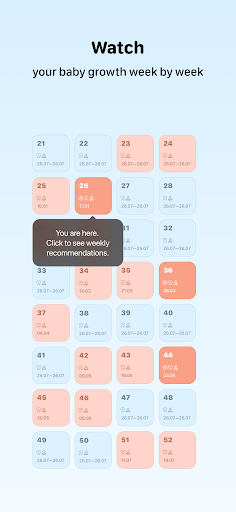
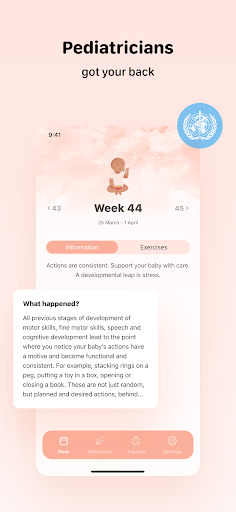
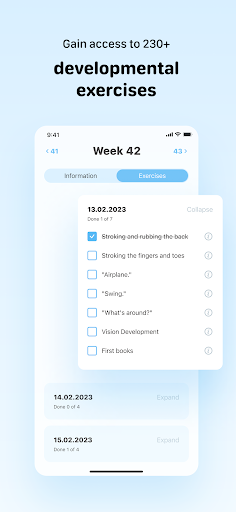
Sprouty – an essential app for parents of babies up to 2 years old. Track your child's growth crises week by week and check comments from pediatricians. Track your baby's sleep, feeding, diaper changes, pumping, and mood. Gain access to 230+ developmental exercises.
Now you have an assistant on your journey to mindful parenting – trusted by 100,000+ moms and dads! Grow Together. Every Step of the Way.
GROWTH CRISES CALENDAR
From birth up to 2 years, a child goes through several growth and development crises. There's no need to be worried – this is a natural process during which the nervous system and brain develop, and the baby acquires new skills. However, during such periods, a child might become fussy and sleep poorly.
We display growth crises in the calendar so you won't worry: together with pediatricians we explain what's happening with the physiology, motor skills, and speech development of your child up to 105 weeks inclusive.
MEASUREMENTS OF HEIGHT, WEIGHT, AND CIRCUMFERENCES
Fix key child's growth parameters – and track how they change. Check them with the World Health Organization's standards.
TRACKERS FOR SLEEP, FEEDING, DIAPER CHANGES, PUMPING, AND CHILD'S MOOD
Record all the important information about your child's daily schedule and routine – all in one app.
230+ DEVELOPMENTAL EXERCISES FOR EVERY DAY
Tiger on a Branch, Maracas, More Noise, Miracles – these are not the titles of colorful children's cartoons, but engaging developmental exercises that you can perform with your child every day.
JOURNAL OF PRECIOUS MOMENTS
The first smile of your little one, the first tooth, the momentous first step – keep lovely memories not just in your heart. Record them in the app to create a cute video and share it on social media and messengers with family and friends.
SUBSCRIPTION INFORMATION
The subscription provides access to additional services in the app, becoming your daily go-to parenting resource.
- A set of exercises for each day. They match the stage of your baby's development and don't take much time. The checklist format makes it easy to keep track of completed exercises.
- Developmental norms: cognitive and psychological, speech and motor skills, teething. Checked by pediatricians and approved by the World Health Organization.
Additional information:
- Payment will be charged to your account after purchase confirmation. You could check the available subscription options in the app after its installation.
- The subscription automatically renews. The renewal cost will be charged to your account 24 hours before the end of the current subscription, if auto-renewal has not been turned off.
- You can easily manage subscriptions in your Google Play account settings – for example, turn off automatic subscription renewal right after purchase.
FROM THE APP'S CREATOR
Hello! My name is Dima, I am the father of a wonderful girl, Elli.
When she was born, my whole world turned upside down. I learned about growth crises challenging for both the child and parents. To keep track of them, I created this app. Suddenly other parents started using it too. Today, thousands of moms and dads monitor their child's development with us – it's so inspiring, I'm so grateful. Thank you!
Growing up is not easy! But we support parents and children every day on this exciting journey.
Privacy Policy: https://sprouty.app/privacy-policy
Terms of Use: https://sprouty.app/terms-of-service
Show more

1. Download MEmu installer and finish the setup

2. Start MEmu then open Google Play on the desktop

3. Search Sprouty in Google Play
Install
4. Download and Install Sprouty
5. On install completion click the icon to start

6. Enjoy using Sprouty on PC with MEmu
MEmu Play is the best Android emulator, and 100 million users already enjoy its superb Android app experience. Powered by advanced virtualization technology, it lets you enjoy thousands of Android apps smoothly on your PC—including the most graphics-intensive ones.
Bigger screen with better graphics; Long duration, without limitation of battery or mobile data.
Full Keymapping support for precise control of keyboard and mouse or gamepad.
Multiple game accounts or tasks on single PC at one time with Multi-Instance manager.
Use Sprouty on PC by following steps: