Stick Nodes - Animation
Updated
Current Version
4.3.4
Offered By

Stop worrying about high battery drain when using Stick Nodes - Animation on your phone. Free yourself from the tiny screen and enjoy the app on a much larger display. From now on, get a full-screen experience of your app with the convenience of a keyboard and mouse. MEmu offers you all the surprising features you’d expect: quick installation and easy setup, intuitive controls, and no more worries about battery life, mobile data, or unexpected calls. The all-new MEmu 9 is the choice for using Stick Nodes - Animation on your computer. With the MEmu multi-instance manager, you can run two or more accounts at the same time. Most importantly, our exclusive emulation engine unlocks your PC’s full potential, delivering smooth and enjoyable performance.
Show more
Enjoy superb experience of using Stick Nodes - Animation on PC with MEMU App Player. It's a powerful free Android emulator which provides you with thousands of android apps for their desktop version. Enjoy connecting with friends and polishing your work with higher efficiency! Stick Nodes is a powerful stickman animator app created with mobile devices in mind!
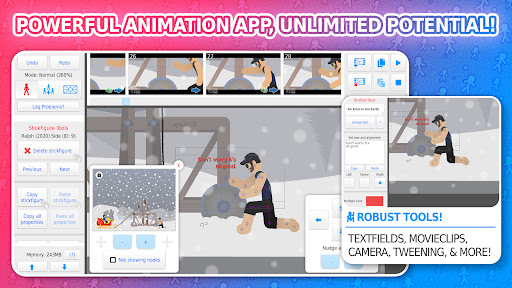
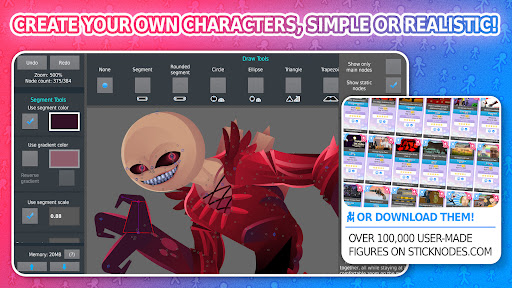
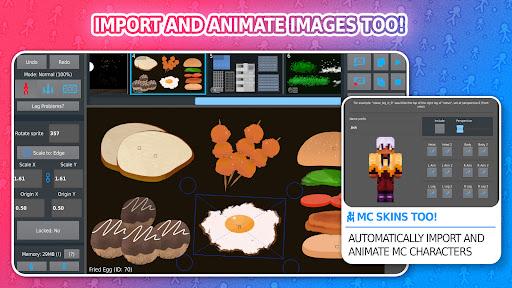
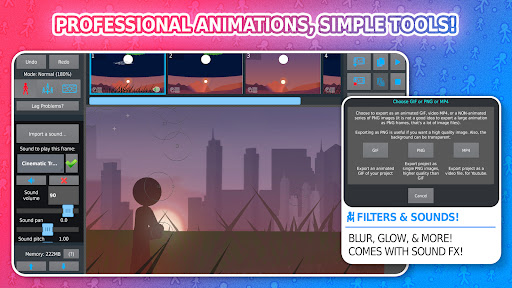
Stick Nodes is a powerful stickman animator app created with mobile devices in mind! Inspired from the popular Pivot stickfigure animator, Stick Nodes allows users to create their own stickfigure-based movies and even export them as animated GIFs and MP4 videos! It is one of the most popular animation apps among young animators!
■ Features ■
◆ Import and animate images as well!
◆ Automatic customizeable frame-tweening, make your animations smoother!
◆ A simple camera to pan/zoom/rotate around the scene, similar to the "v-cam" in Flash.
◆ Movieclips allow you to create and reuse/loop animation objects within your projects.
◆ A variety of shapes, color/scale on a per-segment basis, gradients - create any "stickfigure" you can imagine!
◆ Textfields allow for easy text and speech in your animations.
◆ Add all kinds of sounds effects to make your animations epic.
◆ Apply different filters to your stickfigures - transparency, blur, glow, and more.
◆ Join stickfigures together to easily simulate holding/wearing objects.
◆ A large community full of all kinds of interesting people and other animators.
◆ Over 30,000+ stickfigures (and counting) to download from the website.
◆ Export to GIF (or MP4 for Pro) to share your animation online.
◆ Compatibility with pre-3.0 Pivot stickfigure files.
◆ Save/open/share your projects, stickfigures, and movieclips.
◆ And all the other typical animation stuff - undo/redo, onion-skin, background images, and more!
* Please note, sounds, filters, and MP4-export are Pro-only features
■ Languages ■
◆ English
◆ Español
◆ Français
◆ Japanese
◆ Filipino
◆ Português
◆ Russian
◆ Türkçe
Stick Nodes has a thriving community where animators have a good time, help each other out, show off their work, and even create stickfigures for others to use! There are thousands of stickfigures (and more added daily!) over at the main website https://sticknodes.com/stickfigures/
As of one of the latest updates, Stick Nodes is also a Minecraft™ animator as it allows you to easily import Minecraft™ skins and animate them instantly!
Search for "stick nodes" on YouTube to see just a few of the thousands of animations users have made with this stickfigure animation app! If you're looking for an animation creator or an animation maker app, this is it!
■ Stay Updated ■
New updates have been never-ending for Stick Nodes since it's original 2014 release. Keep up-to-date with the latest news and updates about your favorite stick figure animation app and join in with the community!
◆ Website: https://sticknodes.com
◆ Facebook: http://facebook.com/sticknodes
◆ Reddit: http://reddit.com/r/sticknodes
◆ Twitter: http://twitter.com/FTLRalph
◆ Youtube: http://youtube.com/FTLRalph
Stick Nodes is *the best* simple animation app available on the Android market! It's a great tool for learning animation, even in a school setting for students or newbies. At the same time, Stick Nodes is robust enough and powerful enough for even the most skilled animator to really showcase their skills!
Thank you for trying out Stick Nodes! Leave any questions/comments below or on the main Stick Nodes website! Common questions are already answered on the FAQ page here https://sticknodes.com/faqs/
Show more

1. Download MEmu installer and finish the setup

2. Start MEmu then open Google Play on the desktop

3. Search Stick Nodes - Animation in Google Play
Install
4. Download and Install Stick Nodes - Animation
5. On install completion click the icon to start

6. Enjoy using Stick Nodes - Animation on PC with MEmu
MEmu Play is the best Android emulator, and 100 million users already enjoy its superb Android app experience. Powered by advanced virtualization technology, it lets you enjoy thousands of Android apps smoothly on your PC—including the most graphics-intensive ones.
Bigger screen with better graphics; Long duration, without limitation of battery or mobile data.
Full Keymapping support for precise control of keyboard and mouse or gamepad.
Multiple game accounts or tasks on single PC at one time with Multi-Instance manager.
Use Stick Nodes - Animation on PC by following steps:































