Suno - AI Music & Songs Maker
Updated
Current Version
1.92.0
Offered By

Stop worrying about high battery drain when using Suno - AI Music & Songs Maker on your phone. Free yourself from the tiny screen and enjoy the app on a much larger display. From now on, get a full-screen experience of your app with the convenience of a keyboard and mouse. MEmu offers you all the surprising features you’d expect: quick installation and easy setup, intuitive controls, and no more worries about battery life, mobile data, or unexpected calls. The all-new MEmu 9 is the choice for using Suno - AI Music & Songs Maker on your computer. With the MEmu multi-instance manager, you can run two or more accounts at the same time. Most importantly, our exclusive emulation engine unlocks your PC’s full potential, delivering smooth and enjoyable performance.
Show more
Enjoy superb experience of using Suno - AI Music & Songs Maker on PC with MEMU App Player. It's a powerful free Android emulator which provides you with thousands of android apps for their desktop version. Enjoy connecting with friends and polishing your work with higher efficiency! Suno is the AI music generator that turns any idea into a real, full song — instantly.
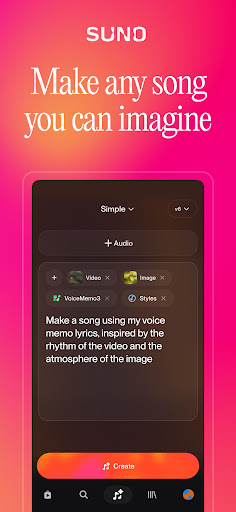
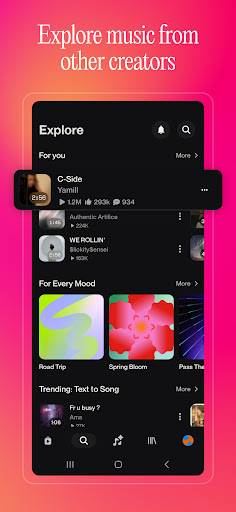
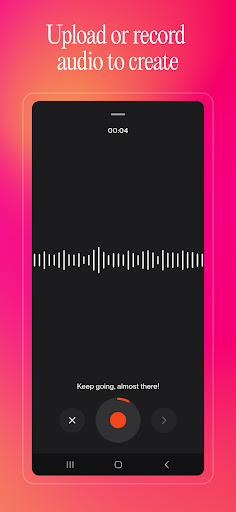
Suno is the AI music generator that turns any idea into a real, full song — instantly. Make music, beats, and lyrics with AI, no experience needed.
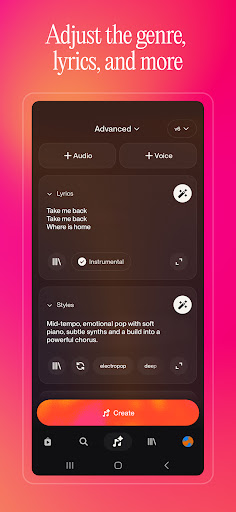
Whether you're a shower-singer with a melody stuck in your head or a seasoned songwriter looking for a creative edge, Suno is your AI music tool. Transform your ideas into full songs through a single text prompt, humming a tune, tapping out a beat, or uploading an audio recording. Whatever sparks your imagination, Suno can help you turn it into something you can listen to again and again. Generate music in any genre — hip hop, pop, rock, R&B, jazz, country, electronic, and beyond. Every song is original, and every song is yours.
Suno can do lyrics, too: our AI lyrics generator can write a full song from any material. Create a rap song using the texts in your group chat. Turn a study guide into a love song, or a poem into a country ballad.
Publish and share your songs with other creators: go viral, connect with others, stay inspired. Jam by listening to their tracks and follow your favorites. Discover trending songs and explore the best AI music across genres like rock, rap, hip hop, pop, and more from rising talents all over the world. Combine your favorites into your personal playlists. Music is better when it's shared — and Suno is where your community lives.
Feeling Pro? Take full creative control: adjust vocals, tweak structure, fine-tune melodies, add instrumental accompaniment, and edit every detail to your vision. Record your own voice, remix your tracks, and produce studio-quality music right from your phone. Suno Studio gives you a full generative audio workstation in your pocket — the creative power of a recording studio, without the price tag.
From your first song to your hundredth, Suno grows with you. Start from anywhere. Sound like yourself. Make music that means something.
Suno is how imagination becomes music, and music becomes yours.
—
• Your subscription will be charged to your Google Account's primary payment method upon confirmation and will automatically renew (at the duration selected) unless auto-renew is turned off at least 24 hours before the end of the current period.
• Your current subscription may not be canceled during the active subscription period; however, you can manage your subscription and/or turn off auto-renewal by visiting your Google Account Settings after purchase.
• Our Terms of Service: https://suno.com/terms
Show more

1. Download MEmu installer and finish the setup

2. Start MEmu then open Google Play on the desktop

3. Search Suno - AI Music & Songs Maker in Google Play
Install
4. Download and Install Suno - AI Music & Songs Maker
5. On install completion click the icon to start

6. Enjoy using Suno - AI Music & Songs Maker on PC with MEmu
MEmu Play is the best Android emulator, and 100 million users already enjoy its superb Android app experience. Powered by advanced virtualization technology, it lets you enjoy thousands of Android apps smoothly on your PC—including the most graphics-intensive ones.
Bigger screen with better graphics; Long duration, without limitation of battery or mobile data.
Full Keymapping support for precise control of keyboard and mouse or gamepad.
Multiple game accounts or tasks on single PC at one time with Multi-Instance manager.
Use Suno - AI Music & Songs Maker on PC by following steps: