VidBite Max-Blockbuster Cinema
Updated
Current Version
1.1.0
Offered By

Stop worrying about high battery drain when using VidBite Max-Blockbuster Cinema on your phone. Free yourself from the tiny screen and enjoy the app on a much larger display. From now on, get a full-screen experience of your app with the convenience of a keyboard and mouse. MEmu offers you all the surprising features you’d expect: quick installation and easy setup, intuitive controls, and no more worries about battery life, mobile data, or unexpected calls. The all-new MEmu 9 is the choice for using VidBite Max-Blockbuster Cinema on your computer. With the MEmu multi-instance manager, you can run two or more accounts at the same time. Most importantly, our exclusive emulation engine unlocks your PC’s full potential, delivering smooth and enjoyable performance.
Show more
Enjoy superb experience of using VidBite Max-Blockbuster Cinema on PC with MEMU App Player. It's a powerful free Android emulator which provides you with thousands of android apps for their desktop version. Enjoy connecting with friends and polishing your work with higher efficiency! Welcome to VidBite Max – Discover More Content Anytime.

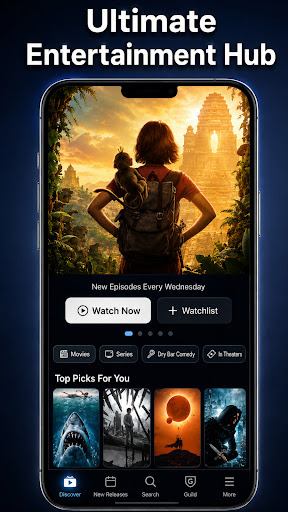


Welcome to VidBite Max – Discover More Content Anytime. VidBite Max is designed to bring clarity and order to your everyday life, specifically tailored for passionate cinephiles and entertainment lovers. With a clean interface and smart categorization system, it helps you manage freshness in your kitchen while unlocking a smooth, visual browsing experience inside one lightweight app. Whether you are organizing ingredients for a perfect movie night or exploring curated content collections of the greatest films ever made, VidBite Max keeps everything structured, intuitive, and instantly accessible.
YOUR ULTIMATE MOVIE & TV SHOW TRACKER A Smooth Visual Browsing Experience awaits you. Beyond organization, VidBite Max offers a fluid, media-rich interface designed for immersive exploration of the cinematic universe. Dive into our comprehensive, IMDb-style entertainment database. You can track, rate, and discover deep metadata for the world's most popular entertainment. Explore detailed cast and crew profiles, read spoiler-free reviews, and uncover mind-blowing trivia for massive hits. Whether you want to build watchlists for epic fantasy like Game of Thrones, post-apocalyptic dramas like Fallout, gripping crime series like Tulsa King, or action-packed blockbusters like Rush Hour 4 and The Rip, our database has you covered. Enjoy continuously updated curated selections, seamless navigation, and resume where you left off in your tracking journey.
STREAM UNLOCKED HD FILMS & DOCUMENTARIES Watch Anywhere, Anytime. VidBite Max is optimized for Android phones and tablets, offering a lightweight and fast experience. Take a break from tracking and dive into our legally curated, unlocked streaming library. We offer a hand-picked selection of independent hits, thrilling documentaries, and timeless public domain classics. Enjoy Recommendations for HD videos, movies, and TV shows about culinary arts, nature, and more. There is no complicated registration and absolutely no subscription commitment. Just open the app and start exploring premium entertainment at zero extra cost.
INTELLIGENT FRESHNESS GRADING FOR MOVIE SNACKS A great movie night requires perfectly fresh snacks. Stay in control of timing and priorities with our advanced food inventory system. Based on saved dates and storage preferences, VidBite Max automatically classifies items into: Fresh & Sustainable, Prioritized for Use, and Expired. Everything is displayed clearly at a glance — helping you reduce waste, manage timing efficiently, and make smarter daily decisions. Never let your favorite movie-watching treats go bad again!
SMART MULTI-DIMENSIONAL FILTERING Find what you need instantly. Categorized by vegetables, fruits, meats, seafood, dry goods, and more. Combined with freshness grading and intelligent filters, VidBite Max allows you to locate specific items or browse curated lists effortlessly. No more searching through shelves — everything is at your fingertips. Prepare the perfect meal inspired by culinary tracking shows like Chef's Table, Kew on a Plate, Ugly Delicious, and Street Food, knowing exactly what ingredients you have on hand.
Easy to Use. Enjoy full access to our tracking and inventory tools without costs. No subscription pressure. No mandatory registration. Open and start exploring immediately. VidBite Max is designed to be accessible to everyone — simple, lightweight, and easy to experience.
Download VidBite Max today and bring order, freshness, and effortless cinematic discovery into your daily routine!
Show more

1. Download MEmu installer and finish the setup

2. Start MEmu then open Google Play on the desktop

3. Search VidBite Max-Blockbuster Cinema in Google Play
Install
4. Download and Install VidBite Max-Blockbuster Cinema
5. On install completion click the icon to start

6. Enjoy using VidBite Max-Blockbuster Cinema on PC with MEmu
MEmu Play is the best Android emulator, and 100 million users already enjoy its superb Android app experience. Powered by advanced virtualization technology, it lets you enjoy thousands of Android apps smoothly on your PC—including the most graphics-intensive ones.
Bigger screen with better graphics; Long duration, without limitation of battery or mobile data.
Full Keymapping support for precise control of keyboard and mouse or gamepad.
Multiple game accounts or tasks on single PC at one time with Multi-Instance manager.
Use VidBite Max-Blockbuster Cinema on PC by following steps: