Virtual Master - Android Clone
Updated
Current Version
3.2.91
Offered By

Stop worrying about high battery drain when using Virtual Master - Android Clone on your phone. Free yourself from the tiny screen and enjoy the app on a much larger display. From now on, get a full-screen experience of your app with the convenience of a keyboard and mouse. MEmu offers you all the surprising features you’d expect: quick installation and easy setup, intuitive controls, and no more worries about battery life, mobile data, or unexpected calls. The all-new MEmu 9 is the choice for using Virtual Master - Android Clone on your computer. With the MEmu multi-instance manager, you can run two or more accounts at the same time. Most importantly, our exclusive emulation engine unlocks your PC’s full potential, delivering smooth and enjoyable performance.
Show more
Enjoy superb experience of using Virtual Master - Android Clone on PC with MEMU App Player. It's a powerful free Android emulator which provides you with thousands of android apps for their desktop version. Enjoy connecting with friends and polishing your work with higher efficiency! Virtual Master runs another Android System on your device, based on our Android on Android Virtualization Technology.
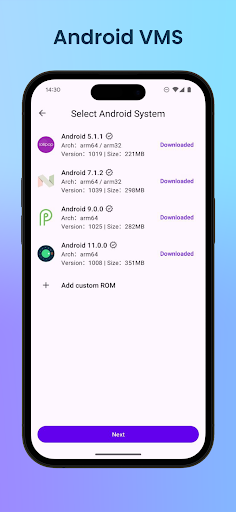
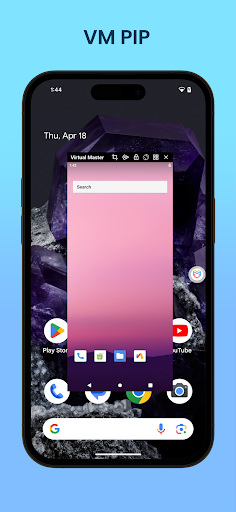
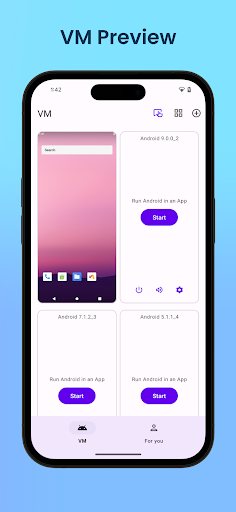
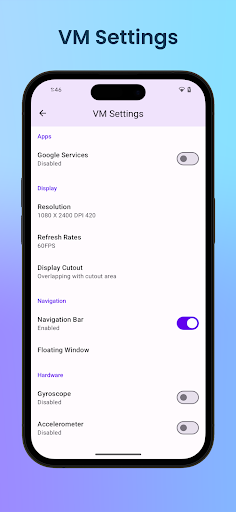
Virtual Master runs another Android System on your device, based on our Android on Android Virtualization Technology.
With Virtual Master, you can have another Android System running on your device, isolated from the Android System of your device.
The new Android System is equivalent to a Parallel Space, or a Virtual Phone, similar to a Cloud Phone, but runs locally.
In the new Android System, you can install its own Apps, arrange its own Launcher, set its own Wallpaper, and customize it as your needs.
You can run multiple Android Systems in Virtual Master, One for Work, One for Game, One for Privacy, and enjoy more fun on one device.
It's an Android Virtual Machine, just like your another phone!
1. Play with multiple Social or Game Accounts at the same time
Games and Apps are cloned after being imported into Virtual Master.
We support almost all Social Apps and Games, you can sign in to multiple accounts at the same time on one device and switch between them freely.
2. Run multiple Apps or Games at the same time
We support background running, that means the Apps and Games can keep running when in background.
So, for example, you can run a game in Virtual Master, but watch a video on your device at the same time.
Just like bringing the emulators such as Bluestacks and Nox to your device.
3. Support Vulkan
We support Vulkan in the Virtual Android System, so you can run many high-end games smoothly in Virtual Master.
4. Protect your Privacy
When Apps and Games run in the Virtual Android System, they can not get any information about your device, like contacts, sms, device id, etc.
So, you can run any Apps or Games in it without worrying about leaking your privacy. It can be used as your Privacy Sandbox.
FAQ from the developer:
1. How much disk space does Virtual Master need?
Virtual Master runs a whole android 7.1.2 system. It needs to download about 300MB system image and requires about 1.6GB disk space to run. It will use more disk space if apps are installed or upgraded in the VM.
2. How long does it take for the Virtual Master to boot?
For the first time you run it, it will take 1 ~ 2 minutes, because we need some time to install the android image on device. After that, it will take only 4 ~ 10 seconds. The exact time depends on the performance of your device and the load at that time.
3. Can Virtual Master be installed in multi-user?
Virtual Master MUST BE installed in the device owner or administrator now.
4. What to do if Virtual Master can't boot?
In most cases, some system file is damaged. Please ensure you have enough disk space, kill the app and reboot. If rebooting doesn't work, you can try the 'Repair VM' in VM Settings. Finally, you can try uninstalling and reinstalling.
Show more

1. Download MEmu installer and finish the setup

2. Start MEmu then open Google Play on the desktop

3. Search Virtual Master - Android Clone in Google Play
Install
4. Download and Install Virtual Master - Android Clone
5. On install completion click the icon to start

6. Enjoy using Virtual Master - Android Clone on PC with MEmu
MEmu Play is the best Android emulator, and 100 million users already enjoy its superb Android app experience. Powered by advanced virtualization technology, it lets you enjoy thousands of Android apps smoothly on your PC—including the most graphics-intensive ones.
Bigger screen with better graphics; Long duration, without limitation of battery or mobile data.
Full Keymapping support for precise control of keyboard and mouse or gamepad.
Multiple game accounts or tasks on single PC at one time with Multi-Instance manager.
Use Virtual Master - Android Clone on PC by following steps: