VNeID
Updated
Current Version
D
Offered By

Stop worrying about high battery drain when using VNeID on your phone. Free yourself from the tiny screen and enjoy the app on a much larger display. From now on, get a full-screen experience of your app with the convenience of a keyboard and mouse. MEmu offers you all the surprising features you’d expect: quick installation and easy setup, intuitive controls, and no more worries about battery life, mobile data, or unexpected calls. The all-new MEmu 9 is the choice for using VNeID on your computer. With the MEmu multi-instance manager, you can run two or more accounts at the same time. Most importantly, our exclusive emulation engine unlocks your PC’s full potential, delivering smooth and enjoyable performance.
Show more
Enjoy superb experience of using VNeID on PC with MEMU App Player. It's a powerful free Android emulator which provides you with thousands of android apps for their desktop version. Enjoy connecting with friends and polishing your work with higher efficiency! VNeID application is an application developed by the National Population Data Center - Ministry of Public Security of Vietnam based on the application of population data, identification and electronic authentication.
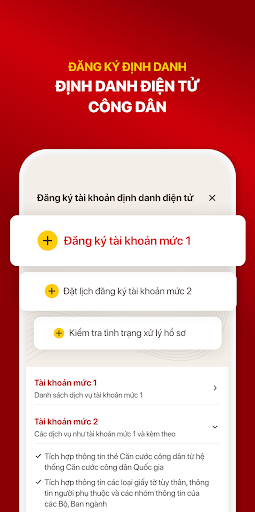
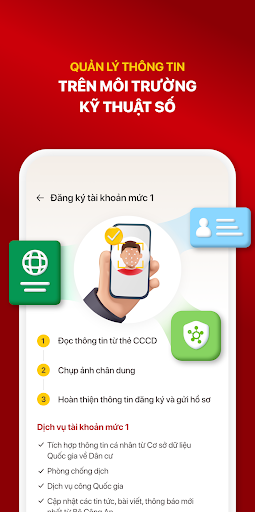
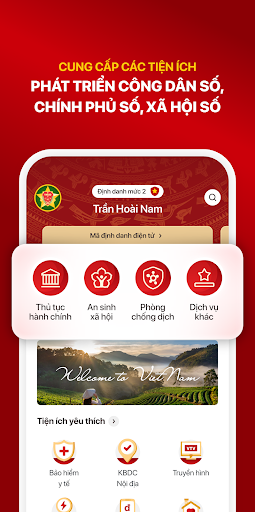
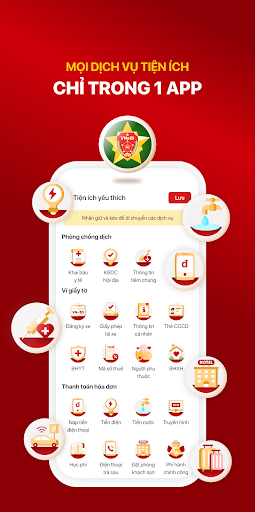
VNeID application is an application developed by the National Population Data Center - Ministry of Public Security of Vietnam based on the application of population data, identification and electronic authentication.
VNeID application applies to people living and traveling in Vietnam.
VNeID application has the value to replace traditional papers, identify citizens in the digital environment, provide utilities to develop digital citizenship, digital government, digital society, help citizens to declare medical reports and quick domestic travel declarations. In addition, the application helps the authorities to trace secondary COVID-19 infections and notify the people in a timely manner.
Access: By using the Application, the User agrees to allow the application to have access to the following functions:
(1) Access to the Internet from the user device
(2) Accessing the camera to scan the QRcode on the CCCD card helps to shorten the time to enter basic information of Citizens and scan the QRcode at the scanning point for quick travel and medical declaration.
(3) Access to Photos, videos, audios and files on the device to store QRcode images for inspection when passing through citizen checkpoints.
(4) Send notifications to the user's device.
Collection of personal information: The user enters data, declares medical information, moves domestically, or declares on behalf of another person with that person's permission and consent to provide information. Personal information includes: Full name, Phone number, Citizen identification, Gender, Year of birth, Permanent address, Nationality, health status, place of departure, destination, vehicle number plate and exposure to people with COVID-19. All information is collected with the user's permission by entering the forms and submitting them to us.
Users are solely responsible for their behavioral capacity in the use and input of information.
Protect privacy and copyright: User's data will be stored and secured by the National Population Data Center, Ministry of Public Security and used only for COVID-19 prevention and control, helping health protection and disease prevention, absolutely do not use for commercial purposes, do not invade private life. Data may be shared with Health Authorities and other competent authorities to better serve the prevention of COVID-19 disease.
In addition to the above purposes, the application developer does not collect and use user information for any other purposes. And will not disclose any information that may harm or perform any illegal acts on user privacy according to Vietnamese law or application policy.
- No location collection: VNeID does not collect data about your location.
- Anonymity: People join the community anonymously with others. Only the competent authorities can know those infected and those suspected of being infected by close contact with a person with COVID-19 and conduct tracing.
See terms of use and privacy policy at: https://sites.google.com/view/chinh-sach-vneid/home
Show more

1. Download MEmu installer and finish the setup

2. Start MEmu then open Google Play on the desktop

3. Search VNeID in Google Play
Install
4. Download and Install VNeID
5. On install completion click the icon to start

6. Enjoy using VNeID on PC with MEmu
MEmu Play is the best Android emulator, and 100 million users already enjoy its superb Android app experience. Powered by advanced virtualization technology, it lets you enjoy thousands of Android apps smoothly on your PC—including the most graphics-intensive ones.
Bigger screen with better graphics; Long duration, without limitation of battery or mobile data.
Full Keymapping support for precise control of keyboard and mouse or gamepad.
Multiple game accounts or tasks on single PC at one time with Multi-Instance manager.
Use VNeID on PC by following steps: