Workout at Home App: Fitness
Updated
Current Version
1.1.11
Offered By

Stop worrying about high battery drain when using Workout at Home App: Fitness on your phone. Free yourself from the tiny screen and enjoy the app on a much larger display. From now on, get a full-screen experience of your app with the convenience of a keyboard and mouse. MEmu offers you all the surprising features you’d expect: quick installation and easy setup, intuitive controls, and no more worries about battery life, mobile data, or unexpected calls. The all-new MEmu 9 is the choice for using Workout at Home App: Fitness on your computer. With the MEmu multi-instance manager, you can run two or more accounts at the same time. Most importantly, our exclusive emulation engine unlocks your PC’s full potential, delivering smooth and enjoyable performance.
Show more
Enjoy superb experience of using Workout at Home App: Fitness on PC with MEMU App Player. It's a powerful free Android emulator which provides you with thousands of android apps for their desktop version. Enjoy connecting with friends and polishing your work with higher efficiency! Your gym is wherever you are.

Your gym is wherever you are. Workout at Home App: Fitness turns your living room into a complete home workout studio — daily exercise plans matched to your goal and fitness level, with no equipment and no gym membership needed.
Just a few minutes a day. Easy to start, easy to stick to.
PICK A GOAL, GET A PLAN
Tell the app what you're working toward and follow a structured day-by-day plan:
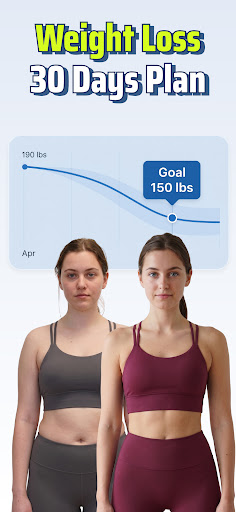
• Lose Weight — full-body fat burning workouts
• Lose Belly Fat — core and abs focused training
• Butt Lift — glute and lower-body toning
• Build Muscle — bodyweight strength training at home
Every plan is split into daily sessions, so you always know exactly what today's workout is. Rest days are part of the schedule too — recovery is training.
28-DAY CHALLENGES
Commit to a challenge and build the exercise habit for real. Each one runs 28 days with a fresh session every day:
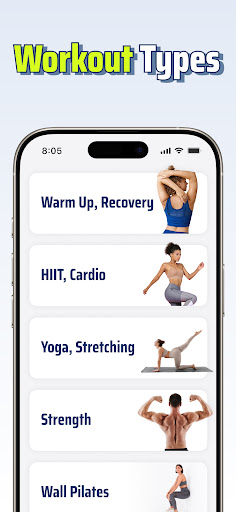
• Pilates & Wall Pilates
• Yoga
• Stretching & flexibility
• Calisthenics
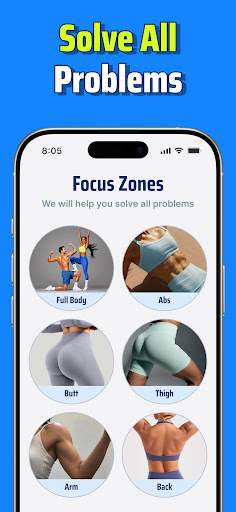
Prefer to freestyle? Browse the workout library by body zone — abs, butt, legs, arms, full body — and jump straight into any session.
FOLLOW ALONG LIKE YOU HAVE A COACH
Every exercise comes with a clear video demonstration and voice guidance that counts you through each move, so you never wonder what to do next. Adjust rest time and workout settings to your own pace, choose your difficulty level, and step it up whenever you're ready — from complete beginner to advanced.
WATCH YOUR PROGRESS ADD UP
Nothing keeps you going like visible results:
• Weight log with a clean trend chart toward your target
• Calories burned and duration for every session
• Full workout history on a calendar
• Daily streaks that make consistency feel like a game
EAT SMARTER WITH PHOTO FOOD LOGGING
Training is only half the story. Snap a photo of your meal and get an instant estimate of calories, protein, carbs and fat — your nutrition and workouts tracked side by side in one app.
EVERYTHING IN ONE FITNESS APP
• 100% home workouts — no equipment, no gym
• Goal-based plans: weight loss, belly fat, butt lift, muscle building
• 28-day Pilates, Wall Pilates, Yoga, Stretching & Calisthenics challenges
• Video + voice guided sessions with adjustable rest times
• Difficulty levels for beginners through advanced
• Photo-based calorie and macro tracking
• Weight, calorie and streak charts
• Available in 17 languages
Lose weight, get toned, build strength, or simply move more — whatever your goal, it starts with one short workout at home. Do today's session now. Your future self will thank you.
Note: This app provides general fitness content and is not a substitute for professional medical advice. Consult your physician before starting any exercise program, especially if you have a medical condition or injury.
Show more

1. Download MEmu installer and finish the setup

2. Start MEmu then open Google Play on the desktop

3. Search Workout at Home App: Fitness in Google Play
Install
4. Download and Install Workout at Home App: Fitness
5. On install completion click the icon to start

6. Enjoy using Workout at Home App: Fitness on PC with MEmu
MEmu Play is the best Android emulator, and 100 million users already enjoy its superb Android app experience. Powered by advanced virtualization technology, it lets you enjoy thousands of Android apps smoothly on your PC—including the most graphics-intensive ones.
Bigger screen with better graphics; Long duration, without limitation of battery or mobile data.
Full Keymapping support for precise control of keyboard and mouse or gamepad.
Multiple game accounts or tasks on single PC at one time with Multi-Instance manager.
Use Workout at Home App: Fitness on PC by following steps: