ZOZOFIT: 3D Body Scanner
Updated
Current Version
3.0.1
Offered By

Stop worrying about high battery drain when using ZOZOFIT: 3D Body Scanner on your phone. Free yourself from the tiny screen and enjoy the app on a much larger display. From now on, get a full-screen experience of your app with the convenience of a keyboard and mouse. MEmu offers you all the surprising features you’d expect: quick installation and easy setup, intuitive controls, and no more worries about battery life, mobile data, or unexpected calls. The all-new MEmu 9 is the choice for using ZOZOFIT: 3D Body Scanner on your computer. With the MEmu multi-instance manager, you can run two or more accounts at the same time. Most importantly, our exclusive emulation engine unlocks your PC’s full potential, delivering smooth and enjoyable performance.
Show more
Enjoy superb experience of using ZOZOFIT: 3D Body Scanner on PC with MEMU App Player. It's a powerful free Android emulator which provides you with thousands of android apps for their desktop version. Enjoy connecting with friends and polishing your work with higher efficiency! SMARTER TRACKING FOR IMPACTFUL CHANGES.
SMARTER TRACKING FOR IMPACTFUL CHANGES
Precise body measurements and AI-powered nutrition tracking, all in one place.
ZOZOFIT provides you with your very own digital toolbox that allows you to revolutionize your personal fitness journey by monitoring weight loss, tracking your body transformation progress, logging your diet and staying accountable through our intuitive scanning data and easy-to-use features.
YOU ARE MORE THAN JUST A NUMBER ON A SCALE
At ZOZOFIT, we know that weight is no longer a reliable indicator of your personal health, as it doesn’t provide you with the full picture of how your body composition is transforming throughout your fitness journey.
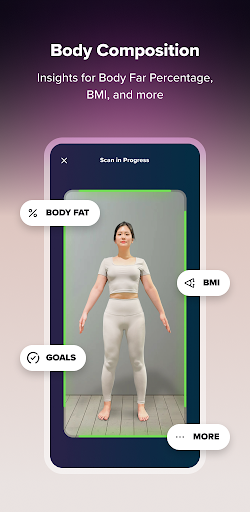
ZOZOFIT’s innovative features provide you with unparalleled access to valuable data and tools, giving you greater control over your body. Our app delivers valuable insights including precise measurements, body fat percentage calculations, and our ColorMetric view where you can oversee changes to your shape in a more holistic way. Plus, with our new Food Journal, you can easily log your meals and track your nutrition to stay on top of your dietary goals.
ZOZOFIT is here to keep you motivated, track your progress, and empower you to take control of your journey.
3D BODY SCANNING MADE EASY
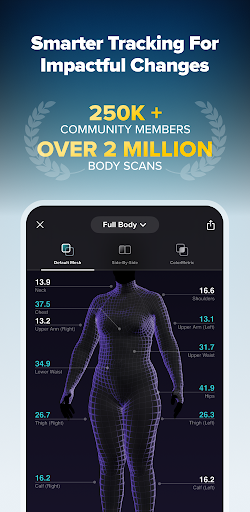
In less than 2 minutes, ZOZOFIT scans your body to provide you with detailed body measurements for 12 key locations as well as informative graphs so that you can track your fitness progress over time. Our data will keep you accountable and focused on your goals.
ZOZOFIT FEATURES INCLUDE:
3D Mesh: Our default mesh view provides you with a full-body, 360-degree view of your body that features measurement data for 12 key areas of your body
Side-by-Side: You can compare two different scans of your body to visualize and evaluate your fitness progress more closely
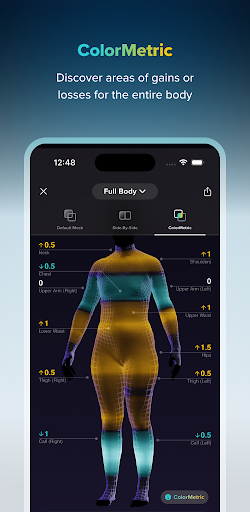
ColorMetric: Our cutting-edge color gradient system that represents measurement differences that your physique has experienced over time throughout the scanning process with color intensity (amber: growth, teal: reduction, clear: no growth)
Goal Setting: Set goals for different measurement areas on your body and track your progress as you work on completing these achievements
Goal Simulator: Motivate yourself as you envision changes to your body composition with our slide that allows you to increase or decrease inches on key areas of your shape
Booty Mode: Use our new visual tool to track your butt’s progress over time as this view highlights changes in lift, fullness, and shape
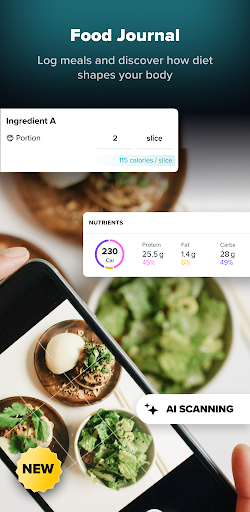
Food Journal (NEW!): Effortlessly log your meals and build healthy habits with AI-powered nutrition tracking. Take the guesswork out of daily logging - track macros and diet trends with just a photo of your plate or a nutrition label. Manual logging is also available.
The ZOZOFIT app is only available on select Android devices and can be used with OS 11 or later. The following is a list of recommended Android-supported devices:
Galaxy S24
Galaxy S24 Ultra
Galaxy S21 5G
Galaxy S21+ 5G
Galaxy S21 Ultra 5G
Galaxy S22
Galaxy S22 Ultra
Galaxy S23
Galaxy S23 Ultra
Galaxy Z Flip3 5G
Galaxy Z Flip4 5G
Galaxy Z Flip 5
Galaxy Z Fold 3 5G
Galaxy Z Fold 4
Galaxy Fold5
Galaxy Flip6
Galaxy Fold6
Google Pixel 9 Pro Fold
Google Pixel 9 Pro XL
Google Pixel 9 Pro
Google Pixel 9
Google Pixel 6
Google Pixel 6 Pro
Google Pixel 6a
Google Pixel 7
Google Pixel 7 Pro
Google Pixel 7a
Google Pixel 8
Google Pixel 8 Pro
Looking for support?
Visit https://zozofit.com to browse FAQs, troubleshooting tips, or to contact our team.
Show more

1. Download MEmu installer and finish the setup

2. Start MEmu then open Google Play on the desktop

3. Search ZOZOFIT: 3D Body Scanner in Google Play
Install
4. Download and Install ZOZOFIT: 3D Body Scanner
5. On install completion click the icon to start

6. Enjoy using ZOZOFIT: 3D Body Scanner on PC with MEmu
MEmu Play is the best Android emulator, and 100 million users already enjoy its superb Android app experience. Powered by advanced virtualization technology, it lets you enjoy thousands of Android apps smoothly on your PC—including the most graphics-intensive ones.
Bigger screen with better graphics; Long duration, without limitation of battery or mobile data.
Full Keymapping support for precise control of keyboard and mouse or gamepad.
Multiple game accounts or tasks on single PC at one time with Multi-Instance manager.
Use ZOZOFIT: 3D Body Scanner on PC by following steps: