FluxWerks
Aggiornata
Versione corrente
Offerta da

Vista tutta la passione dimostrata nel giocare a FluxWerks, le tue mani non dovrebbero essere limitate al minuscolo schermo di un telefono. Gioca come un professionista e ottieni il pieno controllo del gioco con tastiera e mouse. MEmu ti offre tutto ciò che ti aspetti. Scarica e gioca a FluxWerks su PC. Gioca quanto vuoi, niente più limitazioni di batteria, dati mobili e chiamate inquietanti. Il nuovissimo MEmu 9 è la scelta migliore per giocare a FluxWerks su PC. Realizzato sulla base della nostra esperienza, lo squisito sistema di mappatura dei tasti preimpostati rende FluxWerks un vero e proprio gioco per PC. MEmu è un gestore multi-instanza che permette di giocare con 2 o più account sullo stesso dispositivo. E la cosa più importante, il nostro esclusivo motore di emulazione può liberare tutto il potenziale del tuo PC, rendendo tutto fluido.
Mostra altro
Scarica FluxWerks su PC con MEmu Android Emulator. Divertiti giocando sul grande schermo. The terrain in FluxWerks is not a backdrop.
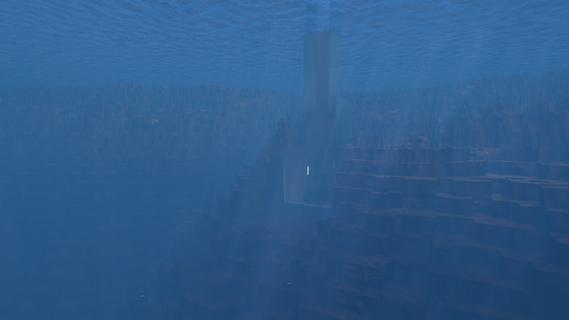
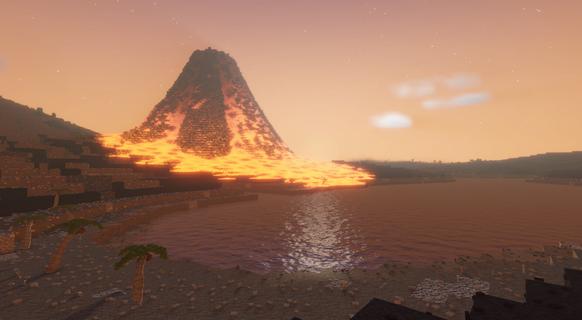

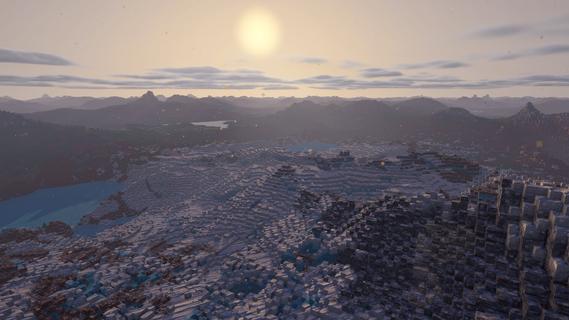
The terrain in FluxWerks is not a backdrop. It is a resource and a hazard. Strip-mine a mountain into nothing, then build your factory down into the hole it left. Dig below a lake and the water pours in behind you. Heat crosses from block to block, and storms wear down every machine you leave in the open.The scan said this world was emptyA long-range scan found a temperate, oxygen-rich, unoccupied world. You are the preparation unit, sent far ahead to raise an industrial base, survey the planet, and transmit everything home. The orders are simple. But a scan taken from that far away does not catch everything, and the closer you look at this world, the less empty it seems.Key featuresTotal voxel freedomEvery block in the world can be mined, moved, or built over. Strip-mine a mountain with excavators, carve a bunker into deep rock, or build a platform across the open ocean and a tunnel underneath it.Dynamic fluid simulationWater, oil, lava and acid flow through the world and react where they meet. Water on lava makes obsidian. Water on hot ground boils away. Volcanoes erupt for real, and lava does not care what you built in its path.Heat is physicalWaste heat does not just vanish away. It moves through the blocks around your machines, so how and where you build matters as much as what you build. Pipe the heat away, or turn it back into power.Deep automation and logisticsBuild dense assembly lines from belts, inserters and pipes, and cover long distances with cargo drones. Copy any working section of your factory as a blueprint and stamp it anywhere.The nanobot swarmYou touch the world through a nanobot swarm. Point it at terrain to clear it, at resources to harvest them, at a blueprint to print it.Your exhaust does not just disappearFluxWerks has no enemy factions, but the planet keeps score. Pollute the air heavily enough and something dormant in the soil might awaken...Explore a world with a pastCross deserts, jungles, tundra and volcanic wastes, and dig into cave systems. Scan for ore straight through solid rock. Points of interest are scattered across the world, with story background to uncoverWeather wears things downRain, blizzards, sandstorms and lightning cross the world on their own schedule, and machines wear out with exposure. Keeping repairs flowing is its own supply chain.Research across erasClimb from your first furnace to industrial chemistry and advanced electronics. Every research era asks for a noticeably bigger factory than the last, and each one unlocks machines that change how you build, not just how fast you build.The computing layerAdvanced machines draw on a shared computing reserve produced by your computer clusters. A starved factory slows down, and computers draw real power and put out real heat, so datacenter management becomes a real puzzle to solve.Built for scaleFluxWerks is designed for large factories, while still simulating the heat and fluids across the whole map. Fly freely around the world while the factory keeps running.
Mostra altro

1. Scarica il programma di installazione di MEmu e completa l'installazione

2. Avvia il Memu e apri il Google Play sulla homepage

3. Cerca FluxWerks in Google Play
Install
4. Scarica e installa FluxWerks
5. Al termine dell'installazione, fai clic sull'icona per avviar

6. Divertiti giocando a FluxWerks su PC con MEmu
MEmu App Player è il miglior emulatore Android gratuito, utilizzato da 50 milioni di persone per ottenere un'esperienza di gioco Android superba. La tecnilogia di virtualizzazione MEmu ti permette di giocare a migliaia di giochi Android con semplicità sul tuo computer, anche i giochi con la grafica più esigente.
Schermo più grande con una grafica migliore; Lunga durata, senza limitazione di batteria o dati mobili.
Supporto completo per mappa di tastiera per un controllo preciso di tastiera e mouse o gamepad.
Multipli account di gioco o attività su un singolo PC contemporaneamente con il gestore di multi istanza.
Play FluxWerks on PC by following steps: