FluxWerks
Zaktualizowano
Aktualna wersja
Sprzedawca

Przy całej swojej pasji do grania w FluxWerks, twoje ręce nie powinny być ograniczone na małym ekranie telefonu. Graj jak zawodowiec i uzyskaj pełną kontrolę nad grą za pomocą klawiatury i myszy. MEmu oferuje ci wszystko, czego oczekujesz. Pobierz i graj FluxWerks na PC. Graj tak długo, jak chcesz, bez ograniczeń baterii, danych komórkowych i niepokojących połączeń. Zupełnie nowy MEmu 9 to najlepszy wybór do grania w FluxWerks na PC. Przygotowany dzięki naszej wiedzy, znakomity, wstępnie ustawiony system mapowania klawiszy sprawia, że FluxWerks jest prawdziwą grą na PC. Zakodowany naszą absorpcją, menedżer wielu instancji umożliwia granie na 2 lub więcej kontach na tym samym urządzeniu. A co najważniejsze, nasz emulator może uwolnić pełny potencjał twojego komputera, sprawić, że wszystko będzie płynne. Dbamy nie tylko o to, jak grasz, ale także o cały proces czerpania radości z grania.
Pokaż więcej
Ciesz się wspaniałym doświadczeniem podczas grania w FluxWerks na komputerze z aplikacją MEMU App Player. Jest to potężny darmowy emulator Androida pozwalający grać w tysiące gier na Androida. The terrain in FluxWerks is not a backdrop.
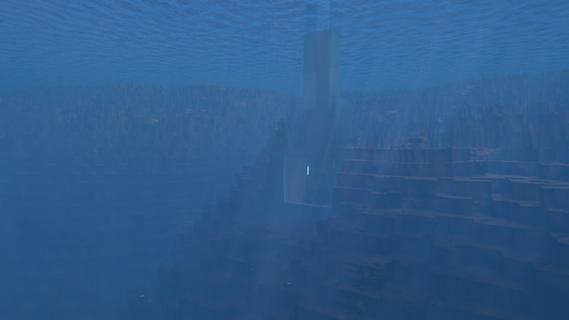
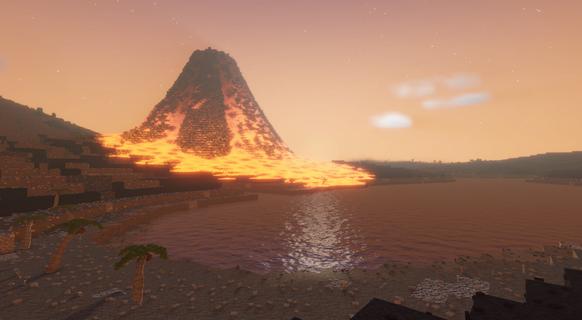

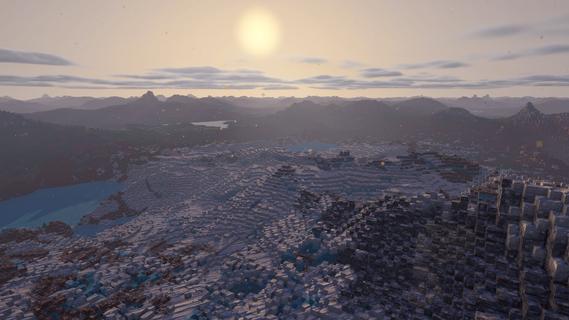
The terrain in FluxWerks is not a backdrop. It is a resource and a hazard. Strip-mine a mountain into nothing, then build your factory down into the hole it left. Dig below a lake and the water pours in behind you. Heat crosses from block to block, and storms wear down every machine you leave in the open.The scan said this world was emptyA long-range scan found a temperate, oxygen-rich, unoccupied world. You are the preparation unit, sent far ahead to raise an industrial base, survey the planet, and transmit everything home. The orders are simple. But a scan taken from that far away does not catch everything, and the closer you look at this world, the less empty it seems.Key featuresTotal voxel freedomEvery block in the world can be mined, moved, or built over. Strip-mine a mountain with excavators, carve a bunker into deep rock, or build a platform across the open ocean and a tunnel underneath it.Dynamic fluid simulationWater, oil, lava and acid flow through the world and react where they meet. Water on lava makes obsidian. Water on hot ground boils away. Volcanoes erupt for real, and lava does not care what you built in its path.Heat is physicalWaste heat does not just vanish away. It moves through the blocks around your machines, so how and where you build matters as much as what you build. Pipe the heat away, or turn it back into power.Deep automation and logisticsBuild dense assembly lines from belts, inserters and pipes, and cover long distances with cargo drones. Copy any working section of your factory as a blueprint and stamp it anywhere.The nanobot swarmYou touch the world through a nanobot swarm. Point it at terrain to clear it, at resources to harvest them, at a blueprint to print it.Your exhaust does not just disappearFluxWerks has no enemy factions, but the planet keeps score. Pollute the air heavily enough and something dormant in the soil might awaken...Explore a world with a pastCross deserts, jungles, tundra and volcanic wastes, and dig into cave systems. Scan for ore straight through solid rock. Points of interest are scattered across the world, with story background to uncoverWeather wears things downRain, blizzards, sandstorms and lightning cross the world on their own schedule, and machines wear out with exposure. Keeping repairs flowing is its own supply chain.Research across erasClimb from your first furnace to industrial chemistry and advanced electronics. Every research era asks for a noticeably bigger factory than the last, and each one unlocks machines that change how you build, not just how fast you build.The computing layerAdvanced machines draw on a shared computing reserve produced by your computer clusters. A starved factory slows down, and computers draw real power and put out real heat, so datacenter management becomes a real puzzle to solve.Built for scaleFluxWerks is designed for large factories, while still simulating the heat and fluids across the whole map. Fly freely around the world while the factory keeps running.
Pokaż więcej

1. Pobierz instalator MEmu i zakończ instalację

2. Uruchom MEmu, a następnie otwórz Google Play na pulpicie

3. Wyszukaj FluxWerks w Google Play
Install
4. Pobierz i zainstaluj FluxWerks
5. Po zakończeniu instalacji kliknij ikonę, aby rozpocząć

6. Ciesz się grą FluxWerks na PC z MEmu
MEmu Play to najlepszy emulator Androida, a 100 milionów ludzi już korzysta z jego i dosta doskonałe wrażenia z gier na Androida. Technologia wirtualizacji MEmu umożliwia płynne granie w tysiące gier Androida na komputerze, nawet tych najbardziej wymagających grafiki.
Większy ekran z lepszą grafiką; Długi czas, bez ograniczeń baterii lub danych mobilnych.
Pełna obsługa mapowania klawiszy dla precyzyjnego sterowania klawiaturą i myszą lub gamepadem.
Wiele kont gier lub zadań na jednym komputerze jednocześnie z menedżerem wielu instancji.
Play FluxWerks on PC by following steps: