Random Slime Defense
Aggiornata
Versione corrente
Offerta da

Vista tutta la passione dimostrata nel giocare a Random Slime Defense, le tue mani non dovrebbero essere limitate al minuscolo schermo di un telefono. Gioca come un professionista e ottieni il pieno controllo del gioco con tastiera e mouse. MEmu ti offre tutto ciò che ti aspetti. Scarica e gioca a Random Slime Defense su PC. Gioca quanto vuoi, niente più limitazioni di batteria, dati mobili e chiamate inquietanti. Il nuovissimo MEmu 9 è la scelta migliore per giocare a Random Slime Defense su PC. Realizzato sulla base della nostra esperienza, lo squisito sistema di mappatura dei tasti preimpostati rende Random Slime Defense un vero e proprio gioco per PC. MEmu è un gestore multi-instanza che permette di giocare con 2 o più account sullo stesso dispositivo. E la cosa più importante, il nostro esclusivo motore di emulazione può liberare tutto il potenziale del tuo PC, rendendo tutto fluido.
Mostra altro
Scarica Random Slime Defense su PC con MEmu Android Emulator. Divertiti giocando sul grande schermo. Monsters are coming to steal the Magic Dice!

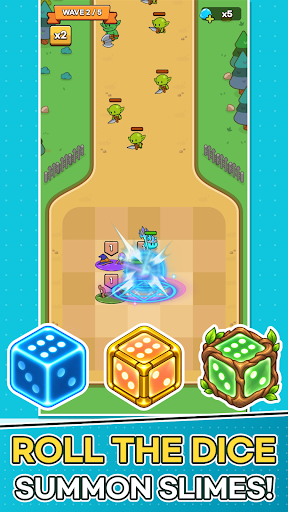

Monsters are coming to steal the Magic Dice!
Place slimes on the plaza, grow the six faces of your dice, and defend the Magic Dice with your very own slime army.
■ One Number Becomes an Army
When battle begins, the Magic Dice rolls on its own.
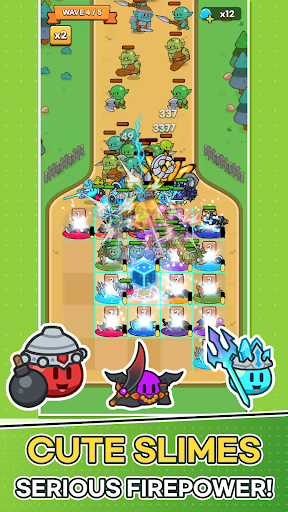
The number you roll charges every tile on the plaza at once, and each fully charged tile spawns a slime that rushes to the front line.
The same roll can lead to a completely different battle depending on which slimes you placed and where.
■ Plan Your Strategy Between Waves
Build your board with the cards offered each wave.
· Place Slime cards on the plaza, and merge slimes of the same type and level to make them stronger!
· Merge Number cards into the dice face with the same number to raise it by one.
· Spend Slime Gel to refresh your cards, or expand plaza tiles and the dice's range.
Power up now, or widen your board for the waves ahead? The choice is yours.
■ Easy Controls, Satisfying Battles
Battles play out automatically. No frantic tapping—just watch the plaza you built hold back the monsters.
Spot a weakness? Fix it in the next wave's setup.
■ 30 Slimes, Each with a Unique Role
Knight, Archer, Mage, Bomb, Healer, Ice...
From tanks and damage dealers to healers and supporters, every slime fights in its own way.
Collect slimes, level them up, and build your Slime Deck to discover your favorite combo.
■ Endless Challenges
· 200 stages and powerful boss monsters
· Earn up to 3 stars based on your remaining dice durability
· Survive as long as you can in Endless Wave and climb the weekly ranking
· Grow stronger in Dokkaebi's Den, the Artifact Dungeon, and more
■ Keep Growing Every Day
Power up with Magic Dice growth and Artifacts.
Daily Rewards, Daily & Weekly Quests, the 7-Day Festival, and Offline Rewards keep new prizes coming every day.
Perfect for players who:
· Love cute characters and casual defense games
· Enjoy building their own strategy around random rolls
· Want quick, satisfying sessions
· Like collecting and growing their team
Lead your slime army and protect the Magic Dice today!
Mostra altro

1. Scarica il programma di installazione di MEmu e completa l'installazione

2. Avvia il Memu e apri il Google Play sulla homepage

3. Cerca Random Slime Defense in Google Play
Install
4. Scarica e installa Random Slime Defense
5. Al termine dell'installazione, fai clic sull'icona per avviar

6. Divertiti giocando a Random Slime Defense su PC con MEmu
MEmu App Player è il miglior emulatore Android gratuito, utilizzato da 50 milioni di persone per ottenere un'esperienza di gioco Android superba. La tecnilogia di virtualizzazione MEmu ti permette di giocare a migliaia di giochi Android con semplicità sul tuo computer, anche i giochi con la grafica più esigente.
Schermo più grande con una grafica migliore; Lunga durata, senza limitazione di batteria o dati mobili.
Supporto completo per mappa di tastiera per un controllo preciso di tastiera e mouse o gamepad.
Multipli account di gioco o attività su un singolo PC contemporaneamente con il gestore di multi istanza.
Play Random Slime Defense on PC by following steps: