
Random Slime Defense
Actualizada
Versión actual
Ofrecida por

Con toda tu pasión para jugar Random Slime Defense, no se supone que tus manos estén limitadas en una pequeña pantalla de tu teléfono. Juega como un profesional y obtén el control total de tu juego con el teclado y el mouse. MEmu le ofrece todas las cosas que espera. Descargar y jugar Random Slime Defense en PC. Juega todo el tiempo que quieras, sin más limitaciones de batería, datos móviles y llamadas molestas. El nuevo MEmu 9 es la mejor opción para jugar Random Slime Defense en PC. Preparado con nuestra experiencia, el exquisito sistema de keymapping preestablecido convierte a Random Slime Defense en un verdadero juego de PC. Codificado con nuestra absorción, el administrador de instancias múltiples hace posible jugar 2 o más cuentas en el mismo dispositivo. Y lo más importante, nuestro exclusivo motor de emulación puede liberar todo el potencial de su PC, hacer que todo sea más fluido. Nos importa no solo cómo juegas, sino también todo el proceso de disfrutar de la felicidad de los juegos.
Más detalles
Descargar Random Slime Defense en PC con MEmu Android Emulador. Disfruta jugando en la pentalla grande. Monsters are coming to steal the Magic Dice!

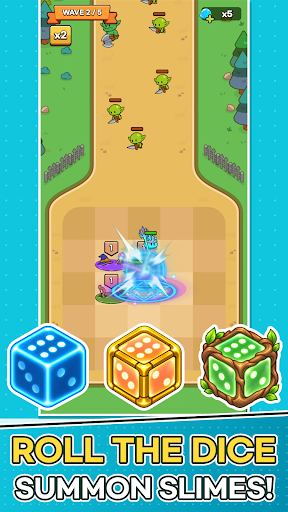


Monsters are coming to steal the Magic Dice!
Place slimes on the plaza, grow the six faces of your dice, and defend the Magic Dice with your very own slime army.
■ One Number Becomes an Army
When battle begins, the Magic Dice rolls on its own.
The number you roll charges every tile on the plaza at once, and each fully charged tile spawns a slime that rushes to the front line.
The same roll can lead to a completely different battle depending on which slimes you placed and where.
■ Plan Your Strategy Between Waves
Build your board with the cards offered each wave.
· Place Slime cards on the plaza, and merge slimes of the same type and level to make them stronger!
· Merge Number cards into the dice face with the same number to raise it by one.
· Spend Slime Gel to refresh your cards, or expand plaza tiles and the dice's range.
Power up now, or widen your board for the waves ahead? The choice is yours.
■ Easy Controls, Satisfying Battles
Battles play out automatically. No frantic tapping—just watch the plaza you built hold back the monsters.
Spot a weakness? Fix it in the next wave's setup.
■ 30 Slimes, Each with a Unique Role
Knight, Archer, Mage, Bomb, Healer, Ice...
From tanks and damage dealers to healers and supporters, every slime fights in its own way.
Collect slimes, level them up, and build your Slime Deck to discover your favorite combo.
■ Endless Challenges
· 200 stages and powerful boss monsters
· Earn up to 3 stars based on your remaining dice durability
· Survive as long as you can in Endless Wave and climb the weekly ranking
· Grow stronger in Dokkaebi's Den, the Artifact Dungeon, and more
■ Keep Growing Every Day
Power up with Magic Dice growth and Artifacts.
Daily Rewards, Daily & Weekly Quests, the 7-Day Festival, and Offline Rewards keep new prizes coming every day.
Perfect for players who:
· Love cute characters and casual defense games
· Enjoy building their own strategy around random rolls
· Want quick, satisfying sessions
· Like collecting and growing their team
Lead your slime army and protect the Magic Dice today!
Más detalles

1. Descargar el instalador de MEmu y finalice la instalación

2. Iniciar MEmu y abrir Google Play en la página de inicio

3. Buscar Random Slime Defense en Google Play
Install
4. Descargar y instalar Random Slime Defense
5. Hacer click al icono para iniciar

6. Disfruta jugando Random Slime Defense en PC con MEmu
MEmu App Player es el mejor emulador de Android gratuito y 50 millones de personas ya están disfrutando su magnífica experiencia jugando en Android. La tecnología de virtualización de MEmu te permite jugar a miles de juegos Android suavemente en tu PC, incluso los más intensivos gráficamente.
Pantalla más grande con mejores gráficos; Larga duración, sin limitación de batería o datos móviles.
Soporte completo de keymapping para un control preciso del teclado y el mouse o gamepad.
Múltiples cuentas de juegos o tareas en una sola PC a la vez con el administrador de instancias múltiples.
Play Random Slime Defense on PC by following steps: