Random Slime Defense
Zaktualizowano
Aktualna wersja
Sprzedawca

Przy całej swojej pasji do grania w Random Slime Defense, twoje ręce nie powinny być ograniczone na małym ekranie telefonu. Graj jak zawodowiec i uzyskaj pełną kontrolę nad grą za pomocą klawiatury i myszy. MEmu oferuje ci wszystko, czego oczekujesz. Pobierz i graj Random Slime Defense na PC. Graj tak długo, jak chcesz, bez ograniczeń baterii, danych komórkowych i niepokojących połączeń. Zupełnie nowy MEmu 9 to najlepszy wybór do grania w Random Slime Defense na PC. Przygotowany dzięki naszej wiedzy, znakomity, wstępnie ustawiony system mapowania klawiszy sprawia, że Random Slime Defense jest prawdziwą grą na PC. Zakodowany naszą absorpcją, menedżer wielu instancji umożliwia granie na 2 lub więcej kontach na tym samym urządzeniu. A co najważniejsze, nasz emulator może uwolnić pełny potencjał twojego komputera, sprawić, że wszystko będzie płynne. Dbamy nie tylko o to, jak grasz, ale także o cały proces czerpania radości z grania.
Pokaż więcej
Ciesz się wspaniałym doświadczeniem podczas grania w Random Slime Defense na komputerze z aplikacją MEMU App Player. Jest to potężny darmowy emulator Androida pozwalający grać w tysiące gier na Androida. Monsters are coming to steal the Magic Dice!
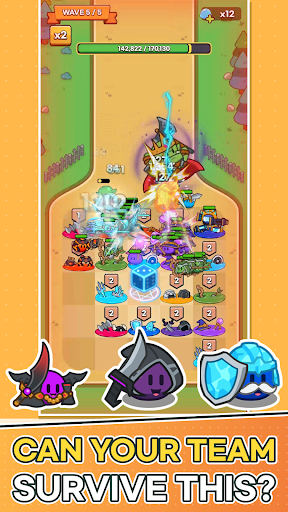

Monsters are coming to steal the Magic Dice!
Place slimes on the plaza, grow the six faces of your dice, and defend the Magic Dice with your very own slime army.
■ One Number Becomes an Army
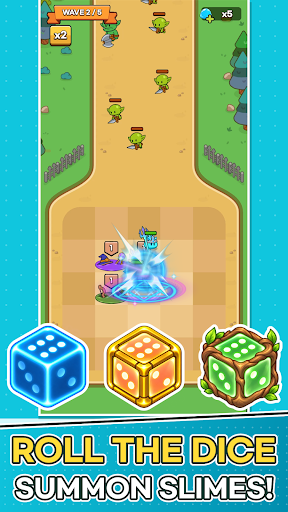
When battle begins, the Magic Dice rolls on its own.
The number you roll charges every tile on the plaza at once, and each fully charged tile spawns a slime that rushes to the front line.
The same roll can lead to a completely different battle depending on which slimes you placed and where.
■ Plan Your Strategy Between Waves
Build your board with the cards offered each wave.
· Place Slime cards on the plaza, and merge slimes of the same type and level to make them stronger!
· Merge Number cards into the dice face with the same number to raise it by one.
· Spend Slime Gel to refresh your cards, or expand plaza tiles and the dice's range.
Power up now, or widen your board for the waves ahead? The choice is yours.
■ Easy Controls, Satisfying Battles
Battles play out automatically. No frantic tapping—just watch the plaza you built hold back the monsters.
Spot a weakness? Fix it in the next wave's setup.
■ 30 Slimes, Each with a Unique Role
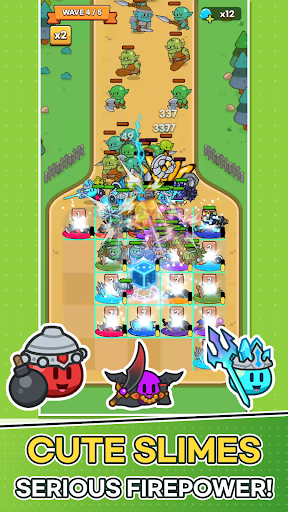
Knight, Archer, Mage, Bomb, Healer, Ice...
From tanks and damage dealers to healers and supporters, every slime fights in its own way.
Collect slimes, level them up, and build your Slime Deck to discover your favorite combo.
■ Endless Challenges
· 200 stages and powerful boss monsters
· Earn up to 3 stars based on your remaining dice durability
· Survive as long as you can in Endless Wave and climb the weekly ranking
· Grow stronger in Dokkaebi's Den, the Artifact Dungeon, and more
■ Keep Growing Every Day
Power up with Magic Dice growth and Artifacts.
Daily Rewards, Daily & Weekly Quests, the 7-Day Festival, and Offline Rewards keep new prizes coming every day.
Perfect for players who:
· Love cute characters and casual defense games
· Enjoy building their own strategy around random rolls
· Want quick, satisfying sessions
· Like collecting and growing their team
Lead your slime army and protect the Magic Dice today!
Pokaż więcej

1. Pobierz instalator MEmu i zakończ instalację

2. Uruchom MEmu, a następnie otwórz Google Play na pulpicie

3. Wyszukaj Random Slime Defense w Google Play
Install
4. Pobierz i zainstaluj Random Slime Defense
5. Po zakończeniu instalacji kliknij ikonę, aby rozpocząć

6. Ciesz się grą Random Slime Defense na PC z MEmu
MEmu Play to najlepszy emulator Androida, a 100 milionów ludzi już korzysta z jego i dosta doskonałe wrażenia z gier na Androida. Technologia wirtualizacji MEmu umożliwia płynne granie w tysiące gier Androida na komputerze, nawet tych najbardziej wymagających grafiki.
Większy ekran z lepszą grafiką; Długi czas, bez ograniczeń baterii lub danych mobilnych.
Pełna obsługa mapowania klawiszy dla precyzyjnego sterowania klawiaturą i myszą lub gamepadem.
Wiele kont gier lub zadań na jednym komputerze jednocześnie z menedżerem wielu instancji.
Play Random Slime Defense on PC by following steps: