
Random Slime Defense
Оновлено
Поточна версія
Постачальник

Перестаньте турбуватися про надмірні витрати, використовуючи ххх на своєму мобільному телефоні, звільніться від крихітного екрану і насолоджуйтеся використанням програми на набагато більшому дисплеї. Відтепер отримуйте повний екран свого додатка за допомогою клавіатури та миші. MEmu пропонує вам усі дивовижні функції, які ви очікували: швидка установка та просте налаштування, інтуїтивно зрозумілі елементи керування, більше обмежень від акумулятора, мобільних даних та тривожних дзвінків. Новий MEmu 9 - найкращий вибір використання Random Slime Defense на вашому комп’ютері. За допомогою нашого поглинання менеджер із кількома примірниками одночасно дозволяє відкрити 2 або більше рахунків. І найголовніше, наш ексклюзивний емуляційний двигун може вивільнити весь потенціал вашого ПК, зробити все гладким і приємним.
Show more
Насолоджуйтесь чудовим досвідом Random Slime Defense гри на ПК за допомогою програми MEMU App Player. Це потужний безкоштовний емулятор Android, який дозволяє вам грати в тисячі ігор Android. Monsters are coming to steal the Magic Dice!



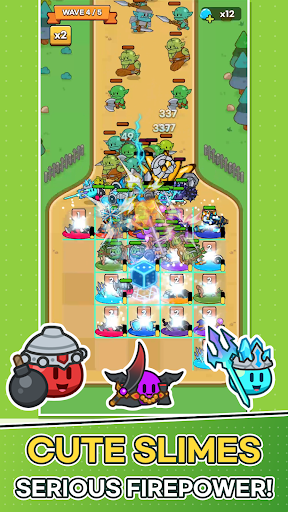
Monsters are coming to steal the Magic Dice!
Place slimes on the plaza, grow the six faces of your dice, and defend the Magic Dice with your very own slime army.
■ One Number Becomes an Army
When battle begins, the Magic Dice rolls on its own.
The number you roll charges every tile on the plaza at once, and each fully charged tile spawns a slime that rushes to the front line.
The same roll can lead to a completely different battle depending on which slimes you placed and where.
■ Plan Your Strategy Between Waves
Build your board with the cards offered each wave.
· Place Slime cards on the plaza, and merge slimes of the same type and level to make them stronger!
· Merge Number cards into the dice face with the same number to raise it by one.
· Spend Slime Gel to refresh your cards, or expand plaza tiles and the dice's range.
Power up now, or widen your board for the waves ahead? The choice is yours.
■ Easy Controls, Satisfying Battles
Battles play out automatically. No frantic tapping—just watch the plaza you built hold back the monsters.
Spot a weakness? Fix it in the next wave's setup.
■ 30 Slimes, Each with a Unique Role
Knight, Archer, Mage, Bomb, Healer, Ice...
From tanks and damage dealers to healers and supporters, every slime fights in its own way.
Collect slimes, level them up, and build your Slime Deck to discover your favorite combo.
■ Endless Challenges
· 200 stages and powerful boss monsters
· Earn up to 3 stars based on your remaining dice durability
· Survive as long as you can in Endless Wave and climb the weekly ranking
· Grow stronger in Dokkaebi's Den, the Artifact Dungeon, and more
■ Keep Growing Every Day
Power up with Magic Dice growth and Artifacts.
Daily Rewards, Daily & Weekly Quests, the 7-Day Festival, and Offline Rewards keep new prizes coming every day.
Perfect for players who:
· Love cute characters and casual defense games
· Enjoy building their own strategy around random rolls
· Want quick, satisfying sessions
· Like collecting and growing their team
Lead your slime army and protect the Magic Dice today!
Show more

1. Download MEmu installer and finish the setup

2. Start MEmu then open Google Play on the desktop

3. Search Random Slime Defense in Google Play
Install
4. Download and Install Random Slime Defense
5. On install completion click the icon to start

6. Enjoy playing Random Slime Defense on PC with MEmu
MEmu App Player є кращим безкоштовним емулятором Android, і 50 мільйонів людей вже користуються його чудовим ігровим досвідом Android. Технологія віртуалізації MEmu дає вам змогу відтворювати тисячі ігор Android на вашому комп'ютері, навіть найбільш насичених графікою.
Bigger screen with better graphics; Long duration, without limitation of battery or mobile data.
Full Keymapping support for precise control of keyboard and mouse or gamepad.
Multiple game accounts or tasks on single PC at one time with Multi-Instance manager.
Play Random Slime Defense on PC by following steps: