Arrow: Compass GPS Navigation
Aggiornata
Versione corrente
1.5.2
Offerta da

Non devi più preoccuparti dei sovraccarichi durante l'utilizzo di Arrow: Compass GPS Navigation sul tuo cellulare, liberati dal piccolo schermo e goditi dell'App su uno schermo molto più grande. D'ora in poi, sperimenta la tua App a schermo intero con tastiera e mouse. MEmu ti offre tutte le sorprendenti funzioni che ti aspettavi: installazione rapida e impostazione semplice, controlli intuitivi, niente più limitazioni di batteria, dati mobili e chiamate fastidiose. Il MEmu 9 nuovo di zecca è la prima scelta per utilizzare Arrow: Compass GPS Navigation sul tuo computer. Codificato con il nostro assorbimento, il gestore multi-istanza consente di aprire 2 o più account contemporaneamente. E soprattutto, il nostro esclusivo motore di emulazione può sbloccare il pieno potenziale del tuo PC, rendendo tutto liscio e piacevole.
Mostra altro
Goditi un'esperienza straordinaria con Arrow: Compass GPS Navigation su PC con MEmu Play. È un potente emulatore Android gratuito che ti offre migliaia di app Android per la versione desktop. Divertiti a connetterti con gli amici e a perfezionare il tuo lavoro con maggiore efficienza! Arrow: The Minimalist GPS Compass & Navigator.
Arrow: The Minimalist GPS Compass & Navigator
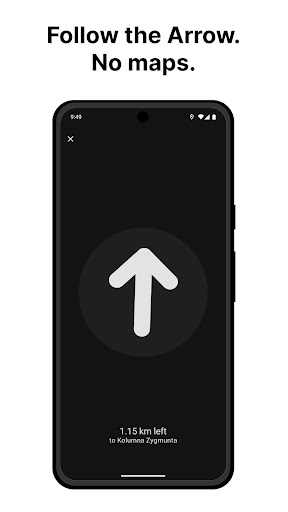
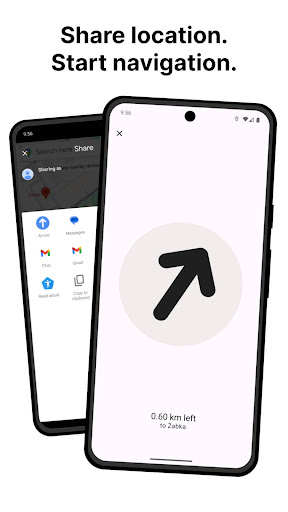
Arrow is a lightweight GPS tracker and offline navigation tool designed for travelers, hikers, and explorers who want to stay focused on the world, not a screen. Instead of a complex map, you get a clean directional arrow and distance display – perfect for precise waypoint navigation.
Why Choose Arrow?
• Hiking & Outdoors: A reliable hiking compass and waypoint tracker for trails where data is spotty.
• Parked Car Finder: Save your current location with one tap and find your way back to your vehicle in any parking lot or stadium.
• Offline GPS: Works fully offline. Enter GPS coordinates manually or save spots in advance to navigate without data.
• Battery-Friendly: No constant map rendering or background data drain, making it the ideal emergency navigator for long trips.
• Fishing & Foraging: Mark your favorite fishing spots or secret foraging landmarks and navigate back with ease.
Powerful Features:
• Floating Arrow (PiP): Keep your navigation guide visible as a floating window while using other apps.
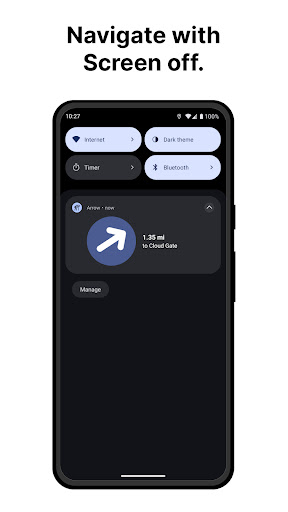
• Notification Compass: View your direction and distance directly in your notification drawer.
• Save Location: One-click saving for any spot you want to return to later.
• Minimalist UI: High-contrast design optimized for readability in direct sunlight.
How It Works:
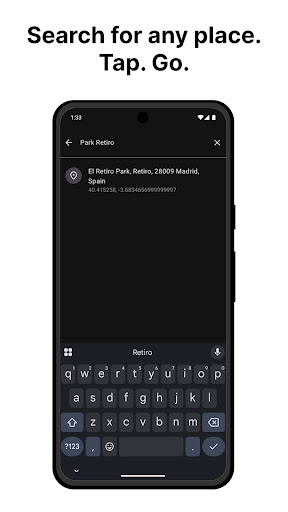
1. Search for a destination or enter raw GPS coordinates.
2. The Arrow points the way and updates your distance in real-time.
3. You walk, hike, or drive—the arrow keeps you on track.
Private by Design:
Your location data never leaves your device. We don’t track you, store your history, or sell your data. Arrow uses your GPS only when the app is active to guide you safely.
Whether you need a walking compass, a back-to-car locator, or a simple waypoint navigator, Arrow gives you exactly what you need to keep moving.
Mostra altro

1. Scarica il programma di installazione di MEmu e completa l'installazione

2. Avvia il Memu e apri il Google Play sulla homepage

3. Cerca Arrow: Compass GPS Navigation in Google Play
Install
4. Scarica e installa Arrow: Compass GPS Navigation
5. Al termine dell'installazione, fai clic sull'icona per avviar

6. Divertiti giocando a Arrow: Compass GPS Navigation su PC con MEmu
MEmu App Player è il miglior emulatore Android gratuito, utilizzato da 50 milioni di persone per ottenere un'esperienza di gioco Android superba. La tecnilogia di virtualizzazione MEmu ti permette di giocare a migliaia di giochi Android con semplicità sul tuo computer, anche i giochi con la grafica più esigente.
Schermo più grande con una grafica migliore; Lunga durata, senza limitazione di batteria o dati mobili.
Supporto completo per mappa di tastiera per un controllo preciso di tastiera e mouse o gamepad.
Multipli account di gioco o attività su un singolo PC contemporaneamente con il gestore di multi istanza.
Use Arrow: Compass GPS Navigation on PC by following steps: