CastAll: TV Mirror & Stream PC

Scarica CastAll: TV Mirror & Stream su PC

CastAll: TV Mirror & Stream PC

CastAll: TV Mirror & Stream

  • Aggiornata

  • Versione corrente

    1.0.0

  • Offerta da

    CastAll: TV Mirror & Stream PC

Caratteristiche di CastAll: TV Mirror & Stream su PC

Non devi più preoccuparti dei sovraccarichi durante l'utilizzo di CastAll: TV Mirror & Stream sul tuo cellulare, liberati dal piccolo schermo e goditi dell'App su uno schermo molto più grande. D'ora in poi, sperimenta la tua App a schermo intero con tastiera e mouse. MEmu ti offre tutte le sorprendenti funzioni che ti aspettavi: installazione rapida e impostazione semplice, controlli intuitivi, niente più limitazioni di batteria, dati mobili e chiamate fastidiose. Il MEmu 9 nuovo di zecca è la prima scelta per utilizzare CastAll: TV Mirror & Stream sul tuo computer. Codificato con il nostro assorbimento, il gestore multi-istanza consente di aprire 2 o più account contemporaneamente. E soprattutto, il nostro esclusivo motore di emulazione può sbloccare il pieno potenziale del tuo PC, rendendo tutto liscio e piacevole.

Mostra altro

Screenshot & video del PC CastAll: TV Mirror & Stream

Goditi un'esperienza straordinaria con CastAll: TV Mirror & Stream su PC con MEmu Play. È un potente emulatore Android gratuito che ti offre migliaia di app Android per la versione desktop. Divertiti a connetterti con gli amici e a perfezionare il tuo lavoro con maggiore efficienza! ⭐ WHY YOU'LL LOVE CASTING APP.
Informazioni del gioco

⭐ WHY YOU'LL LOVE CASTING APP


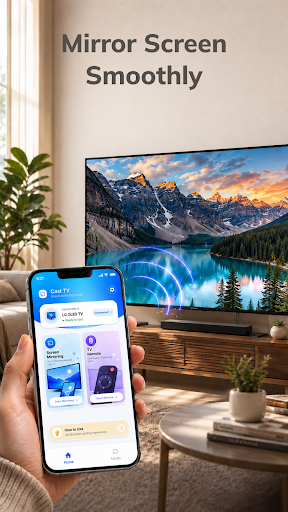
Mirror Your Phone Smoothly
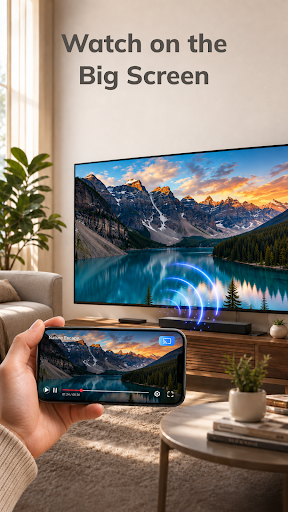
Display supported mobile content on your TV and enjoy more space for videos, photos, games, and other activities. With a wireless TV connection, you can move from your phone screen to the big screen without needing extra cables.

Control TV With Your Phone
Use your phone to manage supported TV playback, pause or resume content, adjust the volume, and navigate available controls. Instead of reaching for another remote, your phone can become a simple TV remote control for your viewing experience.

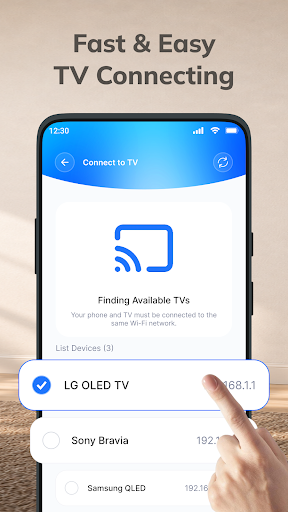
Fast & Easy TV Connect
Smart connect your phone and compatible TV to the same Wi-Fi network, open the screen mirror app, select your device, and start screen mirroring. The simple connection process helps you get to your content with fewer steps.

ADDITIONAL FEATURES
* Quick Device Discovery – Find available compatible TVs on your network without unnecessary setup.
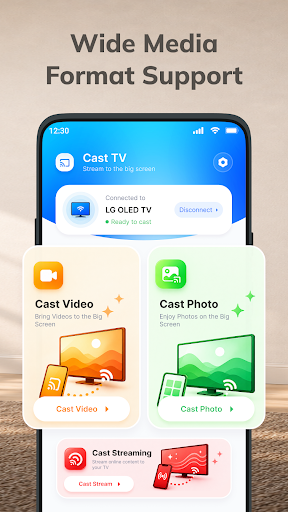
* Wide Media Support – Cast video, photos, and other compatible media from your phone.
* High-Quality TV Casting – Enjoy supported content with a clear and comfortable viewing experience.
* Big Screen Entertainment – Turn everyday mobile content into a larger viewing experience.
* Smooth Wireless Display – Enjoy convenient wireless cast mirroring when your network and devices provide a stable connection.
* Convenient Playback TV Control – Pause, resume, seek, and adjust volume from your phone when supported.
* Easy Content Sharing – Show photos, videos, and other supported content to family and friends.
* Simple Reconnection – Quickly connect to available compatible devices when you want to cast to TV again.

HOW TO CONNECT PHONE TO TV
1⃣ Connect to the Same Wi-Fi: Make sure your phone and compatible TV are connected to the same Wi-Fi network.
2⃣ Open the App: Launch the Cast TV app and allow it to find available compatible devices.
3⃣ Select Your TV: Choose your TV from the list of available devices.
4⃣ Start Screen Mirroring: Tap the TV mirroring option and follow the on-screen instructions to begin.
5⃣ Enjoy the Big Screen: Once connected, enjoy supported content from your phone on your compatible TV.

With CastAll: TV Mirror & Stream, just one phone, a bigger screen, and more ways to enjoy your content.

Mostra altro

Come scaricare CastAll: TV Mirror & Stream su PC

  • CastAll: TV Mirror & Stream PC

    1. Scarica il programma di installazione di MEmu e completa l'installazione

  • CastAll: TV Mirror & Stream PC

    2. Avvia il Memu e apri il Google Play sulla homepage

  • CastAll: TV Mirror & Stream PC

    3. Cerca CastAll: TV Mirror & Stream in Google Play

  • CastAll: TV Mirror & Stream PC Install

    4. Scarica e installa CastAll: TV Mirror & Stream

  • CastAll: TV Mirror & Stream PC

    5. Al termine dell'installazione, fai clic sull'icona per avviar

  • CastAll: TV Mirror & Stream PC
    CastAll: TV Mirror & Stream PC CastAll: TV Mirror & Stream PC

    6. Divertiti giocando a CastAll: TV Mirror & Stream su PC con MEmu

Perché Usare MEmu per CastAll: TV Mirror & Stream

MEmu App Player è il miglior emulatore Android gratuito, utilizzato da 50 milioni di persone per ottenere un'esperienza di gioco Android superba. La tecnilogia di virtualizzazione MEmu ti permette di giocare a migliaia di giochi Android con semplicità sul tuo computer, anche i giochi con la grafica più esigente.

  • Schermo più grande con una grafica migliore; Lunga durata, senza limitazione di batteria o dati mobili.

  • Supporto completo per mappa di tastiera per un controllo preciso di tastiera e mouse o gamepad.

  • Multipli account di gioco o attività su un singolo PC contemporaneamente con il gestore di multi istanza.

Pronto per giocare?

argomenti più seguiti

CastAll: TV Mirror & Stream - FAQs

  • Come si usa CastAll: TV Mirror & Stream su PC?

    Use CastAll: TV Mirror & Stream on PC by following steps:

    • Download MEmu, then install and launch it
    • Login to Google Play Store, install the app
    • Enjoy using the app on PC with MEmu
  • Quali sono i requisiti minimi di sistema per eseguire CastAll: TV Mirror & Stream su PC?
    • Intel or AMD Processor
    • Microsoft Windows 7 and above
    • 2GB of memory
    • 5GB of free disk space
    • Hardware Virtualization Technology