CastAll: TV Mirror & Stream PC

Téléchargez CastAll: TV Mirror & Stream sur PC

CastAll: TV Mirror & Stream PC

CastAll: TV Mirror & Stream

  • Mise à jour

  • Version actuelle

    1.0.0

  • Proposée par

    CastAll: TV Mirror & Stream PC

Caractéristiques de CastAll: TV Mirror & Stream sur PC

Ne vous inquiétez plus des surcharges lorsque vous utilisez CastAll: TV Mirror & Stream sur votre téléphone portable, libérez-vous de l'écran minuscule et profitez de l'application sur un écran beaucoup plus grand. Désormais, vous pouvez utiliser votre application en plein écran avec le clavier et la souris. MEmu vous offre toutes les fonctionnalités surprenantes que vous attendiez : installation rapide et configuration facile, commandes intuitives, plus de limitations de batterie, de données mobiles et d'appels dérangeants. Le tout nouveau MEmu 9 est le meilleur choix pour utiliser CastAll: TV Mirror & Stream sur votre ordinateur. Codé avec notre absorption, le gestionnaire multi-instance permet d'ouvrir 2 ou plusieurs comptes en même temps. Et le plus important, notre moteur d'émulation exclusif peut libérer tout le potentiel de votre PC, rendre tout cela fluide et agréable.

Afficher plus

Captures d'écran et Vidéo de CastAll: TV Mirror & Stream PC

Profitez d'une expérience CastAll: TV Mirror & Stream exceptionnelle sur PC grâce à MEmu Play. Cet émulateur Android gratuit et performant vous donne accès à des milliers d'applications Android pour votre ordinateur. Restez en contact avec vos amis et travaillez plus efficacement ! ⭐ WHY YOU'LL LOVE CASTING APP.
Informations sur la candidature

⭐ WHY YOU'LL LOVE CASTING APP


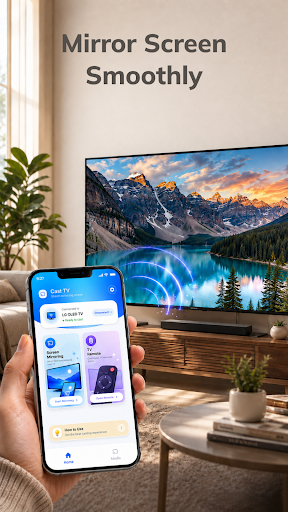
Mirror Your Phone Smoothly
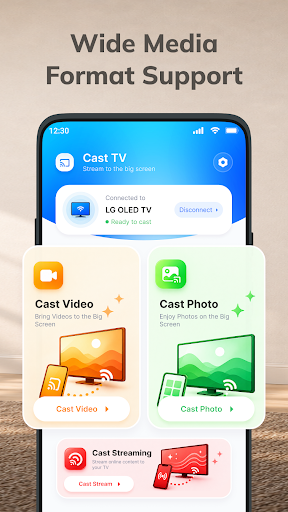
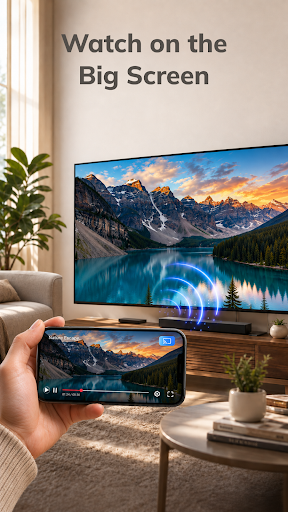
Display supported mobile content on your TV and enjoy more space for videos, photos, games, and other activities. With a wireless TV connection, you can move from your phone screen to the big screen without needing extra cables.

Control TV With Your Phone
Use your phone to manage supported TV playback, pause or resume content, adjust the volume, and navigate available controls. Instead of reaching for another remote, your phone can become a simple TV remote control for your viewing experience.

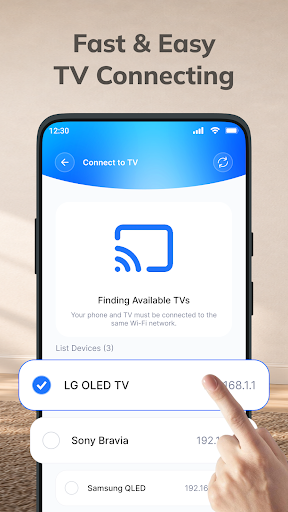
Fast & Easy TV Connect
Smart connect your phone and compatible TV to the same Wi-Fi network, open the screen mirror app, select your device, and start screen mirroring. The simple connection process helps you get to your content with fewer steps.

ADDITIONAL FEATURES
* Quick Device Discovery – Find available compatible TVs on your network without unnecessary setup.
* Wide Media Support – Cast video, photos, and other compatible media from your phone.
* High-Quality TV Casting – Enjoy supported content with a clear and comfortable viewing experience.
* Big Screen Entertainment – Turn everyday mobile content into a larger viewing experience.
* Smooth Wireless Display – Enjoy convenient wireless cast mirroring when your network and devices provide a stable connection.
* Convenient Playback TV Control – Pause, resume, seek, and adjust volume from your phone when supported.
* Easy Content Sharing – Show photos, videos, and other supported content to family and friends.
* Simple Reconnection – Quickly connect to available compatible devices when you want to cast to TV again.

HOW TO CONNECT PHONE TO TV
1⃣ Connect to the Same Wi-Fi: Make sure your phone and compatible TV are connected to the same Wi-Fi network.
2⃣ Open the App: Launch the Cast TV app and allow it to find available compatible devices.
3⃣ Select Your TV: Choose your TV from the list of available devices.
4⃣ Start Screen Mirroring: Tap the TV mirroring option and follow the on-screen instructions to begin.
5⃣ Enjoy the Big Screen: Once connected, enjoy supported content from your phone on your compatible TV.

With CastAll: TV Mirror & Stream, just one phone, a bigger screen, and more ways to enjoy your content.

Afficher plus

Comment télécharger CastAll: TV Mirror & Stream sur PC

  • CastAll: TV Mirror & Stream PC

    1. Téléchargez l'installateur MEmu et terminez l'installation

  • CastAll: TV Mirror & Stream PC

    2. Démarrez MEmu puis ouvrez Google Play sur la page d'accueil

  • CastAll: TV Mirror & Stream PC

    3. Recherchez CastAll: TV Mirror & Stream dans Google Play

  • CastAll: TV Mirror & Stream PC Install

    4. Téléchargez et installez CastAll: TV Mirror & Stream

  • CastAll: TV Mirror & Stream PC

    5. Une fois l'installation terminée, cliquez sur l'icône pour démarrer

  • CastAll: TV Mirror & Stream PC
    CastAll: TV Mirror & Stream PC CastAll: TV Mirror & Stream PC

    6. Utiliser MEmu pour utiliser CastAll: TV Mirror & Stream sur votre ordinateur

Pourquoi utiliser MEmu pour CastAll: TV Mirror & Stream

MEmu Play est actuellement le meilleur émulateur Android gratuit, avec 50 millions d'utilisateurs qui profitent d'une expérience Android exceptionnelle. La technologie de virtualisation de MEmu vous permet de jouer facilement à des milliers d'applications Android sur votre ordinateur, même les plus gourmandes en ressources.

  • L’écran plus grand avec de meilleurs graphismes; Une longue durée, sans limitation de batterie ou de données mobiles.

  • Soutien du Keymapping pour un contrôle précis du clavier et de la souris ou de la manette de jeu

  • Plusieurs comptes de jeu ou tâches sur un seul PC en même temps avec le gestionnaire de multi-instance.

Prêt à commencer à l'utiliser ?

CastAll: TV Mirror & Stream - FAQs

  • Comment utiliser CastAll: TV Mirror & Stream sur PC ?

    Use CastAll: TV Mirror & Stream on PC by following steps:

    • Download MEmu, then install and launch it
    • Login to Google Play Store, install the app
    • Enjoy using the app on PC with MEmu
  • Quelles sont les exigences de système minimales pour utiliser CastAll: TV Mirror & Stream sur PC ?
    • Intel or AMD Processor
    • Microsoft Windows 7 and above
    • 2GB of memory
    • 5GB of free disk space
    • Hardware Virtualization Technology