LightBlue® — Bluetooth LE
Aggiornata
Versione corrente
2.10.0
Offerta da

Non devi più preoccuparti dei sovraccarichi durante l'utilizzo di LightBlue® — Bluetooth LE sul tuo cellulare, liberati dal piccolo schermo e goditi dell'App su uno schermo molto più grande. D'ora in poi, sperimenta la tua App a schermo intero con tastiera e mouse. MEmu ti offre tutte le sorprendenti funzioni che ti aspettavi: installazione rapida e impostazione semplice, controlli intuitivi, niente più limitazioni di batteria, dati mobili e chiamate fastidiose. Il MEmu 9 nuovo di zecca è la prima scelta per utilizzare LightBlue® — Bluetooth LE sul tuo computer. Codificato con il nostro assorbimento, il gestore multi-istanza consente di aprire 2 o più account contemporaneamente. E soprattutto, il nostro esclusivo motore di emulazione può sbloccare il pieno potenziale del tuo PC, rendendo tutto liscio e piacevole.
Mostra altro
Scarica LightBlue® — Bluetooth LE su PC con MEmu Android Emulator. Divertiti giocando sul grande schermo. LightBlue® può collegarti a tutti i tuoi dispositivi che utilizzano Bluetooth Low Energy (noto anche come Bluetooth Smart o Bluetooth Light).
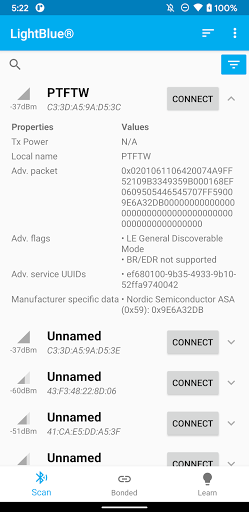
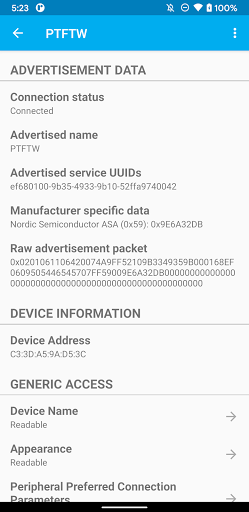
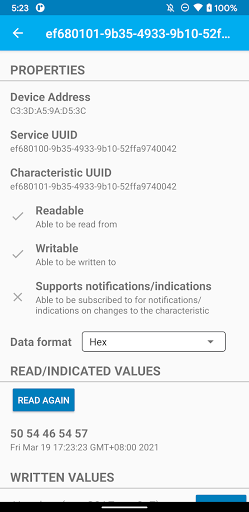
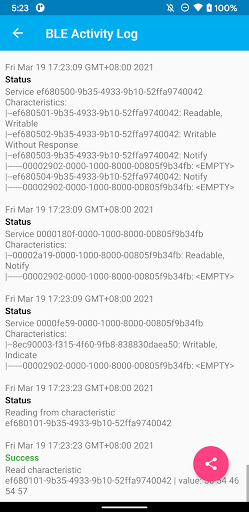
LightBlue® può collegarti a tutti i tuoi dispositivi che utilizzano Bluetooth Low Energy (noto anche come Bluetooth Smart o Bluetooth Light). Con LightBlue®, puoi scansionare, connetterti e sfogliare qualsiasi dispositivo BLE nelle vicinanze.
Il supporto completo di lettura, scrittura e notifica è incluso per facilitare gli sforzi di sviluppo del firmware BLE. Puoi anche visualizzare la potenza del segnale (RSSI) in tempo reale per avere un'idea di quanto sei vicino al dispositivo BLE, utile per trovare Fitbits persi o altri dispositivi BLE!
La funzione di registro ti consente di tenere traccia di tutti gli eventi BLE significativi che si verificano durante l'utilizzo dell'app (ad es. Rilevamento del dispositivo, connessione, lettura, scrittura).
Usa LightBlue® per testare il tuo nuovo cardiofrequenzimetro BLE, sensore di temperatura, telecomando TI CC2540, Nordic uBlue, Panasonic PAN1720, ecc. LightBlue® è ideale anche per gli sviluppatori che desiderano testare il firmware delle proprie periferiche BLE.
Caratteristiche principali:
- Cerca eventuali periferiche BLE
- Visualizza le informazioni di base sul dispositivo (nome, indirizzo MAC, RSSI) a colpo d'occhio
- Sfoglia caratteristiche e servizi
- Registrati per le notifiche
- Leggi le caratteristiche
- Scrivi sulle caratteristiche in formato esadecimale o UTF-8
- Registra accuratamente gli eventi BLE e condividili in formato testo normale
Una nota sull'accesso alla posizione: se il tuo dispositivo Android esegue Android M (6.0) e versioni successive, devi concedere all'applicazione un accesso di precisione alla posizione affinché il sistema operativo possa visualizzare i risultati della scansione BLE sull'app. Questo è un requisito SDK per Android: non utilizziamo la tua posizione per nulla, nemmeno quando l'app è in primo piano.
Mostra altro

1. Scarica il programma di installazione di MEmu e completa l'installazione

2. Avvia il Memu e apri il Google Play sulla homepage

3. Cerca LightBlue® — Bluetooth LE in Google Play
Install
4. Scarica e installa LightBlue® — Bluetooth LE
5. Al termine dell'installazione, fai clic sull'icona per avviar

6. Divertiti giocando a LightBlue® — Bluetooth LE su PC con MEmu
MEmu App Player è il miglior emulatore Android gratuito, utilizzato da 50 milioni di persone per ottenere un'esperienza di gioco Android superba. La tecnilogia di virtualizzazione MEmu ti permette di giocare a migliaia di giochi Android con semplicità sul tuo computer, anche i giochi con la grafica più esigente.
Schermo più grande con una grafica migliore; Lunga durata, senza limitazione di batteria o dati mobili.
Supporto completo per mappa di tastiera per un controllo preciso di tastiera e mouse o gamepad.
Multipli account di gioco o attività su un singolo PC contemporaneamente con il gestore di multi istanza.
Use LightBlue® — Bluetooth LE on PC by following steps: