XGames PS3 – PS3 Games
Aggiornata
Versione corrente
1.3
Offerta da

Non devi più preoccuparti dei sovraccarichi durante l'utilizzo di XGames PS3 – PS3 Games sul tuo cellulare, liberati dal piccolo schermo e goditi dell'App su uno schermo molto più grande. D'ora in poi, sperimenta la tua App a schermo intero con tastiera e mouse. MEmu ti offre tutte le sorprendenti funzioni che ti aspettavi: installazione rapida e impostazione semplice, controlli intuitivi, niente più limitazioni di batteria, dati mobili e chiamate fastidiose. Il MEmu 9 nuovo di zecca è la prima scelta per utilizzare XGames PS3 – PS3 Games sul tuo computer. Codificato con il nostro assorbimento, il gestore multi-istanza consente di aprire 2 o più account contemporaneamente. E soprattutto, il nostro esclusivo motore di emulazione può sbloccare il pieno potenziale del tuo PC, rendendo tutto liscio e piacevole.
Mostra altro
Goditi un'esperienza straordinaria con XGames PS3 – PS3 Games su PC con MEmu Play. È un potente emulatore Android gratuito che ti offre migliaia di app Android per la versione desktop. Divertiti a connetterti con gli amici e a perfezionare il tuo lavoro con maggiore efficienza! Relive the power era of PS3 gaming with XGames – PS3 Games — a premium collection of legendary PS3 titles, all brought together in one powerful and easy-to-use Android app.
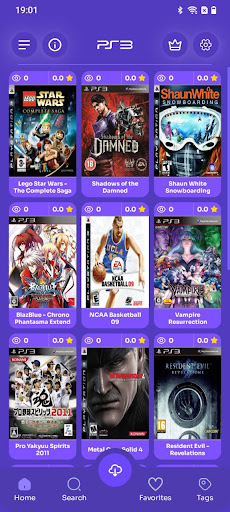
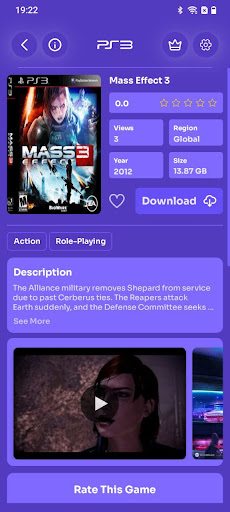
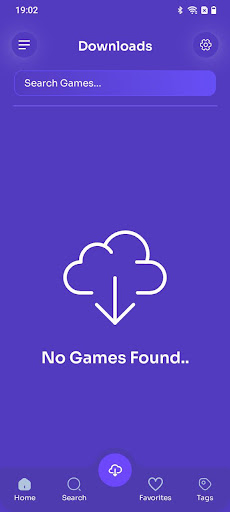
Relive the power era of PS3 gaming with XGames – PS3 Games — a premium collection of legendary PS3 titles, all brought together in one powerful and easy-to-use Android app.
Step into the HD generation with unforgettable PS3 classics — action, open-world, shooters, racing, fighting, RPGs and more — carefully organised to deliver the ultimate PlayStation 3 experience on mobile.
Key Features:
Top PlayStation 3 games in one app
Experience legendary PS3 titles from the golden HD era.
Smartly organised by genre
Action • Open-World • Shooter • Racing • Fighting • RPG • Adventure
Clean & intuitive interface
Smooth navigation designed for fast browsing and discovery.
Detailed game information
Title, file size, cover art, screenshots and ratings for every game.
⭐ Favourites system
Save your favourite PS3 games for instant access.
Advanced search
Find games by name, genre or popularity in seconds.
Supports 65+ languages
Including English, Arabic, Spanish, French, Japanese and many more.
Feel the true power of PS3 gaming
Whether you love cinematic action, massive open-world adventures, intense shooters, story-driven RPGs or pure nostalgia — XGames brings the PS3 generation back to life.
Why gamers love XGames – PS3:
Carefully curated PS3 library
Optimised for Android devices
Regular updates with new games
Simple setup — no complicated steps
Enjoy legendary titles like:
The Last of Us, God of War III, GTA V, Red Dead Redemption, Uncharted, Call of Duty, Metal Gear Solid, FIFA, PES, and more.
Optimised performance with clear expectations depending on your device.
Play anytime, anywhere
Relive your favourite PlayStation 3 memories
Experience HD-era classics on mobile
Built for serious gamers and collectors
XGames – PS3 Games is the ultimate retro-HD hub for PlayStation 3 fans.
Download now and step into the world of PS3 — legendary games are just a tap away.
With support for over 65 languages, XGames is built for gamers everywhere.
Tap to download — and relive the PlayStation 3 era today!
Mostra altro

1. Scarica il programma di installazione di MEmu e completa l'installazione

2. Avvia il Memu e apri il Google Play sulla homepage

3. Cerca XGames PS3 – PS3 Games in Google Play
Install
4. Scarica e installa XGames PS3 – PS3 Games
5. Al termine dell'installazione, fai clic sull'icona per avviar

6. Divertiti giocando a XGames PS3 – PS3 Games su PC con MEmu
MEmu App Player è il miglior emulatore Android gratuito, utilizzato da 50 milioni di persone per ottenere un'esperienza di gioco Android superba. La tecnilogia di virtualizzazione MEmu ti permette di giocare a migliaia di giochi Android con semplicità sul tuo computer, anche i giochi con la grafica più esigente.
Schermo più grande con una grafica migliore; Lunga durata, senza limitazione di batteria o dati mobili.
Supporto completo per mappa di tastiera per un controllo preciso di tastiera e mouse o gamepad.
Multipli account di gioco o attività su un singolo PC contemporaneamente con il gestore di multi istanza.
Use XGames PS3 – PS3 Games on PC by following steps: