FCS1
Aggiornata
Versione corrente
7.2605.49
Offerta da

Non devi più preoccuparti dei sovraccarichi durante l'utilizzo di FCS1 sul tuo cellulare, liberati dal piccolo schermo e goditi dell'App su uno schermo molto più grande. D'ora in poi, sperimenta la tua App a schermo intero con tastiera e mouse. MEmu ti offre tutte le sorprendenti funzioni che ti aspettavi: installazione rapida e impostazione semplice, controlli intuitivi, niente più limitazioni di batteria, dati mobili e chiamate fastidiose. Il MEmu 9 nuovo di zecca è la prima scelta per utilizzare FCS1 sul tuo computer. Codificato con il nostro assorbimento, il gestore multi-istanza consente di aprire 2 o più account contemporaneamente. E soprattutto, il nostro esclusivo motore di emulazione può sbloccare il pieno potenziale del tuo PC, rendendo tutto liscio e piacevole.
Mostra altro
Goditi un'esperienza straordinaria con FCS1 su PC con MEmu Play. È un potente emulatore Android gratuito che ti offre migliaia di app Android per la versione desktop. Divertiti a connetterti con gli amici e a perfezionare il tuo lavoro con maggiore efficienza! FCS1 redefines hotel operations with a powerful, all-in-one app that keeps your team connected and your guests delighted.
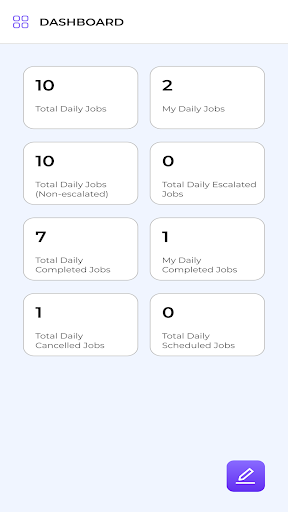
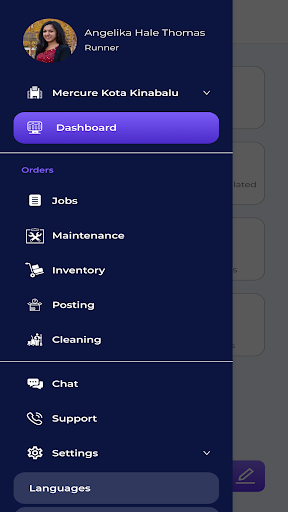
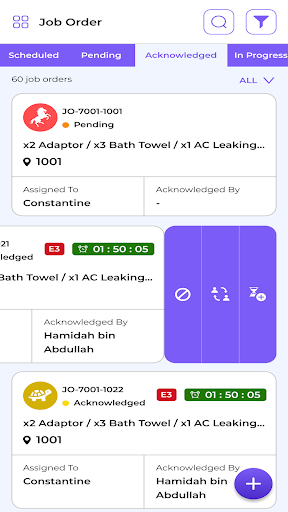
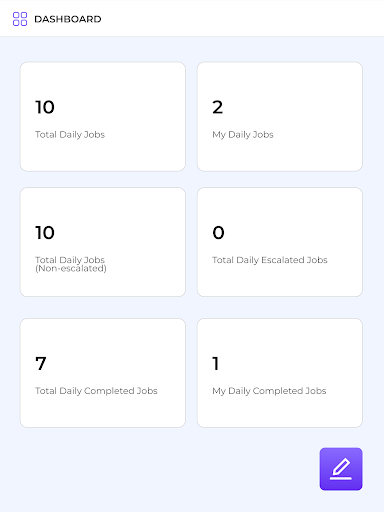
FCS1 redefines hotel operations with a powerful, all-in-one app that keeps your team connected and your guests delighted. From task assignments to guest requests, FCS1 centralizes your operations in real time, so you can stay on top of every detail effortlessly. Built to enhance hotel operations through automation and integration, it connects housekeeping, guest services, and maintenance offering agility to hotels.
MOBILE-READY
Access FCS1 on mobile or on the web. Hotel operations management doesn’t stop at your desk—no matter where you are.
UNIFIED TASK MANAGEMENT
Assign and track tasks across all departments to ensure smooth and efficient operations.
GUESTS REQUEST TRACKING
Ensure no guest request goes unaddressed with real-time updates.
OPERATIONAL INSIGHTS
Make informed decisions with up-to-date analytics on performance and key metrics.
ADAPTABLE WORKFLOWS
Customize workflows to match your hotel’s specific requirements, boosting team productivity.
GLOBAL ASSIST
24/7 technical and multi-language support in 23 languages (Burmese, Czech, English, French, German, Haitian Creole, Hindi, Indonesian, Japanese, Korean, Lao, Malay, Mongolian, Polish, Portuguese, Russian, Simplified Chinese, Spanish, Tamil, Thai, Traditional Chinese, Turkish, Vietnamese)
ONE APP. LIMITLESS POSSIBILITIES
Jobs
Streamlines task and guest request management by enabling real-time creation, dispatch, and tracking of every job.
Maintenance
Empowers teams with real-time tracking, clear accountability, and automated escalation of maintenance tasks.
Cleaning
Optimizes housekeeping operations with intelligent task assignments, mobile-friendly access, and real-time progress tracking.
Incident Management
Real-time tracking and resolution of over 100 types of incidents from room rates dispute to security concerns.
Breakfast Attendance
Allows room attendants to begin cleaning while guests enjoy breakfast, ensuring that rooms are clean and refreshed.
Concierge
Tracks and handles baggage deposits, retrievals, and storage locations.
Inspection Task
Creates checklists, ensures all items are completed before submission, and automatically generates follow-up tasks. orders.
Call Accounting
Simplifies guest billing, integrates with third-party solutions, and connects multiple properties.
Voicemail
Improves guest and staff communication through the PABX system, automating wake-up calls with alerts, escalations, and snooze options.
With FCS1, managing hotel operations is simple, efficient, and guest-centered. Whether you oversee a boutique property, luxury or a large chain hotel, FCS1 provides the technology to elevate service quality and streamline every aspect of your hotel’s daily operations. Exclusively developed to support registered hospitality professionals, FCS1 empowers teams to deliver exceptional service with precision, efficiency, and security. This app is for registered users only. If you’re not yet registered, please contact www.fcshub.com to learn more.
Mostra altro

1. Scarica il programma di installazione di MEmu e completa l'installazione

2. Avvia il Memu e apri il Google Play sulla homepage

3. Cerca FCS1 in Google Play
Install
4. Scarica e installa FCS1
5. Al termine dell'installazione, fai clic sull'icona per avviar

6. Divertiti giocando a FCS1 su PC con MEmu
MEmu App Player è il miglior emulatore Android gratuito, utilizzato da 50 milioni di persone per ottenere un'esperienza di gioco Android superba. La tecnilogia di virtualizzazione MEmu ti permette di giocare a migliaia di giochi Android con semplicità sul tuo computer, anche i giochi con la grafica più esigente.
Schermo più grande con una grafica migliore; Lunga durata, senza limitazione di batteria o dati mobili.
Supporto completo per mappa di tastiera per un controllo preciso di tastiera e mouse o gamepad.
Multipli account di gioco o attività su un singolo PC contemporaneamente con il gestore di multi istanza.
Use FCS1 on PC by following steps: