My Porsche
Aggiornata
Versione corrente
13.24.48-pcna+100492
Offerta da

Non devi più preoccuparti dei sovraccarichi durante l'utilizzo di My Porsche sul tuo cellulare, liberati dal piccolo schermo e goditi dell'App su uno schermo molto più grande. D'ora in poi, sperimenta la tua App a schermo intero con tastiera e mouse. MEmu ti offre tutte le sorprendenti funzioni che ti aspettavi: installazione rapida e impostazione semplice, controlli intuitivi, niente più limitazioni di batteria, dati mobili e chiamate fastidiose. Il MEmu 9 nuovo di zecca è la prima scelta per utilizzare My Porsche sul tuo computer. Codificato con il nostro assorbimento, il gestore multi-istanza consente di aprire 2 o più account contemporaneamente. E soprattutto, il nostro esclusivo motore di emulazione può sbloccare il pieno potenziale del tuo PC, rendendo tutto liscio e piacevole.
Mostra altro
Scarica My Porsche su PC con MEmu Android Emulator. Divertiti giocando sul grande schermo. The My Porsche app is the ideal companion for your Porsche experience.
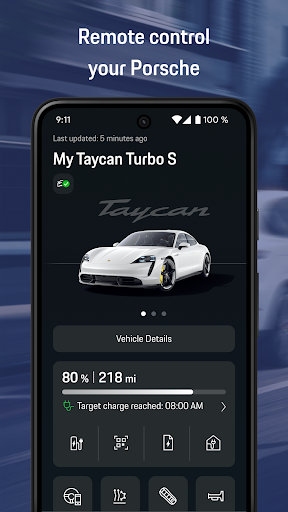
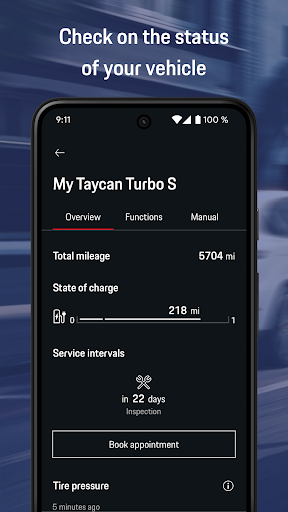
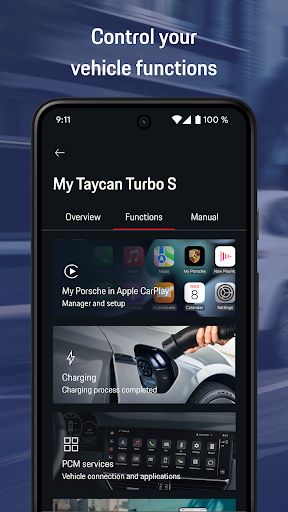
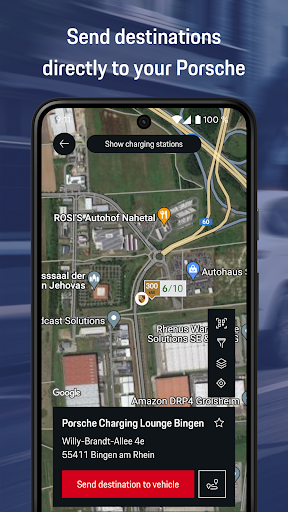
The My Porsche app is the ideal companion for your Porsche experience. Call up the current vehicle status at any time and control Connect services remotely. The app is constantly being developed and additional features will be added in the next versions.
The My Porsche app offers you the following advantages*:
VEHICLE STATUS
You can view the vehicle status at any time and display current vehicle information:
• Fuel level/battery status and remaining range
• Mileage
• Tire pressure
• Trip data for your past journeys
• Closing status of the doors and windows
• Remaining charging time
REMOTE CONTROL
Control certain vehicle functions remotely:
• Air conditioning/pre-heater
• Locking and unlocking of the doors
• Horn and turn signals
• Location alarm and speed alarm
• Remote Park Assist
NAVIGATION
Plan your next route:
• Call up the vehicle location
• Navigation to the vehicle
• Save destinations as favorites
• Send destinations to vehicle
• Find e-charging stations
• Route planner including charging stops
CHARGING
Manage and control vehicle charging:
• Charging timer
• Direct charging
• Charging profiles
• Charging planner
• Charging service: information about e-charging stations, activation of charging process, transaction history
SERVICE & SAFETY
Receive important information about workshop appointments, breakdown calls and operating instructions:
• Service intervals and service appointment request
• VTS, theft notification, breakdown call
• Digital owners manual
DISCOVER PORSCHE
Receive exclusive information about Porsche:
• Latest information about the Porsche brand
• Upcoming events from Porsche
• Exclusive content about your Porsche in production
*In order to use all the features of the My Porsche app, you need a Porsche ID account. Simply register at login.porsche.de and add your Porsche if you own a vehicle. Please note that the range of features of the app may differ depending on the model, model year and country availability.
Mostra altro

1. Scarica il programma di installazione di MEmu e completa l'installazione

2. Avvia il Memu e apri il Google Play sulla homepage

3. Cerca My Porsche in Google Play
Install
4. Scarica e installa My Porsche
5. Al termine dell'installazione, fai clic sull'icona per avviar

6. Divertiti giocando a My Porsche su PC con MEmu
MEmu App Player è il miglior emulatore Android gratuito, utilizzato da 50 milioni di persone per ottenere un'esperienza di gioco Android superba. La tecnilogia di virtualizzazione MEmu ti permette di giocare a migliaia di giochi Android con semplicità sul tuo computer, anche i giochi con la grafica più esigente.
Schermo più grande con una grafica migliore; Lunga durata, senza limitazione di batteria o dati mobili.
Supporto completo per mappa di tastiera per un controllo preciso di tastiera e mouse o gamepad.
Multipli account di gioco o attività su un singolo PC contemporaneamente con il gestore di multi istanza.
Use My Porsche on PC by following steps: