VoidLauncher
Aggiornata
Versione corrente
Offerta da

Non devi più preoccuparti dei sovraccarichi durante l'utilizzo di VoidLauncher sul tuo cellulare, liberati dal piccolo schermo e goditi dell'App su uno schermo molto più grande. D'ora in poi, sperimenta la tua App a schermo intero con tastiera e mouse. MEmu ti offre tutte le sorprendenti funzioni che ti aspettavi: installazione rapida e impostazione semplice, controlli intuitivi, niente più limitazioni di batteria, dati mobili e chiamate fastidiose. Il MEmu 9 nuovo di zecca è la prima scelta per utilizzare VoidLauncher sul tuo computer. Codificato con il nostro assorbimento, il gestore multi-istanza consente di aprire 2 o più account contemporaneamente. E soprattutto, il nostro esclusivo motore di emulazione può sbloccare il pieno potenziale del tuo PC, rendendo tutto liscio e piacevole.
Mostra altro
Goditi un'esperienza straordinaria con VoidLauncher su PC con MEmu Play. È un potente emulatore Android gratuito che ti offre migliaia di app Android per la versione desktop. Divertiti a connetterti con gli amici e a perfezionare il tuo lavoro con maggiore efficienza! Void Launcher is a meticulous reimagining of the Android home screen.
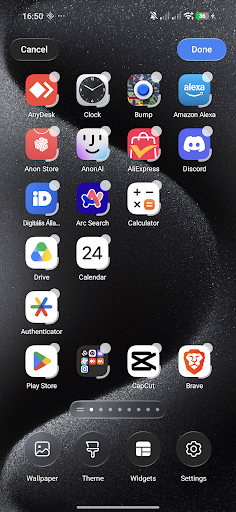
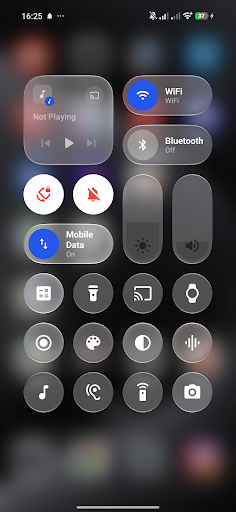
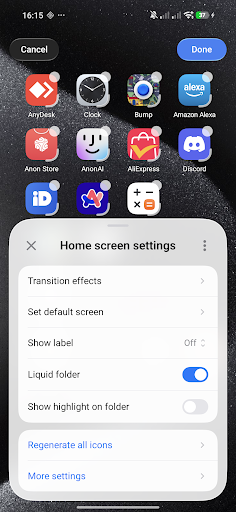
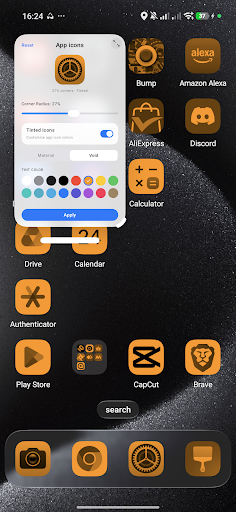
Void Launcher is a meticulous reimagining of the Android home screen. Designed with a profound focus on craftsmanship, materiality, and the behavior of light, it transforms your device into a living, tactile canvas.
Designed for the Senses.
At the heart of Void Launcher is a custom-engineered liquid-glass interface. We studied how light filters through frosted glass, how layers interact in physical space, and how motion can feel entirely organic. The result is a layout defined by depth, subtle translucent layers, and high-fidelity graphics that elevate every interaction.
A Symphony of Fluid Motion.
Every gesture feels natural and responsive. Powered by custom AGSL physics engines, a gentle tap sends liquid ripples flowing across your wallpaper, while transitioning between screens feels weightless. It is not just about moving from page to page; it is about the poetry of motion.
The Beauty of Materiality.
Experience custom-crafted Monarch shapes that adapt harmoniously to your display. The interface behaves like a physical material—refracting light, shifting dynamically based on your wallpaper, and creating a sense of clean, structured space. It is quiet, elegant, and entirely focused on what matters most to you.
Intelligent Simplicity.
A highly refined home screen that respects your focus. Organize your workspace with precise grid adjustments, seamless icon pack integration, and custom blur parameters. It is an experience that stays out of your way, letting your content shine.
Integrated Voice Control.
For moments when you need it, a minimalist, built-in Voice and keyboard assistant rests quietly at the bottom of the screen. Available with a simple gesture, it allows you to effortlessly navigate pages or adjust launcher settings with natural command input.
ACCESSIBILITY SERVICE DISCLOSURE:
VoidLauncher uses the Android Accessibility Service API to provide its Control Center functionality while you are using other applications. The Accessibility Service allows VoidLauncher to display and control the Control Center overlay over other apps.
The Accessibility Service is used exclusively for this Control Center functionality. VoidLauncher does not collect, store, or share personal or sensitive user data through the Accessibility Service.
Mostra altro

1. Scarica il programma di installazione di MEmu e completa l'installazione

2. Avvia il Memu e apri il Google Play sulla homepage

3. Cerca VoidLauncher in Google Play
Install
4. Scarica e installa VoidLauncher
5. Al termine dell'installazione, fai clic sull'icona per avviar

6. Divertiti giocando a VoidLauncher su PC con MEmu
MEmu App Player è il miglior emulatore Android gratuito, utilizzato da 50 milioni di persone per ottenere un'esperienza di gioco Android superba. La tecnilogia di virtualizzazione MEmu ti permette di giocare a migliaia di giochi Android con semplicità sul tuo computer, anche i giochi con la grafica più esigente.
Schermo più grande con una grafica migliore; Lunga durata, senza limitazione di batteria o dati mobili.
Supporto completo per mappa di tastiera per un controllo preciso di tastiera e mouse o gamepad.
Multipli account di gioco o attività su un singolo PC contemporaneamente con il gestore di multi istanza.
Use VoidLauncher on PC by following steps: