VoidLauncher
Mise à jour
Version actuelle
Proposée par

Ne vous inquiétez plus des surcharges lorsque vous utilisez VoidLauncher sur votre téléphone portable, libérez-vous de l'écran minuscule et profitez de l'application sur un écran beaucoup plus grand. Désormais, vous pouvez utiliser votre application en plein écran avec le clavier et la souris. MEmu vous offre toutes les fonctionnalités surprenantes que vous attendiez : installation rapide et configuration facile, commandes intuitives, plus de limitations de batterie, de données mobiles et d'appels dérangeants. Le tout nouveau MEmu 9 est le meilleur choix pour utiliser VoidLauncher sur votre ordinateur. Codé avec notre absorption, le gestionnaire multi-instance permet d'ouvrir 2 ou plusieurs comptes en même temps. Et le plus important, notre moteur d'émulation exclusif peut libérer tout le potentiel de votre PC, rendre tout cela fluide et agréable.
Afficher plus
Profitez d'une expérience VoidLauncher exceptionnelle sur PC grâce à MEmu Play. Cet émulateur Android gratuit et performant vous donne accès à des milliers d'applications Android pour votre ordinateur. Restez en contact avec vos amis et travaillez plus efficacement ! Void Launcher is a meticulous reimagining of the Android home screen.
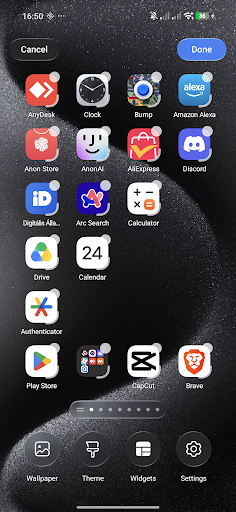
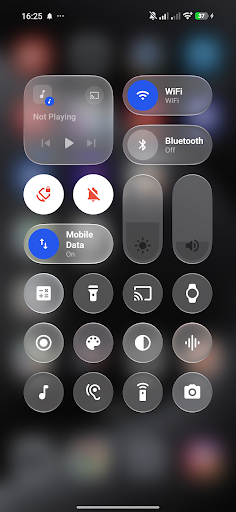
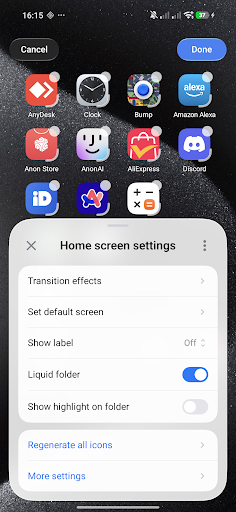
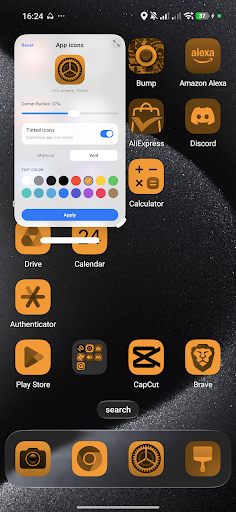
Void Launcher is a meticulous reimagining of the Android home screen. Designed with a profound focus on craftsmanship, materiality, and the behavior of light, it transforms your device into a living, tactile canvas.
Designed for the Senses.
At the heart of Void Launcher is a custom-engineered liquid-glass interface. We studied how light filters through frosted glass, how layers interact in physical space, and how motion can feel entirely organic. The result is a layout defined by depth, subtle translucent layers, and high-fidelity graphics that elevate every interaction.
A Symphony of Fluid Motion.
Every gesture feels natural and responsive. Powered by custom AGSL physics engines, a gentle tap sends liquid ripples flowing across your wallpaper, while transitioning between screens feels weightless. It is not just about moving from page to page; it is about the poetry of motion.
The Beauty of Materiality.
Experience custom-crafted Monarch shapes that adapt harmoniously to your display. The interface behaves like a physical material—refracting light, shifting dynamically based on your wallpaper, and creating a sense of clean, structured space. It is quiet, elegant, and entirely focused on what matters most to you.
Intelligent Simplicity.
A highly refined home screen that respects your focus. Organize your workspace with precise grid adjustments, seamless icon pack integration, and custom blur parameters. It is an experience that stays out of your way, letting your content shine.
Integrated Voice Control.
For moments when you need it, a minimalist, built-in Voice and keyboard assistant rests quietly at the bottom of the screen. Available with a simple gesture, it allows you to effortlessly navigate pages or adjust launcher settings with natural command input.
ACCESSIBILITY SERVICE DISCLOSURE:
VoidLauncher uses the Android Accessibility Service API to provide its Control Center functionality while you are using other applications. The Accessibility Service allows VoidLauncher to display and control the Control Center overlay over other apps.
The Accessibility Service is used exclusively for this Control Center functionality. VoidLauncher does not collect, store, or share personal or sensitive user data through the Accessibility Service.
Afficher plus

1. Téléchargez l'installateur MEmu et terminez l'installation

2. Démarrez MEmu puis ouvrez Google Play sur la page d'accueil

3. Recherchez VoidLauncher dans Google Play
Install
4. Téléchargez et installez VoidLauncher
5. Une fois l'installation terminée, cliquez sur l'icône pour démarrer

6. Utiliser MEmu pour utiliser VoidLauncher sur votre ordinateur
MEmu Play est actuellement le meilleur émulateur Android gratuit, avec 50 millions d'utilisateurs qui profitent d'une expérience Android exceptionnelle. La technologie de virtualisation de MEmu vous permet de jouer facilement à des milliers d'applications Android sur votre ordinateur, même les plus gourmandes en ressources.
L’écran plus grand avec de meilleurs graphismes; Une longue durée, sans limitation de batterie ou de données mobiles.
Soutien du Keymapping pour un contrôle précis du clavier et de la souris ou de la manette de jeu
Plusieurs comptes de jeu ou tâches sur un seul PC en même temps avec le gestionnaire de multi-instance.
Use VoidLauncher on PC by following steps: