Kaldoris: Rising Crown
更新日
現在のバージョン
1.1.6
提供元

スマホ不要!プロ選手のようにキーボードとマウスで操作しよう。MEmuエミュはあなたにすべての期待を与える。電池が切れてしまうとか画面が小さいとかの問題を心配する必要がなくて、存分Kaldoris: Rising Crownを楽しんでください。新しいMEmuエミュ7はPCでKaldoris: Rising Crownをプレイするのに最適!完璧なキーマッピングシステムにより、まるでパソコンゲームみたい。マルチインスタンスで複数のゲームやアプリを同時に実行!唯一無二な仮想化エンジンがパソコンの可能性を最大限になる。遊べるだけでなく、より楽しめる!
もっと見る
Kaldoris: Rising CrownをPCでダウンロード!大画面でより楽しむ。電源が落ちてしまうとか通信料が足りないとかの問題を心配する必要がなく、PCの大画面でより快適にゲームを楽しましょう! Kaldoris: Rising Crown is a real-time action MMORPG built on three pillars: massive battles, guild warfare, and the Guardian Fusion system.
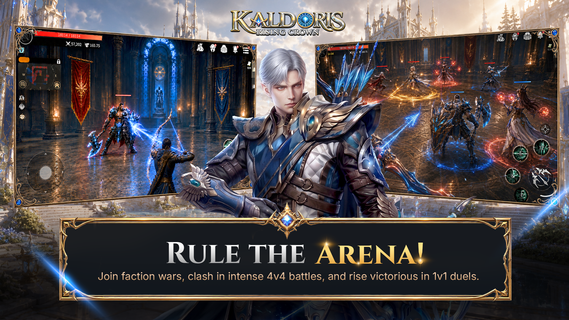
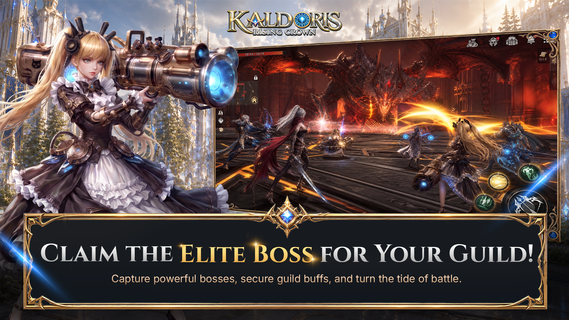
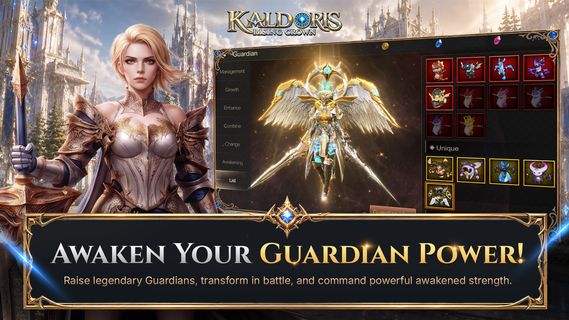
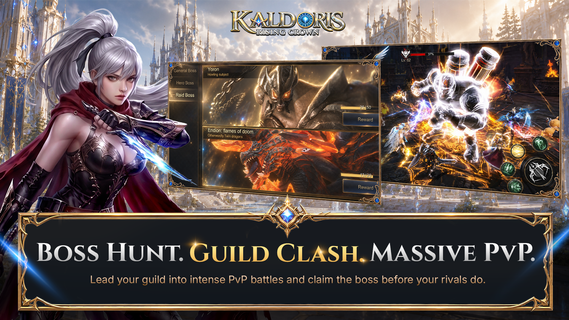
Kaldoris: Rising Crown is a real-time action MMORPG built on three pillars: massive battles, guild warfare, and the Guardian Fusion system. Step into a dark fantasy world, pick your class, and fight shoulder-to-shoulder with hundreds of players in live, large-scale combat.SIX UNIQUE CLASSESPlay as the Archer, Holy Knight, Assassin, Mage, Canon Shooter, or Warrior â each with its own branching skill tree built around Link, Take, Promote, and Stack mechanics. Mix and match to engineer the build that wins.GUARDIAN FUSIONGather and fuse more than 100 Guardians across five attributes â Angel, Demon, Otherworldly, Spirit, and Machine. Evolve and merge them to multiply your base damage and swing any fight in your favor.HUNDRED-PLAYER WORLD BOSS RAIDSRally your guild and converge with allies and rivals on open-field World Bosses, where hundreds of players battle at once. Bring down the boss together and claim the spoils.CROSS-SERVER GUILD WARSTake your guild beyond its home server. In mixed PvP and PvE modes, members are auto-matched into battle against rival guilds. Out-think, out-coordinate, and out-fight them for cross-server supremacy.NO LEVEL CAP â STRAIGHT TO THE ACTIONRace through main quests and level rewards, then head for the EXP map where auto-battle pushes your power higher fast. There's no ceiling â only the next fight.ELITE BOSS SYSTEMTeam up in dungeons to take down Elite Bosses. Beat one and it grants daily buffs to your entire guild â and joins you as a loyal Guardian ally.CRAFT YOUR OWN GEARForge and combine equipment that's truly yours. Every craft succeeds at 100%, and your gear is never destroyed no matter how far you push the enhancement. MASSIVE REAL-TIME BATTLESThrow yourself into large-scale PvP, guild wars, and world boss raids with hundreds of players on screen. New challenges and rewards land every day â this is intense combat at its purest. Your crown is waiting. Choose your class, forge your Guardians, rally your guild, and rise to claim it.Official Website: https://kaldoris.ntworld.com.sg/Discord: https://discord.gg/BHK4PvDJbqContact: support@ntworld.com.sg
もっと見る

1. MEmuインストーラーをダウンロードしてセットアップを完了する

2. MEmuを起動し、デスクトップでのPlayストアを開く

3. PlayストアでKaldoris: Rising Crownを検索する
Install
4. Kaldoris: Rising Crownをダウンロードしてインストールする
5. インストールが完了したら、アイコンをクリックしてスタート

6. MEmuを使用してPCでKaldoris: Rising Crownを楽しむ
MEmu App Playerは最高の無料で提供されるAndroidエミュレータで、5,000万人がすでに優れたAndroidゲーム体験を楽しんでいます。 MEmuの仮想化技術は、あなたのPCで何千ものAndroidゲームを快適にプレイすることを可能にします。
大画面でより精細;無限の待機、電池とドラフィックの極限を超え
キーボード・マウス・コントローラーを全力でサポート、より快適
マルチインスタンスで複数のゲームを同時に実行
Play Kaldoris: Rising Crown on PC by following steps: