ABTC
更新日
現在のバージョン
1.1.0
提供元

スマートフォンは不要!パソコンと同じようにキーボードとマウスで操作できます。MEmu Playは、あなたが待ち望んでいたすべての楽しみをお届けします。バッテリー残量や小さな画面を気にすることなく、ABTCをご利用ください。最新のMEmu 9は、ABTCをPCで体験するのに最適です!完璧なキーマッピングシステムにより、PCのようなスムーズな操作性を実現します。マルチインスタンス機能により、複数のアプリケーションを同時に実行できます。独自の仮想化エンジンがPCのパフォーマンスを最大限に引き出します。アプリを使用するだけでなく、高品質な体験を得ることができます。
もっと見る
ABTCをPCでダウンロード!大画面でより楽しむ。電源が落ちてしまうとか通信料が足りないとかの問題を心配する必要がなく、PCの大画面でより快適にゲームを楽しましょう! The Asia-Pacific Economic Cooperation (APEC) Business Travel Card (ABTC) App – the Virtual ABTC – is an official APEC App of the APEC Business Mobility Group.
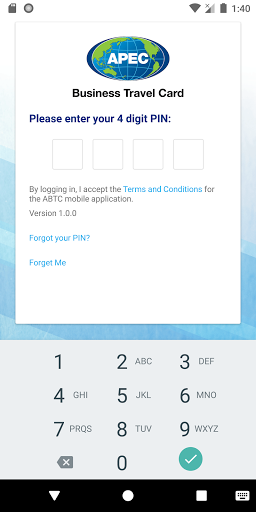
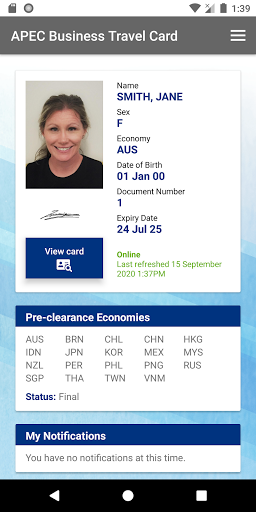
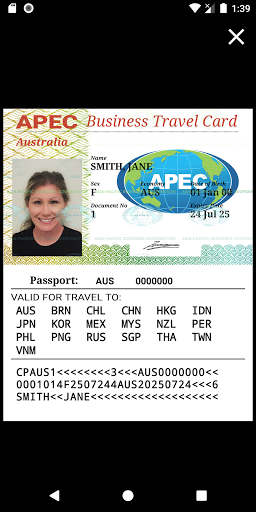
The Asia-Pacific Economic Cooperation (APEC) Business Travel Card (ABTC) App – the Virtual ABTC – is an official APEC App of the APEC Business Mobility Group.
The ABTC App – the Virtual ABTC – is a new method for travelling on the ABTC. It brings the ABTC Scheme into the modern and digitised world of global travel and provides approved cardholders from fully participating APEC Member Economies with a more efficient, convenient and user-friendly service.
The ABTC App – the Virtual ABTC – provides cardholders the ability to access their ABTC on their smart device. This new Virtual ABTC is in addition to the physically printed ABTC and allows for the immediate use of the ABTC for travel when entering APEC Economies.
Features of the Virtual ABTC include:
Real time data - The Virtual ABTC provides cardholders and officials with real-time information on the status of their ABTC. Any changes made to their application will be immediately reflected when the cardholder opens or refreshes the ABTC App, including:
• if Pre-Clearance to enter an Economy has been approved, updated, etc.,
• the ABTC itself has expired, or
• the cardholder’s passport has been renewed.
Secure Sign on - An approved ABTC cardholder will be sent an email with a unique token (an application number), along with a link to download the ABTC App.
There are no changes to existing application or entry procedures for an ABTC. The Virtual ABTC is essentially a digital version of the ABTC: when passing through international ports on your ABTC, you will be required to present the Virtual ABTC, as instructed by a Port Official either when entering the APEC fast track lane or when entering an Economy.
For more information on the Virtual ABTC, please visit the APEC Website:
http://apec.org/Groups/Committee-on-Trade-and-Investment/Business-Mobility-Group/ABTC-Mobile-Application
You will also find frequently asked questions for ABTC cardholders here:
http://apec.org/-/media/Files/Groups/BMG/ABTC-Mobile-Application---FAQs-for-Digital-Card-Holders.pdf.
Note: You must be an approved cardholder for an ABTC from a fully participating APEC Member Economy and have received pre-registration and login credentials from your Home Economy to be able to access and use the Virtual ABTC. For more information, please visit the APEC Website here:
http://apec.org/Groups/Committee-on-Trade-and-Investment/Business-Mobility-Group/ABTC
もっと見る

1. MEmuインストーラーをダウンロードしてセットアップを完了する

2. MEmuを起動し、デスクトップでのPlayストアを開く

3. PlayストアでABTCを検索する
Install
4. ABTCをダウンロードしてインストールする
5. インストールが完了したら、アイコンをクリックしてスタート

6. MEmuを使ってパソコンでABTCを体験する
MEmu Playは現在、最高の無料Androidエミュレーターであり、5,000万人のユーザーが優れたAndroidアプリ体験を楽しんでいます。MEmuの仮想化テクノロジーにより、数千ものAndroidアプリをコンピューターでスムーズに実行できます。
大画面でより精細;無限の待機、電池とドラフィックの極限を超え
キーボード・マウス・コントローラーを全力でサポート、より快適
マルチインスタンスで複数のゲームを同時に実行
Use ABTC on PC by following steps: