Add text on Photo - TextLab
更新日
現在のバージョン
4.1.6
提供元

スマートフォンは不要!パソコンと同じようにキーボードとマウスで操作できます。MEmu Playは、あなたが待ち望んでいたすべての楽しみをお届けします。バッテリー残量や小さな画面を気にすることなく、Add text on Photo - TextLabをご利用ください。最新のMEmu 9は、Add text on Photo - TextLabをPCで体験するのに最適です!完璧なキーマッピングシステムにより、PCのようなスムーズな操作性を実現します。マルチインスタンス機能により、複数のアプリケーションを同時に実行できます。独自の仮想化エンジンがPCのパフォーマンスを最大限に引き出します。アプリを使用するだけでなく、高品質な体験を得ることができます。
もっと見る
Add text on Photo - TextLabをPCでダウンロード!大画面でより楽しむ。電源が落ちてしまうとか通信料が足りないとかの問題を心配する必要がなく、PCの大画面でより快適にゲームを楽しましょう! TextLab - Add text on Photo – The Ultimate Photo Editor for Adding Text on Your Photos.
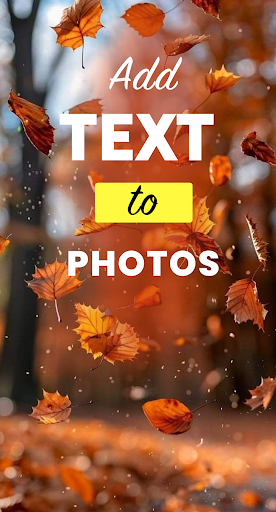

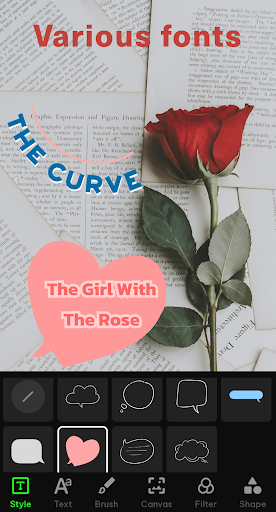
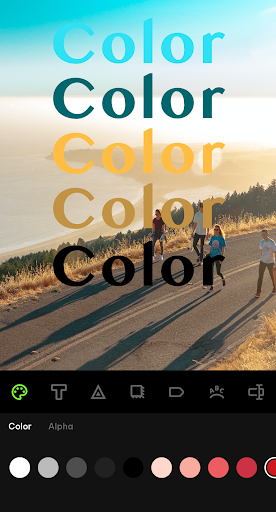
TextLab - Add text on Photo – The Ultimate Photo Editor for Adding Text on Your Photos
Are you looking for a powerful and user-friendly app to add text to your photos? Look no further than TextLab – the ultimate photo editor for adding text on your photos. This amazing app offers a range of features that make it easy for anyone to add text, captions, and other graphical elements to their photos.
With TextLab, you can add text to your photos in just a few easy steps. Simply upload your photo and select your desired font, size, color, and style. You can also adjust the positioning and add special effects to enhance your photos. With a range of effects, such as Blur and color adjustments, you can truly make your photos stand out.
TextLab also allows you to choose from a variety of text presets, stickers, and other graphical elements to make your photos even more unique. With a range of backgrounds, you can add text to your photos and make them more visually appealing. Whether you're looking to create a stylish poster, a beautiful social media post, or a unique business card, TextLab has everything you need to make it happen.
One of the best features of TextLab is its intuitive interface, which makes it easy to create stunning photos in just a few minutes. You don't need to be a graphic designer or have any special skills to use this app – it's designed to be accessible and easy to use for everyone.
In addition to its powerful text editing capabilities, TextLab also offers a range of other features to enhance your photos. One of these features is the ability to blur your photo's background, creating a professional-looking depth of field effect. This feature is perfect for portrait photos or any time you want to draw attention to a specific subject in your photo.
TextLab also includes a doodle brush tool that allows you to draw directly on your photos. With a range of brush sizes and colors to choose from, you can add your own personal touch to your photos and create unique designs. Whether you want to add a fun doodle to your selfie or create a custom graphic for your business, the doodle brush tool in TextLab makes it easy to do.
With these additional features, TextLab truly is the ultimate photo editor for adding text and other graphical elements to your photos. Whether you're a social media influencer, blogger, or just someone who loves to take photos, TextLab has everything you need to create stunning graphics and enhance your photos.
Some of the key features of TextLab include:
* Easy to use interface for adding text to photos
* A large selection of fonts, including custom fonts, to choose from
* blur your photo's background
* A range of effects, filters, and adjustments to enhance your photos
* a doodle brush tool that allows you to draw directly on your photos.
* The ability to save your photos to your device or share them directly to social media
Whether you're a professional photographer, blogger, or social media influencer, TextLab is the perfect app to help you create stunning photos and graphics. With its powerful features and easy-to-use interface, adding text to your photos has never been easier.
So why wait? Download TextLab today and start exploring everything this amazing photo editor has to offer!
If you have any comments or suggestions, don't hesitate to contact us by email at yamcai64@gmail.com.
もっと見る

1. MEmuインストーラーをダウンロードしてセットアップを完了する

2. MEmuを起動し、デスクトップでのPlayストアを開く

3. PlayストアでAdd text on Photo - TextLabを検索する
Install
4. Add text on Photo - TextLabをダウンロードしてインストールする
5. インストールが完了したら、アイコンをクリックしてスタート

6. MEmuを使ってパソコンでAdd text on Photo - TextLabを体験する
MEmu Playは現在、最高の無料Androidエミュレーターであり、5,000万人のユーザーが優れたAndroidアプリ体験を楽しんでいます。MEmuの仮想化テクノロジーにより、数千ものAndroidアプリをコンピューターでスムーズに実行できます。
大画面でより精細;無限の待機、電池とドラフィックの極限を超え
キーボード・マウス・コントローラーを全力でサポート、より快適
マルチインスタンスで複数のゲームを同時に実行
Use Add text on Photo - TextLab on PC by following steps: