ATAK-CIV (Civil Use)
更新日
現在のバージョン
5.3.0.3 (634e5ea6)[playstore]
提供元

スマートフォンは不要!パソコンと同じようにキーボードとマウスで操作できます。MEmu Playは、あなたが待ち望んでいたすべての楽しみをお届けします。バッテリー残量や小さな画面を気にすることなく、ATAK-CIV (Civil Use)をご利用ください。最新のMEmu 9は、ATAK-CIV (Civil Use)をPCで体験するのに最適です!完璧なキーマッピングシステムにより、PCのようなスムーズな操作性を実現します。マルチインスタンス機能により、複数のアプリケーションを同時に実行できます。独自の仮想化エンジンがPCのパフォーマンスを最大限に引き出します。アプリを使用するだけでなく、高品質な体験を得ることができます。
もっと見る
ATAK-CIV (Civil Use)をPCでダウンロード!大画面でより楽しむ。電源が落ちてしまうとか通信料が足りないとかの問題を心配する必要がなく、PCの大画面でより快適にゲームを楽しましょう! The Tactical Assault Kit is DoD nomenclature for the Team Awareness Kit (TAK) application: a mission planning, geospatial, Full Motion Video (FMV), and system administrator tool that reduces the operational footprint from a tactical laptop, to a commercial mobile device.
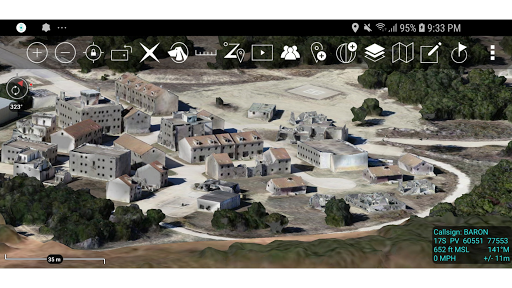
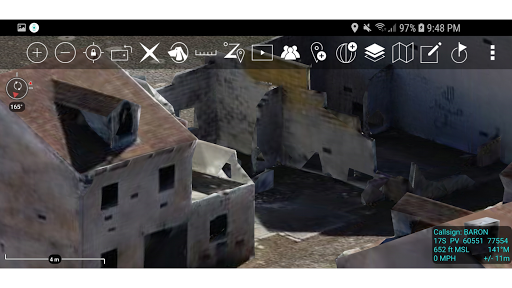
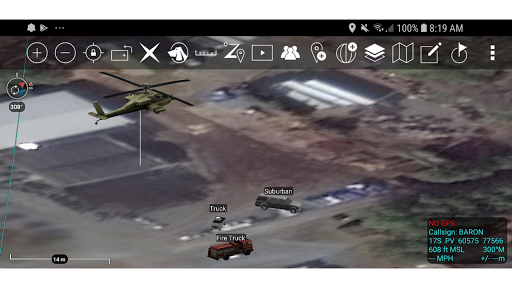
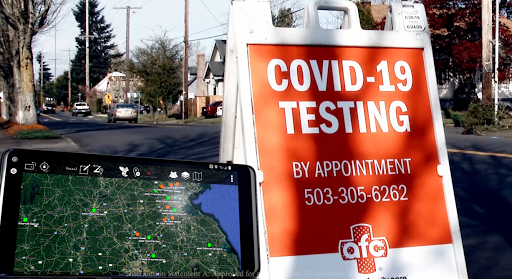
The Tactical Assault Kit is DoD nomenclature for the Team Awareness Kit (TAK) application: a mission planning, geospatial, Full Motion Video (FMV), and system administrator tool that reduces the operational footprint from a tactical laptop, to a commercial mobile device. The geospatial engine and communications component support Department of Defense (DoD) and commercial sector standards. Extensibility of the core platform is supported by the Software Development Kit (https://tak.gov), which enables any partner to develop mission-specific capability or contribute to the advancement of the baseline. Data can be pre-loaded into ATAK or downloaded from the network when available.
Civil use capabilities of ATAK-CIV include:
• Online and offline mapping (most standard formats), with a blazing fast rendering engine
• Support for very high-resolution imagery (sub 1 cm resolution)
• Collaborative mapping, including points, drawings, locations of interest
• Extensive and customizable set of Icons
• Overlay Manager which allows the Import and display of KML, KMZ, GPX overlays, maps and imagery including both online and offline sources with adjustable transparency. These overlays can be treated as Gridded Refrence Gaphics.
• Location marking, sharing, history
• Chat, file sharing, photo sharing, video sharing, streaming
• Navigation-walking/hiking, driving, also useful flying and air-ground coordination
• Elevation Tools, heat maps, computed contour maps, viewsheds, routes w/DTED, SRTM, including dynamic profiling
• Hashtags and Sticky tags
• Center on Self, Center on other objects (e.g. another person in the network)
• Range, bearing, and other measurement tools
• Network-aware geofences with triggers
• "Bloodhound" destination tracking, including on moving objects
• Team Emergency Beacons
• Customizable Toolbar
• Radio controls and Integration
• Photo to map capability (aka Rubber Sheeting)
• Casualty evacuation tool
• Icon support for a wide variety of First Responder missions with further extensible Icons
• 3D perspective and ability to display 3D geospatial models
• Useful for First Responders, Hunting, fishing, ornithology, wildlife site survey
• ATAK-CIV is open source: https://github.com/deptofdefense/AndroidTacticalAssaultKit-CIV
System Requirements
Operating System: ATAK requires Android 5.0 (API 21) or later.
Hardware: ATAK does not require specific hardware and should run on any Android device that supports the other System Requirements.
Graphics: ATAK requires a graphics processor that supports GLES 3.0.
Storage, Memory and Processor: no specific requirements for storage, memory or processor- performance of the application will depend on the configuration.
Recommended for optimal experience: Samsung S9 equivalent hardware or newer is used and for a tablet style device Samsung S2 equivalent or newer.
TAK CORE
TAK CORE includes functionality that is common to all TAK applications and focuses on capabilities that can live in a cross-platform layer (simplifying the development and management of the library).
TAK CORE Features:
Networking – All ATAK applications use a variety of network mediums to send situational awareness data, chat messages, and other file types associated with mission planning activities. The networking component of TAK CORE handles creating the appropriate message at the application level (Cursor-on-Target), manages receiving and dispatching messages, and brokers communication with the TAK Server product.
Geospatial Data Processing – The TAK applications ingest geospatial imagery and overlay products for use on the moving map display.
Geospatial Data Visualization – A set of rendering utility and helper functions exist in TAK CORE to standardize the way geospatial imagery and overlays are rendered to the screen.
Geospatial Data Management – A data management capability is included in the TAK CORE to ensure that the data managed by TAK is relevant and accurate for the end user.
もっと見る

1. MEmuインストーラーをダウンロードしてセットアップを完了する

2. MEmuを起動し、デスクトップでのPlayストアを開く

3. PlayストアでATAK-CIV (Civil Use)を検索する
Install
4. ATAK-CIV (Civil Use)をダウンロードしてインストールする
5. インストールが完了したら、アイコンをクリックしてスタート

6. MEmuを使ってパソコンでATAK-CIV (Civil Use)を体験する
MEmu Playは現在、最高の無料Androidエミュレーターであり、5,000万人のユーザーが優れたAndroidアプリ体験を楽しんでいます。MEmuの仮想化テクノロジーにより、数千ものAndroidアプリをコンピューターでスムーズに実行できます。
大画面でより精細;無限の待機、電池とドラフィックの極限を超え
キーボード・マウス・コントローラーを全力でサポート、より快適
マルチインスタンスで複数のゲームを同時に実行
Use ATAK-CIV (Civil Use) on PC by following steps: