ATAK-CIV (Civil Use)
Atualizada
Versão atual
5.3.0.3 (634e5ea6)[playstore]
Oferecido por

Pare de se preocupar com sobrecargas ao usar ATAK-CIV (Civil Use) no seu celular, liberte-se da pequena tela e aproveite o uso do aplicativo numa tela muito maior. A partir de agora, obtenha uma experiência em tela cheia do seu aplicativo com teclado e mouse. O MEmu oferece-lhe todos os recursos surpreendentes que você esperava: instalação rápida e configuração fácil, controles intuitivos, sem mais limitações de bateria, dados móveis e chamadas perturbadoras. O novíssimo MEmu 9 é a melhor opção para usar ATAK-CIV (Civil Use) no seu computador. Codificado com a nossa absorção, o gerenciador de multi-instâncias possibilita a abertura de 2 ou mais contas ao mesmo tempo. E o mais importante, nosso mecanismo de emulação exclusivo pode liberar todo o potencial do seu PC, tornando tudo suave e agradável.
Mostre mais
Download do ATAK-CIV (Civil Use) no PC com MEmu Android Emulador: Divirta-se jogando na tela grande. The Tactical Assault Kit is DoD nomenclature for the Team Awareness Kit (TAK) application: a mission planning, geospatial, Full Motion Video (FMV), and system administrator tool that reduces the operational footprint from a tactical laptop, to a commercial mobile device.
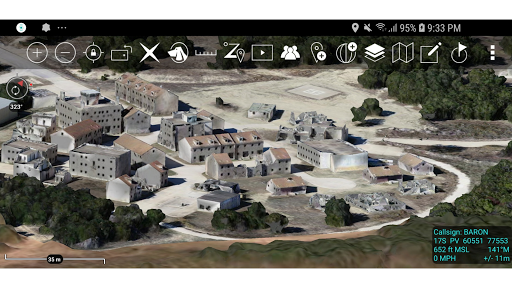
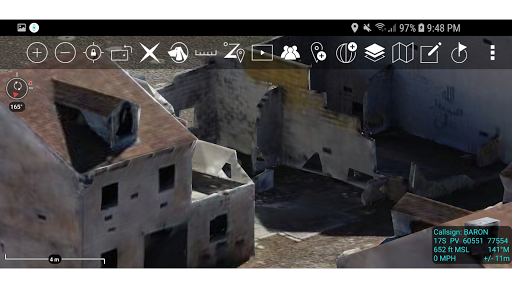
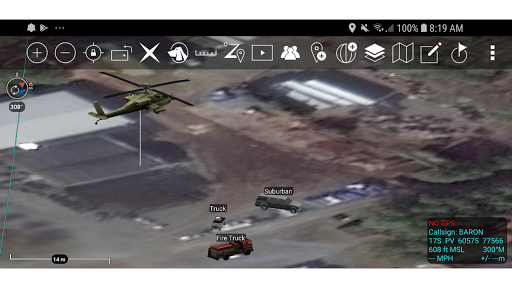
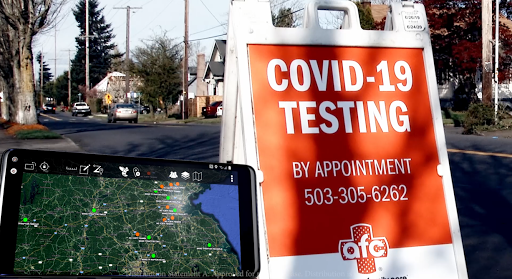
The Tactical Assault Kit is DoD nomenclature for the Team Awareness Kit (TAK) application: a mission planning, geospatial, Full Motion Video (FMV), and system administrator tool that reduces the operational footprint from a tactical laptop, to a commercial mobile device. The geospatial engine and communications component support Department of Defense (DoD) and commercial sector standards. Extensibility of the core platform is supported by the Software Development Kit (https://tak.gov), which enables any partner to develop mission-specific capability or contribute to the advancement of the baseline. Data can be pre-loaded into ATAK or downloaded from the network when available.
Civil use capabilities of ATAK-CIV include:
• Online and offline mapping (most standard formats), with a blazing fast rendering engine
• Support for very high-resolution imagery (sub 1 cm resolution)
• Collaborative mapping, including points, drawings, locations of interest
• Extensive and customizable set of Icons
• Overlay Manager which allows the Import and display of KML, KMZ, GPX overlays, maps and imagery including both online and offline sources with adjustable transparency. These overlays can be treated as Gridded Refrence Gaphics.
• Location marking, sharing, history
• Chat, file sharing, photo sharing, video sharing, streaming
• Navigation-walking/hiking, driving, also useful flying and air-ground coordination
• Elevation Tools, heat maps, computed contour maps, viewsheds, routes w/DTED, SRTM, including dynamic profiling
• Hashtags and Sticky tags
• Center on Self, Center on other objects (e.g. another person in the network)
• Range, bearing, and other measurement tools
• Network-aware geofences with triggers
• "Bloodhound" destination tracking, including on moving objects
• Team Emergency Beacons
• Customizable Toolbar
• Radio controls and Integration
• Photo to map capability (aka Rubber Sheeting)
• Casualty evacuation tool
• Icon support for a wide variety of First Responder missions with further extensible Icons
• 3D perspective and ability to display 3D geospatial models
• Useful for First Responders, Hunting, fishing, ornithology, wildlife site survey
• ATAK-CIV is open source: https://github.com/deptofdefense/AndroidTacticalAssaultKit-CIV
System Requirements
Operating System: ATAK requires Android 5.0 (API 21) or later.
Hardware: ATAK does not require specific hardware and should run on any Android device that supports the other System Requirements.
Graphics: ATAK requires a graphics processor that supports GLES 3.0.
Storage, Memory and Processor: no specific requirements for storage, memory or processor- performance of the application will depend on the configuration.
Recommended for optimal experience: Samsung S9 equivalent hardware or newer is used and for a tablet style device Samsung S2 equivalent or newer.
TAK CORE
TAK CORE includes functionality that is common to all TAK applications and focuses on capabilities that can live in a cross-platform layer (simplifying the development and management of the library).
TAK CORE Features:
Networking – All ATAK applications use a variety of network mediums to send situational awareness data, chat messages, and other file types associated with mission planning activities. The networking component of TAK CORE handles creating the appropriate message at the application level (Cursor-on-Target), manages receiving and dispatching messages, and brokers communication with the TAK Server product.
Geospatial Data Processing – The TAK applications ingest geospatial imagery and overlay products for use on the moving map display.
Geospatial Data Visualization – A set of rendering utility and helper functions exist in TAK CORE to standardize the way geospatial imagery and overlays are rendered to the screen.
Geospatial Data Management – A data management capability is included in the TAK CORE to ensure that the data managed by TAK is relevant and accurate for the end user.
Mostre mais

1. Faça o download do instalador do MEmu e conclua a instalação

2. Inicie o MEmu e depois abra o Google Play na página inicial

3. Pesquise ATAK-CIV (Civil Use) no Google Play
Install
4. Baixe e Instale ATAK-CIV (Civil Use)
5. Na conclusão da instalação, clique no ícone para iniciar

6. º Experimente o ATAK-CIV (Civil Use) no PC com o MEmu.
O MEmu Play é o melhor emulador Android gratuito, com 50 milhões de utilizadores a desfrutar da sua experiência superior com aplicações Android. A tecnologia de virtualização do MEmu permite-lhe executar milhares de aplicações Android sem problemas no seu computador, mesmo as mais exigentes.
Tela maior com gráficos melhores; Longa duração e sem limitação de bateria ou dados móveis.
Suporte completo ao Mapaeamento de Teclas para controle preciso do teclado e mouse ou gamepad.
Várias contas de jogos ou tarefas em um único PC de uma só vez com o Gerenciador de várias instâncias.
Use ATAK-CIV (Civil Use) on PC by following steps: