Autonapůl - carsharing
更新日
現在のバージョン
5.5
提供元

スマートフォンは不要!パソコンと同じようにキーボードとマウスで操作できます。MEmu Playは、あなたが待ち望んでいたすべての楽しみをお届けします。バッテリー残量や小さな画面を気にすることなく、Autonapůl - carsharingをご利用ください。最新のMEmu 9は、Autonapůl - carsharingをPCで体験するのに最適です!完璧なキーマッピングシステムにより、PCのようなスムーズな操作性を実現します。マルチインスタンス機能により、複数のアプリケーションを同時に実行できます。独自の仮想化エンジンがPCのパフォーマンスを最大限に引き出します。アプリを使用するだけでなく、高品質な体験を得ることができます。
もっと見る
Autonapůl - carsharingをPCでダウンロード!大画面でより楽しむ。電源が落ちてしまうとか通信料が足りないとかの問題を心配する必要がなく、PCの大画面でより快適にゲームを楽しましょう! The Autonapul application will enable you to use cars in many cities, for traveling within the Czech Republic and abroad.
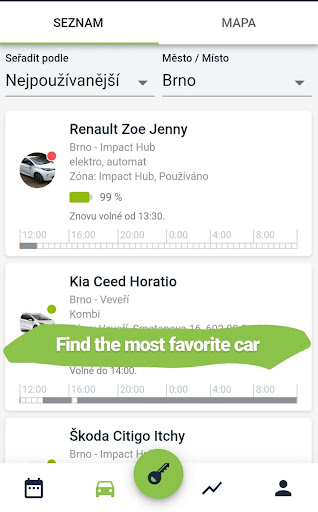
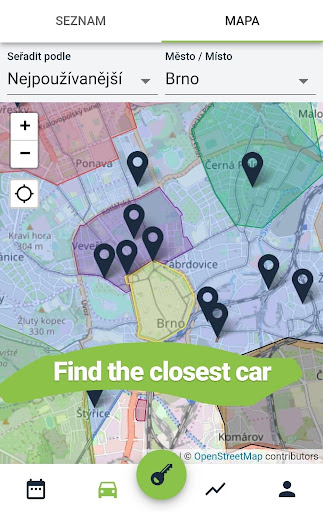
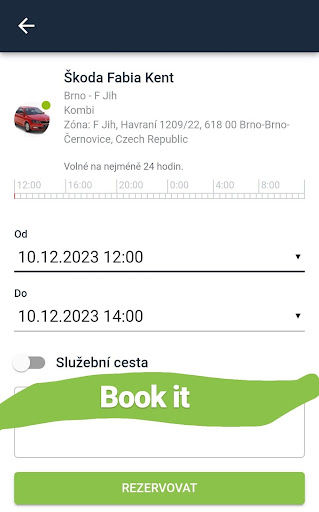
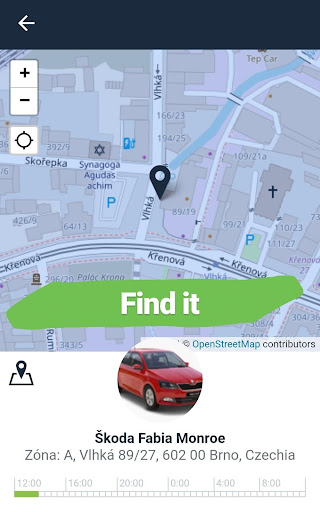
The Autonapul application will enable you to use cars in many cities, for traveling within the Czech Republic and abroad.
Sharing with Autonapul is easy, clever and responsible. You reserve a car in the app, find it by location on the map, unlock it with the app or a smart card and off you go. At the end of your journey, you return the car to its designated zone and lock it with the app or card. At the end of the month, you'll receive an invoice by email, which you pay. You don't have to take care of the car, it's always at your disposal, and you save space in the city from unnecessary cars.
How much is it?
Try the online calculator, and you will know how much your trip will cost: https://www.autonapul.cz/en/carsharing-calculator/
- If you do not drive, you do not pay. There are no regular monthly fees.
How does it work?
You pay for kilometers driven and time booked, combined.
You always have the car that you need. From small city cars to larger Combis or 9-seater vans. We also offer electric or hybrid cars.
Cars are booked online via your computer or mobile app. - Available 24/7
Book a car for just a few hours, half day trips, weekends with your family or for the whole vacation
Suitable for companies and freelancers
You don't deal with servicing, insurance or buying a car. We take care of all the worries about it
The best choice for traveling out of the city, shopping or trips with friends.
There is no better option for peoplewho drive less than 10.000km per year.
Car sharing saves not only your purse but the environment and city space, too.
Car sharing fits perfectlywith your daily commute with public transportation or by bicycle., but also in combination with a train or bus for long journeys. For example, you can get a discount on Autonapul with the collected ČD Points.
Where can you find Autonapul?
Our cars are in: Brno, Praha, Olomouc, Ostrava, Liberec, Plzeň, Hradec Králové, Pardubice.
How do you join in?
Register at www.autonapul.cz/chci-se-pridat
Pay a returnable deposit of 5000 CZK. Once you decide to cancel your membership, the deposit will be returned to you. You only pay when you drive.
Allow a working day after your payment to activate your account. And you can go for your trip.
One shared car replaces up to 15 privately owned cars in the city.
Autonapul creates space for people. Together.
Any problem or question? Let us know at autonapul@autonapul.cz or +420 778 470 898.
もっと見る

1. MEmuインストーラーをダウンロードしてセットアップを完了する

2. MEmuを起動し、デスクトップでのPlayストアを開く

3. PlayストアでAutonapůl - carsharingを検索する
Install
4. Autonapůl - carsharingをダウンロードしてインストールする
5. インストールが完了したら、アイコンをクリックしてスタート

6. MEmuを使ってパソコンでAutonapůl - carsharingを体験する
MEmu Playは現在、最高の無料Androidエミュレーターであり、5,000万人のユーザーが優れたAndroidアプリ体験を楽しんでいます。MEmuの仮想化テクノロジーにより、数千ものAndroidアプリをコンピューターでスムーズに実行できます。
大画面でより精細;無限の待機、電池とドラフィックの極限を超え
キーボード・マウス・コントローラーを全力でサポート、より快適
マルチインスタンスで複数のゲームを同時に実行
Use Autonapůl - carsharing on PC by following steps: