Aviator Assistant - Pilot App
更新日
現在のバージョン
3.53.1
提供元

スマートフォンは不要!パソコンと同じようにキーボードとマウスで操作できます。MEmu Playは、あなたが待ち望んでいたすべての楽しみをお届けします。バッテリー残量や小さな画面を気にすることなく、Aviator Assistant - Pilot Appをご利用ください。最新のMEmu 9は、Aviator Assistant - Pilot AppをPCで体験するのに最適です!完璧なキーマッピングシステムにより、PCのようなスムーズな操作性を実現します。マルチインスタンス機能により、複数のアプリケーションを同時に実行できます。独自の仮想化エンジンがPCのパフォーマンスを最大限に引き出します。アプリを使用するだけでなく、高品質な体験を得ることができます。
もっと見る
Aviator Assistant - Pilot AppをPCでダウンロード!大画面でより楽しむ。電源が落ちてしまうとか通信料が足りないとかの問題を心配する必要がなく、PCの大画面でより快適にゲームを楽しましょう! Welcome to Aviator Assistant, your ultimate co-pilot for a safer and more efficient flying experience.
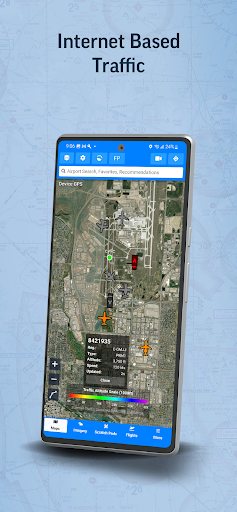
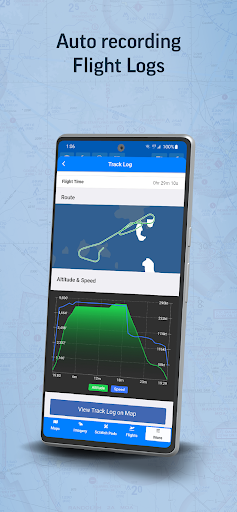
Welcome to Aviator Assistant, your ultimate co-pilot for a safer and more efficient flying experience. Plan, brief, and file your flights with ease, using our advanced tools, briefing utilities, and high-quality charts.
Features
Flight Planning & Filing: Centralize your information for safer, more efficient flying. Our intuitive route manager lets you set up a route in seconds, providing insights into weather, NOTAMs, and TFRs along your planned path.
Pilot Log Books: Maintain meticulous records with our digital pilot log books, designed for ease and accuracy.
Weight and Balance Tools: Ensure safe and efficient flights with our comprehensive weight and balance calculators, tailored to your aircraft's specific parameters.
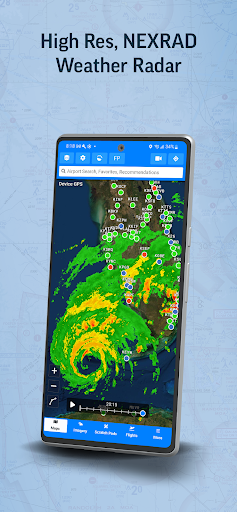
Reliable Weather Tools: Make informed pre-flight decisions with real-time animated NEXRAD radar, global winds-aloft, turbulence information, METARs, TAFs, Airsigmets, and more.
High-Quality Charts: Fulfill all your VFR and IFR needs with VFR Sectionals, High/Low Instrument Enroute charts, and Procedures (SIDs, STARs, approaches, and taxi charts).
Briefing Tools: Comprehensive briefing tools to help you prepare for your flight with precision and confidence.
Radar Playback: Leverage the latest NEXRAD radar data for an accurate representation of the weather conditions.
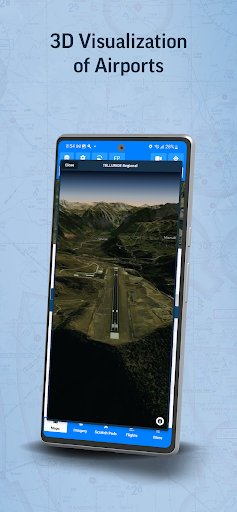
Synthetic Vision: Enhance your situational awareness with our Synthetic Vision tool, offering insights into traffic, obstacles, runways, terrain warnings, and more.
ADS-B Support: Benefit from real-time traffic reports, in-flight weather data, and Synthetic Vision terrain data with our advanced ADS-B integration.
Aircraft Performance Calculator: Store your aircraft's performance information for faster flight planning and accurate ETA calculations.
Scratch Pads: Keep track of ATIS updates, clearances, PIREPs, and more with our handy Scratch Pad templates.
Essential Information: Access communication frequencies, weather forecasts, NOTAMs, procedures, runways, and more - all in one place.
Offline Access: Download specific data and charts for offline use in the air.
Aviator Assistant requires a subscription, visit our website for more information.
Please Note: Location is used to provide navigation services over a moving map, and the camera is used to submit Instructor documentation for account configuration.
Embrace the future of flying with Aviator Assistant. Download now and elevate your aviation experience today!
もっと見る

1. MEmuインストーラーをダウンロードしてセットアップを完了する

2. MEmuを起動し、デスクトップでのPlayストアを開く

3. PlayストアでAviator Assistant - Pilot Appを検索する
Install
4. Aviator Assistant - Pilot Appをダウンロードしてインストールする
5. インストールが完了したら、アイコンをクリックしてスタート

6. MEmuを使ってパソコンでAviator Assistant - Pilot Appを体験する
MEmu Playは現在、最高の無料Androidエミュレーターであり、5,000万人のユーザーが優れたAndroidアプリ体験を楽しんでいます。MEmuの仮想化テクノロジーにより、数千ものAndroidアプリをコンピューターでスムーズに実行できます。
大画面でより精細;無限の待機、電池とドラフィックの極限を超え
キーボード・マウス・コントローラーを全力でサポート、より快適
マルチインスタンスで複数のゲームを同時に実行
Use Aviator Assistant - Pilot App on PC by following steps: