Aviator Assistant - Pilot App
Aktualisiert
Aktuelle Version
3.53.1
Angeboten von

Machen Sie sich keine Sorgen mehr über überhöhte Gebühren, wenn Sie Aviator Assistant - Pilot App auf Ihrem Mobiltelefon verwenden, befreien Sie sich von dem winzigen Bildschirm und genießen Sie die Nutzung der App auf einem viel größeren Display. Von nun an können Sie Ihre App mit Tastatur und Maus im Vollbildmodus nutzen. MEmu bietet Ihnen all die überraschenden Funktionen, die Sie erwartet haben: schnelle Installation und einfache Einrichtung, intuitive Steuerung, keine Einschränkungen mehr durch Batterie, mobile Daten und störende Anrufe. Der brandneue MEmu 9 ist die beste Wahl für die Nutzung von Aviator Assistant - Pilot App auf Ihrem Computer. Mit unserer Absorption kodiert, ermöglicht der Multi-Instanz-Manager die Eröffnung von 2 oder mehr Konten zur gleichen Zeit. Und das Wichtigste, unsere exklusive Emulations-Engine kann das volle Potenzial Ihres PCs freisetzen und alles reibungslos und angenehm gestalten.
Mehr anzeigen
Laden Sie Play Aviator Assistant - Pilot App auf dem PC mit MEmu Android Emulator. Viel Spaß beim Spielen auf großmundieren. Welcome to Aviator Assistant, your ultimate co-pilot for a safer and more efficient flying experience.
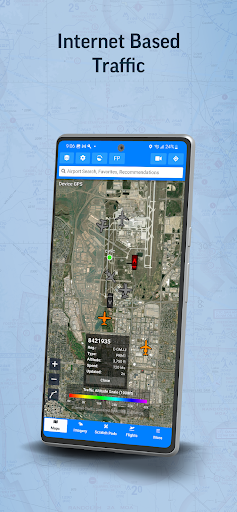
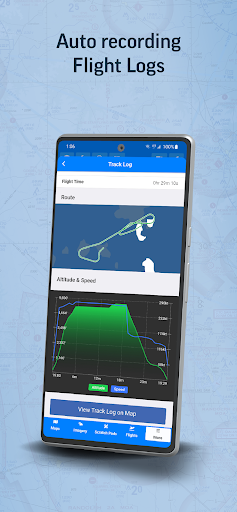
Welcome to Aviator Assistant, your ultimate co-pilot for a safer and more efficient flying experience. Plan, brief, and file your flights with ease, using our advanced tools, briefing utilities, and high-quality charts.
Features
Flight Planning & Filing: Centralize your information for safer, more efficient flying. Our intuitive route manager lets you set up a route in seconds, providing insights into weather, NOTAMs, and TFRs along your planned path.
Pilot Log Books: Maintain meticulous records with our digital pilot log books, designed for ease and accuracy.
Weight and Balance Tools: Ensure safe and efficient flights with our comprehensive weight and balance calculators, tailored to your aircraft's specific parameters.
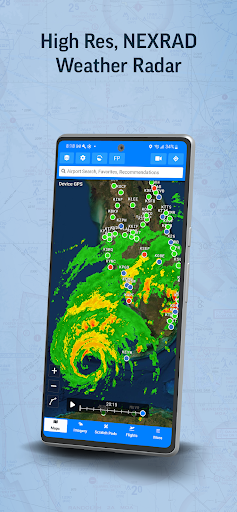
Reliable Weather Tools: Make informed pre-flight decisions with real-time animated NEXRAD radar, global winds-aloft, turbulence information, METARs, TAFs, Airsigmets, and more.
High-Quality Charts: Fulfill all your VFR and IFR needs with VFR Sectionals, High/Low Instrument Enroute charts, and Procedures (SIDs, STARs, approaches, and taxi charts).
Briefing Tools: Comprehensive briefing tools to help you prepare for your flight with precision and confidence.
Radar Playback: Leverage the latest NEXRAD radar data for an accurate representation of the weather conditions.
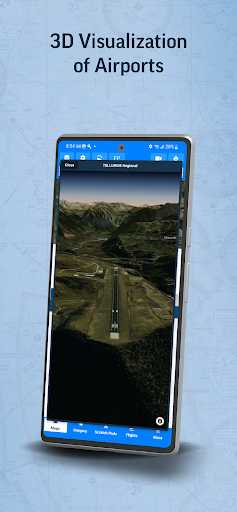
Synthetic Vision: Enhance your situational awareness with our Synthetic Vision tool, offering insights into traffic, obstacles, runways, terrain warnings, and more.
ADS-B Support: Benefit from real-time traffic reports, in-flight weather data, and Synthetic Vision terrain data with our advanced ADS-B integration.
Aircraft Performance Calculator: Store your aircraft's performance information for faster flight planning and accurate ETA calculations.
Scratch Pads: Keep track of ATIS updates, clearances, PIREPs, and more with our handy Scratch Pad templates.
Essential Information: Access communication frequencies, weather forecasts, NOTAMs, procedures, runways, and more - all in one place.
Offline Access: Download specific data and charts for offline use in the air.
Aviator Assistant requires a subscription, visit our website for more information.
Please Note: Location is used to provide navigation services over a moving map, and the camera is used to submit Instructor documentation for account configuration.
Embrace the future of flying with Aviator Assistant. Download now and elevate your aviation experience today!
Mehr anzeigen

1. Laden das MEmu-Installationsprogramm herunter und beenden die Installation

2. MEmu starten und Google Play auf der Homepage öffnen

3. Suchen Aviator Assistant - Pilot App in Google Play
Install
4. Herunterladen und Installieren Aviator Assistant - Pilot App
5. Klicken nach Abschluss der Installation auf das Symbol, um es zu starten

6. Verwenden Sie MEmu, um Aviator Assistant - Pilot App auf Ihrem PC zu nutzen
MEmu Play ist aktuell der beste kostenlose Android-Emulator und bietet 50 Millionen Nutzern ein überragendes Android-App-Erlebnis. Dank der Virtualisierungstechnologie von MEmu können Sie Tausende von Android-Apps problemlos auf Ihrem Computer nutzen, selbst solche mit hohen Grafikanforderungen.
BGrößeres Bild mit besserer Grafik; Keine unterbrechungen, keine sorgen um Akku
Komplette Tastenbelegung unterstützt mit Maus und Tastatur oder Controller
Mit dem „Multi-Instance-Manager“ können Sie mehrere Spielkonten oder Spiele gleichzeitig auf einem PC ausführen.
Use Aviator Assistant - Pilot App on PC by following steps: