Bible Standard Version
更新日
現在のバージョン
Bible English Standard Audio 5.0
提供元

スマートフォンは不要!パソコンと同じようにキーボードとマウスで操作できます。MEmu Playは、あなたが待ち望んでいたすべての楽しみをお届けします。バッテリー残量や小さな画面を気にすることなく、Bible Standard Versionをご利用ください。最新のMEmu 9は、Bible Standard VersionをPCで体験するのに最適です!完璧なキーマッピングシステムにより、PCのようなスムーズな操作性を実現します。マルチインスタンス機能により、複数のアプリケーションを同時に実行できます。独自の仮想化エンジンがPCのパフォーマンスを最大限に引き出します。アプリを使用するだけでなく、高品質な体験を得ることができます。
もっと見る
Bible Standard VersionをPCでダウンロード!大画面でより楽しむ。電源が落ちてしまうとか通信料が足りないとかの問題を心配する必要がなく、PCの大画面でより快適にゲームを楽しましょう! Bible Standard Version: encounter God reading the Holy Bible.
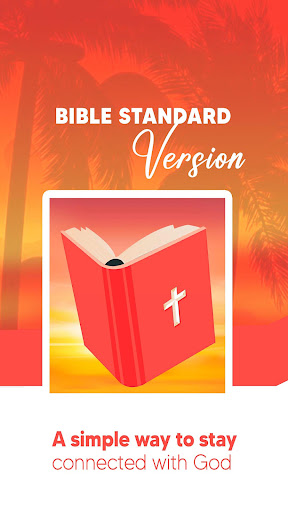
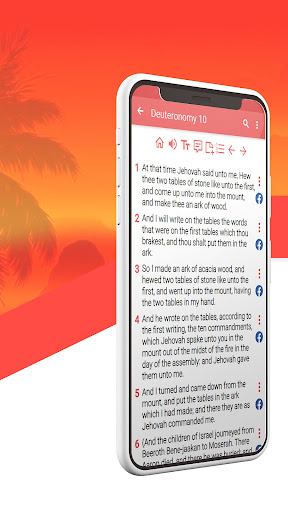
Bible Standard Version: encounter God reading the Holy Bible. With this app, you will have the complete text of the ASV, American Standard Version of the Holy Bible. Audio, free and offline.
Reading the Bible is an experience that can change our lives. We created this free app to help you include in your life the daily habit of reading the Bible.
Now it is very easy: you will have it on your phone to access it whenever you want, ideally once a day.
Download it now and enjoy the amazing features
BIBLE APP FEATURES
- Free app to download and use
- Complete text of the ASV American Standard Version, 1901
- Audio Bible: the app allows you to listen to the Word of God, verse by verse, chapter by chapter
- This app works offline: users can read or listen to the Bible without Internet connection
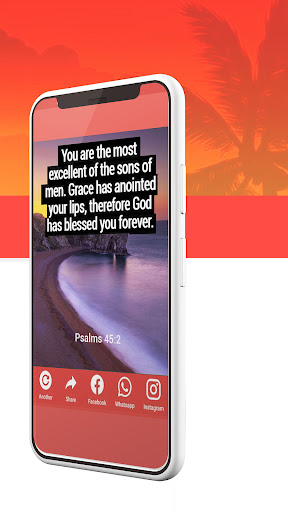
- Receive an inspirational Bible verse every morning. You can schedule it daily or once a week.
MORE AMAZING FEATURES
- Highlight and bookmark verses and load them into a favourite list
- Take notes while reading
- Search by keywords
- The app remembers the last verse read
- Change the font size of the text
- Set up dark mode to reduce the brightness of your screen and rest your eyes
SHARE THE HOLY BIBLE
- Share Bible verses and images on Facebook. You will see the social network icon next to the verses to make it easier to post and share them
- Send verses to your loved ones and friends through messenger, email or WhatsApp
- Create creative images with verses to share with your friends
- All the features are free! Download it now!
LIST OF BOOKS OF THE ASV American Standard Version:
Old Testament:
• Pentateuch (Genesis, Exodus, Leviticus, Numbers, Deuteronomy) and Historical books (Joshua, Judges, Ruth, 1 Samuel, 2 Samuel, 1 Kings, 2 Kings, 1 Chronicles, 2 Chronicles, Ezra, Nehemiah, Esther)
• Poetic books (Job, Psalms, Proverbs, Ecclesiastes, Song of Solomon)
• Prophetic Books (Isaiah, Jeremiah, Lamentations, Ezekiel, Daniel, Hosea, Joel, Amos, Obadiah, Jonah, Micah, Nahum, Habakkuk, Zephaniah, Haggai, Zechariah, and Malachi)
New Testament:
• Matthew, Mark, Luke, John and Acts of the Apostles
• Letters from St. Paul (Romans, 1 Corinthians, 2 Corinthians, Galatians, Ephesians, Philippians, Colossians, 1 Thessalonians, 2 Thessalonians, 1 Timothy, 2 Timothy, Titus, Philemon, Hebrews) General Letters (James, 1 Peter, 2 Peter, 1 John, 2 John, 3 John, Jude.)
• Prophetic: Revelation
もっと見る

1. MEmuインストーラーをダウンロードしてセットアップを完了する

2. MEmuを起動し、デスクトップでのPlayストアを開く

3. PlayストアでBible Standard Versionを検索する
Install
4. Bible Standard Versionをダウンロードしてインストールする
5. インストールが完了したら、アイコンをクリックしてスタート

6. MEmuを使ってパソコンでBible Standard Versionを体験する
MEmu Playは現在、最高の無料Androidエミュレーターであり、5,000万人のユーザーが優れたAndroidアプリ体験を楽しんでいます。MEmuの仮想化テクノロジーにより、数千ものAndroidアプリをコンピューターでスムーズに実行できます。
大画面でより精細;無限の待機、電池とドラフィックの極限を超え
キーボード・マウス・コントローラーを全力でサポート、より快適
マルチインスタンスで複数のゲームを同時に実行
Use Bible Standard Version on PC by following steps: