Buttons Remapper: Map & Combo
更新日
現在のバージョン
1.24.2
提供元

スマートフォンは不要!パソコンと同じようにキーボードとマウスで操作できます。MEmu Playは、あなたが待ち望んでいたすべての楽しみをお届けします。バッテリー残量や小さな画面を気にすることなく、Buttons Remapper: Map & Comboをご利用ください。最新のMEmu 9は、Buttons Remapper: Map & ComboをPCで体験するのに最適です!完璧なキーマッピングシステムにより、PCのようなスムーズな操作性を実現します。マルチインスタンス機能により、複数のアプリケーションを同時に実行できます。独自の仮想化エンジンがPCのパフォーマンスを最大限に引き出します。アプリを使用するだけでなく、高品質な体験を得ることができます。
もっと見る
Buttons Remapper: Map & ComboをPCでダウンロード!大画面でより楽しむ。電源が落ちてしまうとか通信料が足りないとかの問題を心配する必要がなく、PCの大画面でより快適にゲームを楽しましょう! With Buttons Remapper, you can easily customize your device and make it work the way you want it to.
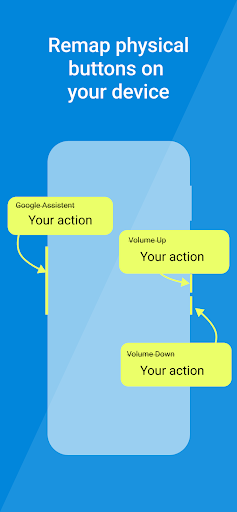
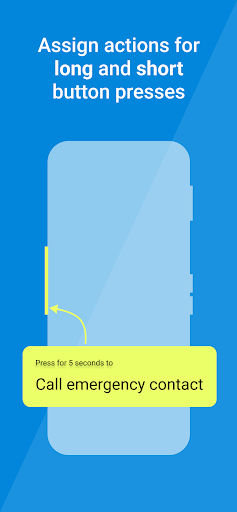
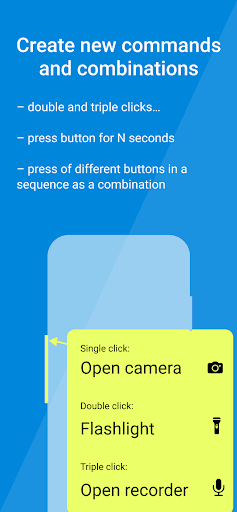
With Buttons Remapper, you can easily customize your device and make it work the way you want it to. Here are just a few of the amazing features you can enjoy:
• Unlock a world of possibilities with the power to assign custom actions to a combination of keys
• Remap buttons to screen taps and touch events, even for games! Say goodbye to awkward controls and hello to a more immersive gaming experience. You can even automate certain actions in games using scripts.
• Create macros, a sequence of commands to be executed at once, making it easier to perform repetitive tasks with just one button press
• Change the default function of buttons to call emergency contacts or open your favorite apps
• Create custom button layouts by swapping buttons or assigning new functions to keys, so you can find the perfect layout that works for you
• Change the default volume setting, so you can be sure that you're always adjusting the media volume, not the call or notification volume
• Enable a flashlight via a double click on the volume button (or any other), so you always have a convenient light source at your fingertips
• Open your favorite browser, dialer, or camera apps with just the touch of a button, for even more convenience
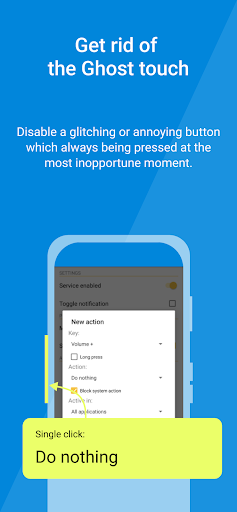
• Disable a glitching button and assign the function to another button, so you can save money on device replacements
• Change the combination for taking a screenshot, making it even easier to capture your screen
• Use the Last App feature, similar to Android N for old devices, allowing you to switch between apps with ease
• Make full use of your QWERTY keyboard, external gamepad, or any other remote control device, for the ultimate customization experience
• Use the app on your Android TV to remap your remote control buttons to any actions, and remap your remote control buttons to any actions, and reassign the buttons that are mapped to video services you don't use.
Take full control of your Android device and make it work for you with Buttons Remapper. Download now and start customizing!
Buttons Remapper supports ONLY hardware buttons (including capacitive ones) and is not compatible with on-screen soft buttons.
Some of the actions are available only on modern Android versions:
• Simulate screen taps (Android 7.0+)
• Simulate hold of the screen (Android 9.0+)
• Lock the screen (Android 9.0+)
• Screenshot (Android 9.0+)
• Answer a phone call (Android 8.0+ or Root)
• End a phone call (Android 9.0+ or Root)
Some features only available with Root:
• Menu
• Search
• Kill current process
• Emulate other buttons via keycode
The following features are available only in the Premium version of the app:
• Simulate screen events
• Executing a sequence of commands
• Screenshot
• Answering and rejecting phone calls
• Disabling microphone
• Brightness control
• Last App feature
• Combinations
ATTENTION!
Buttons Remapper uses Android Accessibility services to provide faster app access and simplified actions. The app only uses specific features of the service, including filtering key events, tracking "window changed" events, and dispatching gestures for the Emulate touch feature. These features are intended to benefit drivers, users with disabilities, and anyone who wants to customize their device.
This app doesn't store or send any key events or last opened package outside of the device. Events are processed in RAM only for combinations and the Last app action. No internet permission is required, and there are no ads.
もっと見る

1. MEmuインストーラーをダウンロードしてセットアップを完了する

2. MEmuを起動し、デスクトップでのPlayストアを開く

3. PlayストアでButtons Remapper: Map & Comboを検索する
Install
4. Buttons Remapper: Map & Comboをダウンロードしてインストールする
5. インストールが完了したら、アイコンをクリックしてスタート

6. MEmuを使ってパソコンでButtons Remapper: Map & Comboを体験する
MEmu Playは現在、最高の無料Androidエミュレーターであり、5,000万人のユーザーが優れたAndroidアプリ体験を楽しんでいます。MEmuの仮想化テクノロジーにより、数千ものAndroidアプリをコンピューターでスムーズに実行できます。
大画面でより精細;無限の待機、電池とドラフィックの極限を超え
キーボード・マウス・コントローラーを全力でサポート、より快適
マルチインスタンスで複数のゲームを同時に実行
Use Buttons Remapper: Map & Combo on PC by following steps: