Repainter · dynamic themes
更新日
現在のバージョン
2.0.8
提供元

スマートフォンは不要!パソコンと同じようにキーボードとマウスで操作できます。MEmu Playは、あなたが待ち望んでいたすべての楽しみをお届けします。バッテリー残量や小さな画面を気にすることなく、Repainter · dynamic themesをご利用ください。最新のMEmu 9は、Repainter · dynamic themesをPCで体験するのに最適です!完璧なキーマッピングシステムにより、PCのようなスムーズな操作性を実現します。マルチインスタンス機能により、複数のアプリケーションを同時に実行できます。独自の仮想化エンジンがPCのパフォーマンスを最大限に引き出します。アプリを使用するだけでなく、高品質な体験を得ることができます。
もっと見る
Repainter · dynamic themesをPCでダウンロード!大画面でより楽しむ。電源が落ちてしまうとか通信料が足りないとかの問題を心配する必要がなく、PCの大画面でより快適にゲームを楽しましょう! Repainter brings customizable, dynamic Material You theming with a vivid community to any device/ROM with Android 12 or newer.
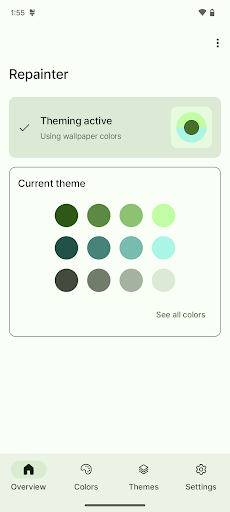
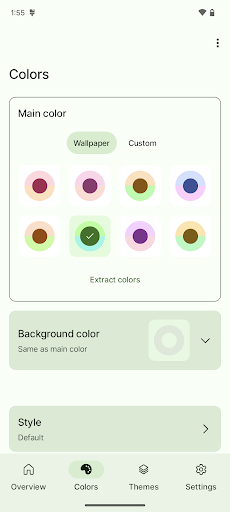

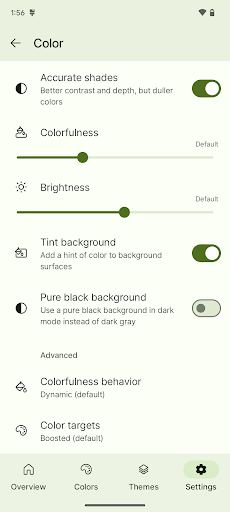
Repainter brings customizable, dynamic Material You theming with a vivid community to any device/ROM with Android 12 or newer.
Check out the community's themes: https://repainter.app/themes
ROOT MAY BE REQUIRED depending on your device and Android version! Install Repainter to check compatibility for free.
Customize your phone with Repainter:
• Choose colors from your wallpaper, or pick your own color
• Change accent and background colors
• Get Android 13's new theme styles on any device
• Change colorfulness and brightness, including pure AMOLED black
• Advanced controls for behavior and color targets
• Preview themes and colors instantly
Explore the theming community:
• Save and share your themes with the world
• Pick from hundreds of community-made themes
• Search for themes with your favorite color
IMPORTANT COMPATIBILITY NOTES
Repainter works best with root, but some unrooted devices are supported with limitations:
• Samsung: All features supported, reboot needed to apply themes
• Pixel: Limited features: only custom color picking, separate background color selection, and on Android 13, theme styles). Other customization is not possible without root.
• Pixel 3: No limitations! Everything works without root.
• OnePlus, Oppo, Realme: Same as Pixel if you have the March security patch or newer.
• Custom ROM with Repainter support: No limitations! Everything works without root.
• Other devices: Root is required.
Repainter is free to use, so you can always try it and uninstall if it doesn't work. The app will tell you if your device is supported.
With root, all devices and ROMs are supported, including full support for Samsung One UI, OxygenOS, Asus ZenUI, and Sony. Other skins may only be partially supported.
SYSTEM UI (notifications, settings, first-party system apps, etc.) WILL NOT BE THEMED on MIUI or Funtouch OS.
Repainter themes the system-wide Material You color palette, which is used by Google apps and other third-party apps that support Material You. Skins that use their own colors instead of Material You will not have system UI theming.
Samsung One UI, OxygenOS, and Asus ZenUI are fully supported with root.
Support email: repainter.support@kdrag0n.dev
Telegram support group: https://t.me/repainter_support
Website: https://repainter.app
もっと見る

1. MEmuインストーラーをダウンロードしてセットアップを完了する

2. MEmuを起動し、デスクトップでのPlayストアを開く

3. PlayストアでRepainter · dynamic themesを検索する
Install
4. Repainter · dynamic themesをダウンロードしてインストールする
5. インストールが完了したら、アイコンをクリックしてスタート

6. MEmuを使ってパソコンでRepainter · dynamic themesを体験する
MEmu Playは現在、最高の無料Androidエミュレーターであり、5,000万人のユーザーが優れたAndroidアプリ体験を楽しんでいます。MEmuの仮想化テクノロジーにより、数千ものAndroidアプリをコンピューターでスムーズに実行できます。
大画面でより精細;無限の待機、電池とドラフィックの極限を超え
キーボード・マウス・コントローラーを全力でサポート、より快適
マルチインスタンスで複数のゲームを同時に実行
Use Repainter · dynamic themes on PC by following steps: