Repainter · dynamic themes
Đã cập nhật
Phiên bản hiện tại
2.0.8
Cung cấp bởi

Bạn không cần phải lo lắng về việc sạc quá mức khi sử dụng Repainter · dynamic themes trên điện thoại của bạn, không phải sử dụng trên màn hình nhỏ bé và tận hưởng ứng dụng trên màn hình lớn hơn rất nhiều. Từ bây giờ, bạn hãy trải nghiệm ứng dụng của bạn toàn màn hình bằng bàn phím và chuột. MEmu cung cấp cho bạn tất cả các tính năng đáng ngạc nhiên mà bạn mong đợi: cài đặt nhanh, cài đặt dễ dàng, điều khiển trực quan, không còn giới hạn về pin, dữ liệu di động và các cuộc gọi làm phiền. MEmu 9 hoàn toàn mới là sự lựa chọn tốt nhất để sử dụng Repainter · dynamic themes trên máy tính của bạn. Được mã hóa với sự hợp nhất của chúng tôi, trình quản lý multi-instance giúp mở 2 tài khoản trở lên cùng một lúc. Và điều quan trọng nhất là, công cụ mô phỏng độc quyền của chúng tôi có thể tận dụng hết toàn bộ tiềm năng trên PC của bạn, giúp mọi thứ vận hành trơn tru và thú vị.
Nhiều hơn
Tải Repainter · dynamic themes trên PC với Trình giả lập Android MEmu. Tận hưởng trải nghiệm chơi game trên màn hình lớn Repainter brings customizable, dynamic Material You theming with a vivid community to any device/ROM with Android 12 or newer.
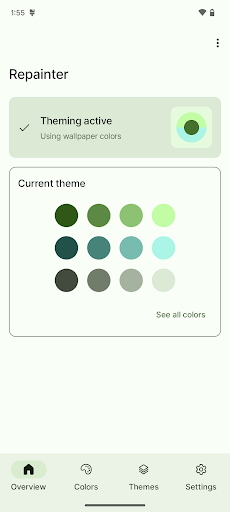
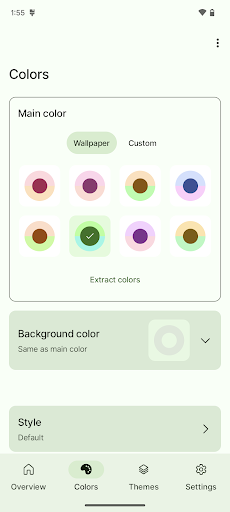
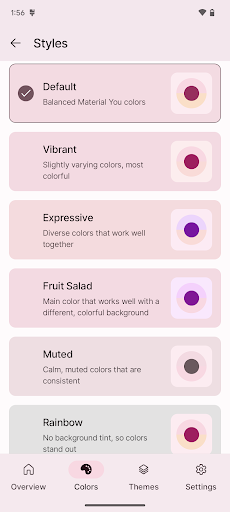
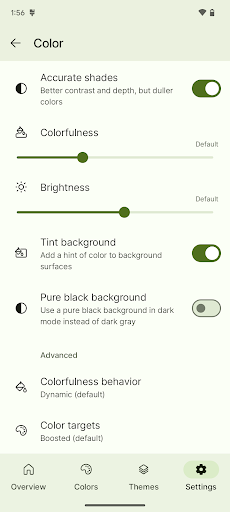
Repainter brings customizable, dynamic Material You theming with a vivid community to any device/ROM with Android 12 or newer.
Check out the community's themes: https://repainter.app/themes
ROOT MAY BE REQUIRED depending on your device and Android version! Install Repainter to check compatibility for free.
Customize your phone with Repainter:
• Choose colors from your wallpaper, or pick your own color
• Change accent and background colors
• Get Android 13's new theme styles on any device
• Change colorfulness and brightness, including pure AMOLED black
• Advanced controls for behavior and color targets
• Preview themes and colors instantly
Explore the theming community:
• Save and share your themes with the world
• Pick from hundreds of community-made themes
• Search for themes with your favorite color
IMPORTANT COMPATIBILITY NOTES
Repainter works best with root, but some unrooted devices are supported with limitations:
• Samsung: All features supported, reboot needed to apply themes
• Pixel: Limited features: only custom color picking, separate background color selection, and on Android 13, theme styles). Other customization is not possible without root.
• Pixel 3: No limitations! Everything works without root.
• OnePlus, Oppo, Realme: Same as Pixel if you have the March security patch or newer.
• Custom ROM with Repainter support: No limitations! Everything works without root.
• Other devices: Root is required.
Repainter is free to use, so you can always try it and uninstall if it doesn't work. The app will tell you if your device is supported.
With root, all devices and ROMs are supported, including full support for Samsung One UI, OxygenOS, Asus ZenUI, and Sony. Other skins may only be partially supported.
SYSTEM UI (notifications, settings, first-party system apps, etc.) WILL NOT BE THEMED on MIUI or Funtouch OS.
Repainter themes the system-wide Material You color palette, which is used by Google apps and other third-party apps that support Material You. Skins that use their own colors instead of Material You will not have system UI theming.
Samsung One UI, OxygenOS, and Asus ZenUI are fully supported with root.
Support email: repainter.support@kdrag0n.dev
Telegram support group: https://t.me/repainter_support
Website: https://repainter.app
Nhiều hơn

1. Tải trình cài đặt MEmu và hoàn tất cài đặt

2. Khởi động MEmu, sau đó mở Google Play trên trang chủ

3. Tìm kiếm Repainter · dynamic themes trong Google Play
Install
4. Tải và Cài Đặt Repainter · dynamic themes
5. Khi cài đặt hoàn tất, nhấp vào biểu tượng để bắt đầu

6. Trải nghiệm Repainter · dynamic themes trên PC của bạn bằng MEmu
MEmu Play là trình giả lập Android miễn phí tốt nhất, với 50 triệu người dùng trải nghiệm ứng dụng Android tuyệt vời. Công nghệ ảo hóa của MEmu cho phép bạn chạy mượt mà hàng ngàn ứng dụng Android trên máy tính, ngay cả những ứng dụng đòi hỏi cấu hình cao nhất.
Màn hình lớn hơn cùng với đồ hoạ tốt hơn; thời lượng dài, không giới hạn về pin hoặc dữ liệu di động
Hỗ trợ đầy đủ Keymapping cho việc kiểm soát chính xác bàn phím và chuột hoặc gamepad
Nhiều tài khoản trò chơi hoặc tác vụ cùng lúc trên một PC với Quản lý Đa năng
Use Repainter · dynamic themes on PC by following steps: