
Diabetes:M - Blood Sugar Diary
更新日
現在のバージョン
1733814740
提供元

スマートフォンは不要!パソコンと同じようにキーボードとマウスで操作できます。MEmu Playは、あなたが待ち望んでいたすべての楽しみをお届けします。バッテリー残量や小さな画面を気にすることなく、Diabetes:M - Blood Sugar Diaryをご利用ください。最新のMEmu 9は、Diabetes:M - Blood Sugar DiaryをPCで体験するのに最適です!完璧なキーマッピングシステムにより、PCのようなスムーズな操作性を実現します。マルチインスタンス機能により、複数のアプリケーションを同時に実行できます。独自の仮想化エンジンがPCのパフォーマンスを最大限に引き出します。アプリを使用するだけでなく、高品質な体験を得ることができます。
もっと見る
Diabetes:M - Blood Sugar DiaryをPCでダウンロード!大画面でより楽しむ。電源が落ちてしまうとか通信料が足りないとかの問題を心配する必要がなく、PCの大画面でより快適にゲームを楽しましょう! Designed for both smart phones and tablets, this application will help you manage your diabetes better and keep it under control.
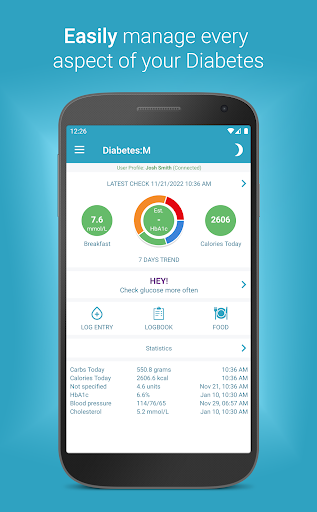
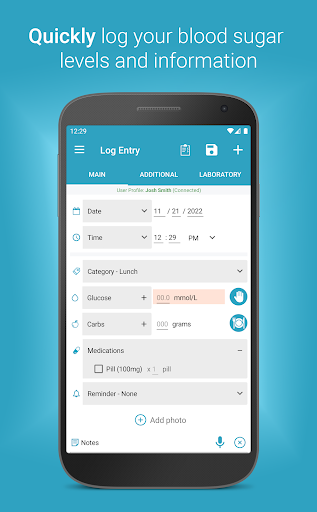
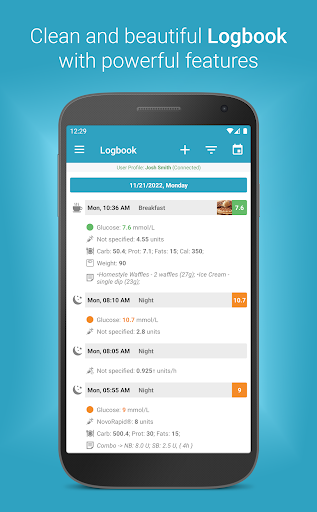
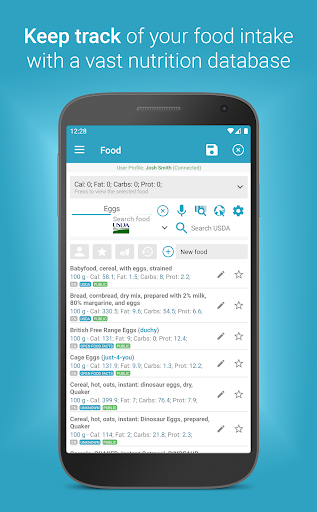
Designed for both smart phones and tablets, this application will help you manage your diabetes better and keep it under control. Whether you are Type 1 or Type 2, have Gestational Diabetes or just want to help and monitor a family member, this is the logbook app for you.
The application tracks almost all aspects of the diabetes treatment and provides you and with detailed reports, charts and statistics. You can send the reports to your supervising physician via email. Diabetes:M also gives you various tools, so you can find the trends in blood glucose levels and allows you to get an insight about normal and prolonged insulin boluses using its highly effective, top-notch Bolus Advisor.
It also has a vast nutrition database, to help you keep track of your food intake and nutrition information, as well as exercise time. Never forget another check with our simple but powerful reminders system.
Diabetes:M can analyze the values from the imported data from various glucometers and insulin pumps via the exported files from their respective diabetes management software systems.
Supports Wear OS smart watches.
The Diabetes:M platform is CE certified as Class I Medical Device.
IMPORTANT: DIABETES:M DOES NOT SUPPORT 14 DAYS US LIBRE SENSORS!
PREMIUM SUBSCRIPTION FEATURES
If you’re really serious about your health, our subscription plan includes:
+ No Ads – Subscribing removes all advertising from the app, so you can concentrate on what is important.
+ Bluetooth Integration – connects to some of the most popular bluetooth glucose meters.
+ 2 Additional Profiles – You can set up to two additional, fully featured profiles. This allows you to keep track of your loved ones (or even pets).
+ Additional lab result records - Add a comprehensive metabolic panel, kidney function tests and much more...
+ Expanded Food Database – This will allow greater access to server food database, as well as an option to save selected food as Meals and Dishes
+ Pattern Analysis – Advanced glucose analysis of logbook data with explanations for the most probable problem causes.
+ Synchronization – Automatically sync multiple devices on data change. Allows you to use any of your available mobile devices to keep track effortlessly.
+ Reports - Get your reports in PDF or XLS format
もっと見る

1. MEmuインストーラーをダウンロードしてセットアップを完了する

2. MEmuを起動し、デスクトップでのPlayストアを開く

3. PlayストアでDiabetes:M - Blood Sugar Diaryを検索する
Install
4. Diabetes:M - Blood Sugar Diaryをダウンロードしてインストールする
5. インストールが完了したら、アイコンをクリックしてスタート

6. MEmuを使ってパソコンでDiabetes:M - Blood Sugar Diaryを体験する
MEmu Playは現在、最高の無料Androidエミュレーターであり、5,000万人のユーザーが優れたAndroidアプリ体験を楽しんでいます。MEmuの仮想化テクノロジーにより、数千ものAndroidアプリをコンピューターでスムーズに実行できます。
大画面でより精細;無限の待機、電池とドラフィックの極限を超え
キーボード・マウス・コントローラーを全力でサポート、より快適
マルチインスタンスで複数のゲームを同時に実行
Use Diabetes:M - Blood Sugar Diary on PC by following steps: