
FamiLami - Habit Tracker
更新日
現在のバージョン
1.83.13
提供元

スマートフォンは不要!パソコンと同じようにキーボードとマウスで操作できます。MEmu Playは、あなたが待ち望んでいたすべての楽しみをお届けします。バッテリー残量や小さな画面を気にすることなく、FamiLami - Habit Trackerをご利用ください。最新のMEmu 9は、FamiLami - Habit TrackerをPCで体験するのに最適です!完璧なキーマッピングシステムにより、PCのようなスムーズな操作性を実現します。マルチインスタンス機能により、複数のアプリケーションを同時に実行できます。独自の仮想化エンジンがPCのパフォーマンスを最大限に引き出します。アプリを使用するだけでなく、高品質な体験を得ることができます。
もっと見る
FamiLami - Habit TrackerをPCでダウンロード!大画面でより楽しむ。電源が落ちてしまうとか通信料が足りないとかの問題を心配する必要がなく、PCの大画面でより快適にゲームを楽しましょう! FamiLami is a gamified task planner for families with children.
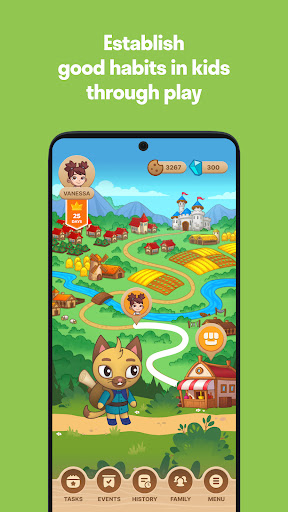
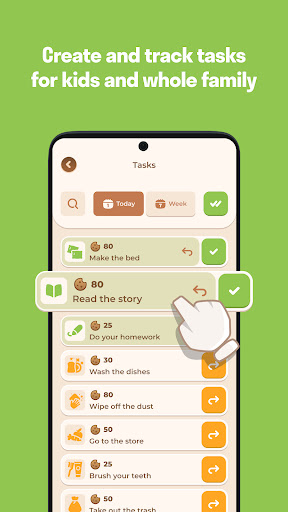
FamiLami is a gamified task planner for families with children. The app provides parents with a tool to set tasks and track their completion.
Fun and friendly environment of the game helps children develop healthy habits in:
— household chores
— schooling
— physical development
— daily routine
- social interaction
FamiLami also promotes good behavior, and positive mindset. Rewards and gifts motivate children to stay on track.
HOW THE GAME GOES?
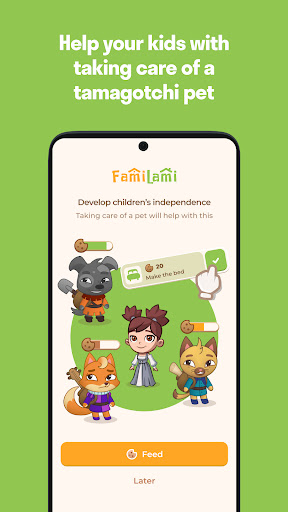
Your family gets into a fairy tale world where every member has a pet to take care of and feed with cookies. To earn these treats, kids need to complete real-life activities such as:
— helping around the house
— doing homework and exercises
— assisting other family members
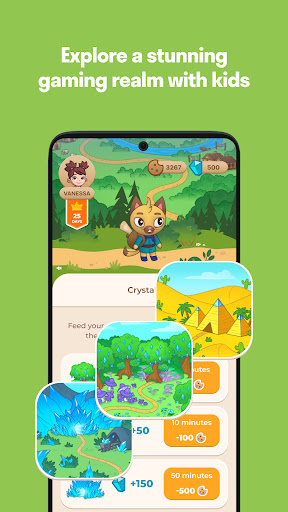
The more real-life tasks children complete, the more cookies they get for the pet. As a thanks for the cookies, pets find magical crystals that children can exchange for gifts at the Fair. Parents can create their own rewards or choose from the list.
MAIN AIM
FamiLami is totally dedicated to family relationships. So the main aim is to strengthen bonds between parents and their children, foster a deep sense of connection and trust within the family.
Gamified environment offers customizable features to support individuality. And cute characters enable to create a healthy and positive atmosphere for their development.
BACKED BY EXPERTS
The app is developed on the basis of attachment theory and emphasizes the importance of the relationship. So in addition to track and task features, FamiLami provides advice from experienced family psychologists and coaches to help parents promote healthy habits, instill a sense of responsibility and self-confidence in their children.
Transform your family routine into exciting experiences !!
Build healthy habits and strong relationships with Familami app.
Enjoy your journey!
もっと見る

1. MEmuインストーラーをダウンロードしてセットアップを完了する

2. MEmuを起動し、デスクトップでのPlayストアを開く

3. PlayストアでFamiLami - Habit Trackerを検索する
Install
4. FamiLami - Habit Trackerをダウンロードしてインストールする
5. インストールが完了したら、アイコンをクリックしてスタート

6. MEmuを使ってパソコンでFamiLami - Habit Trackerを体験する
MEmu Playは現在、最高の無料Androidエミュレーターであり、5,000万人のユーザーが優れたAndroidアプリ体験を楽しんでいます。MEmuの仮想化テクノロジーにより、数千ものAndroidアプリをコンピューターでスムーズに実行できます。
大画面でより精細;無限の待機、電池とドラフィックの極限を超え
キーボード・マウス・コントローラーを全力でサポート、より快適
マルチインスタンスで複数のゲームを同時に実行
Use FamiLami - Habit Tracker on PC by following steps: