
HueHive: Color Palette Manager
更新日
現在のバージョン
1.0
提供元

スマートフォンは不要!パソコンと同じようにキーボードとマウスで操作できます。MEmu Playは、あなたが待ち望んでいたすべての楽しみをお届けします。バッテリー残量や小さな画面を気にすることなく、HueHive: Color Palette Managerをご利用ください。最新のMEmu 9は、HueHive: Color Palette ManagerをPCで体験するのに最適です!完璧なキーマッピングシステムにより、PCのようなスムーズな操作性を実現します。マルチインスタンス機能により、複数のアプリケーションを同時に実行できます。独自の仮想化エンジンがPCのパフォーマンスを最大限に引き出します。アプリを使用するだけでなく、高品質な体験を得ることができます。
もっと見る
HueHive: Color Palette ManagerをPCでダウンロード!大画面でより楽しむ。電源が落ちてしまうとか通信料が足りないとかの問題を心配する必要がなく、PCの大画面でより快適にゲームを楽しましょう! HueHive: AI Color Palette Manager & Color Picker.
HueHive: AI Color Palette Manager & Color Picker
HueHive is an AI-powered color palette manager and color picker designed for creators, aiming to make it quick and fun to create and share stunning color palettes on the go.
KEY FEATURES
* Generate, preview, and modify color palettes using HueHive AI chat assistant
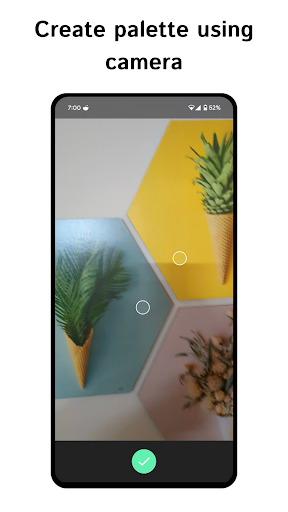
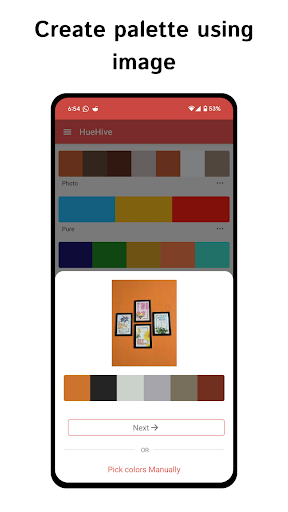
* Automatically extract prominent colors from an image using your gallery or camera
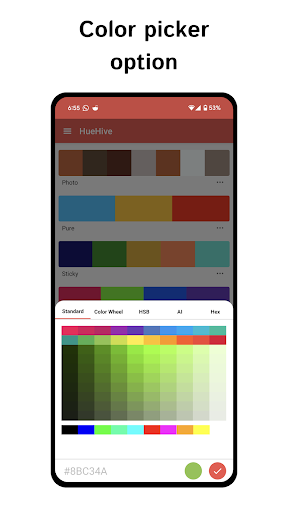
* Manually pick colors from objects or images using the dedicated color picker
* Recognize and save hex color codes from text using your camera
* Generate harmonious color schemes using various models (complementary, triadic, analogous, etc.)
* Share palettes with a link for quick preview, even if the recipient doesn't have the app
* View color details and convert between color codes (HEX, RGB, HSL, HSV, HWB, CMYK, CIELAB)
* Copy color codes to your clipboard with a tap
* Add colors using various color code formats, including CSS named colors
* Access a color palette library with Material Design, CSS, and Tailwind palettes
* Download palettes as PNG images
* Rearrange colors in a palette with ease
PRO BENEFITS
Pro
* Add more than 4 colors to a palette
* Explore/Search AI generated color palettes
Pro Plus
* AI chat to create color palette
* AI color picker
DESCRIPTION
HueHive is a must-have productivity tool for designers, helping you manage colors easily for various tasks such as web and graphic design, logo creation, and more. The AI-powered chat assistant makes generating and modifying color palettes a breeze.
Automatically extract prominent colors from images using our homemade algorithm tailored for color palettes. Manually pick colors from objects or images using the dedicated color picker, and even grab color codes from any random text, such as an email or article.
Generate harmonious color schemes from an existing color using various models, including:
* Complementary
* Split Complementary
* Split Complementary CW (Clockwise)
* Split Complementary CCW (Counterclockwise)
* Triadic
* Clash
* Natural
* Analogous
* Four Tone CW (Clockwise)
* Four Tone CCW (Counterclockwise)
* Five Tone A to E
* Six Tone CW (Clockwise)
* Six Tone CCW (Counterclockwise)
* Monochromatic
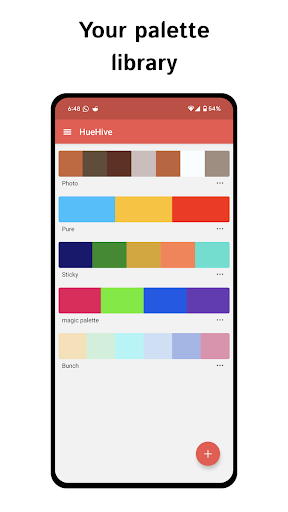
Save your favorite palettes to your library for easy access.
Sharing is important, so we made it easier than ever to share color palettes. The recipient gets a link to quickly preview the colors in HueHive, even if they don't have the app installed.
See all sorts of details about a color, including luminance and darkness. Convert any color code to various formats with ease. When adding a color, you can use any color code format, including the CSS named colors. Copy the color code to your clipboard with just a tap.
Access a built-in color palette library featuring Material Design palettes, CSS named colors, and Tailwind color palettes for inspiration and quick use.
With HueHive, you can work seamlessly without getting in your way. The app is designed to help you focus on the things you need the most, making color management a simple and enjoyable process.
Download HueHive now and start creating stunning color palettes in seconds!
You can also generate color palettes on our website huehive.app using AI (ChatGPT) and view and edit palettes in the app.
OPEN SOURCE
We believe in open source. The source code for HueHive is hosted at:
https://github.com/croma-app/huehive-mobile-app
SUPPORT
Have any questions or suggestions? Please join our Discord channel:
https://discord.com/invite/ZSBVsBqDtg
もっと見る

1. MEmuインストーラーをダウンロードしてセットアップを完了する

2. MEmuを起動し、デスクトップでのPlayストアを開く

3. PlayストアでHueHive: Color Palette Managerを検索する
Install
4. HueHive: Color Palette Managerをダウンロードしてインストールする
5. インストールが完了したら、アイコンをクリックしてスタート

6. MEmuを使ってパソコンでHueHive: Color Palette Managerを体験する
MEmu Playは現在、最高の無料Androidエミュレーターであり、5,000万人のユーザーが優れたAndroidアプリ体験を楽しんでいます。MEmuの仮想化テクノロジーにより、数千ものAndroidアプリをコンピューターでスムーズに実行できます。
大画面でより精細;無限の待機、電池とドラフィックの極限を超え
キーボード・マウス・コントローラーを全力でサポート、より快適
マルチインスタンスで複数のゲームを同時に実行
Use HueHive: Color Palette Manager on PC by following steps: