Kucing Pink Id
更新日
現在のバージョン
1.0
提供元

スマートフォンは不要!パソコンと同じようにキーボードとマウスで操作できます。MEmu Playは、あなたが待ち望んでいたすべての楽しみをお届けします。バッテリー残量や小さな画面を気にすることなく、Kucing Pink Idをご利用ください。最新のMEmu 9は、Kucing Pink IdをPCで体験するのに最適です!完璧なキーマッピングシステムにより、PCのようなスムーズな操作性を実現します。マルチインスタンス機能により、複数のアプリケーションを同時に実行できます。独自の仮想化エンジンがPCのパフォーマンスを最大限に引き出します。アプリを使用するだけでなく、高品質な体験を得ることができます。
もっと見る
MEmu Playを使えば、PCでKucing Pink Idを快適に楽しめます。何千ものAndroidアプリをデスクトップ版で利用できる、パワフルな無料Androidエミュレーターです。友達とつながり、より効率的に作品を磨き上げましょう! Kucing Pink is a stylish anime discovery app for fans who want a faster way to explore series, movies, OVAs, episode guides, ratings, and official trailers.
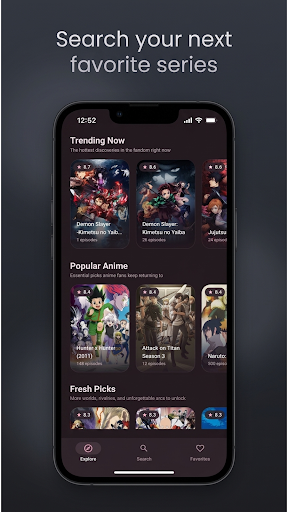
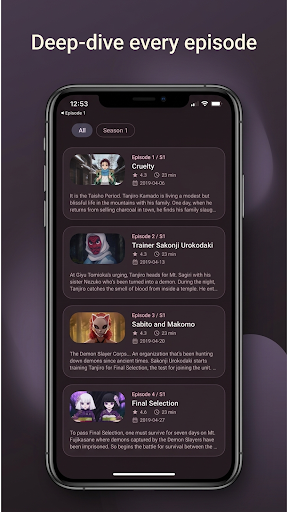
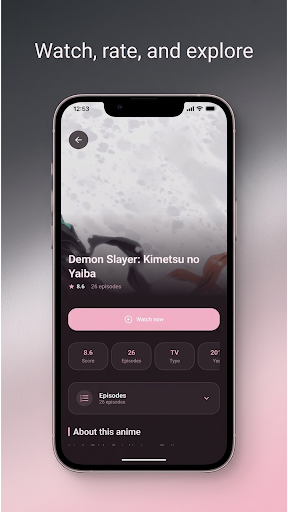
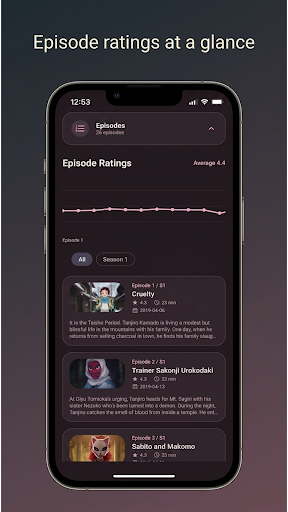
Kucing Pink is a stylish anime discovery app for fans who want a faster way to explore series, movies, OVAs, episode guides, ratings, and official trailers.
Browse a curated anime library with trending titles, popular picks, fresh discoveries, and detailed anime pages. Search by title, compare ratings, check episode counts, view release years, read story summaries, and save favorites for later.
What you can do with Kucing Pink:
Discover anime faster
Explore trending anime, popular series, anime movies, OVAs, and special releases in one clean library.
Search anime titles
Find shows and films by name with a focused search screen built for quick browsing.
View detailed anime info
Open each anime page to see ratings, episode count, type, year, runtime, age rating, popularity, status, genres, story details, characters, and related anime.
Browse episode guides
Check episode lists with names, air dates, runtimes, scores, seasons, and community rating charts when available.
Watch official trailers
Open official anime trailers through supported video links and preview a title before adding it to your watchlist.
Save your favorites
Keep track of anime you want to revisit with a simple favorites section.
Kucing Pink is designed for anime fans who enjoy discovering new shows, comparing ratings, checking episode details, and keeping a clean anime library close by. Whether you are looking for trending shonen, classic adventure series, anime films, fantasy worlds, comedy, action, romance, or hidden gems, Kucing Pink helps you explore more titles with less friction.
This app is an anime information and discovery guide. It does not provide unauthorized streaming or downloads. Trailers and media links open through supported official or public sources when available.
もっと見る

1. MEmuインストーラーをダウンロードしてセットアップを完了する

2. MEmuを起動し、デスクトップでのPlayストアを開く

3. PlayストアでKucing Pink Idを検索する
Install
4. Kucing Pink Idをダウンロードしてインストールする
5. インストールが完了したら、アイコンをクリックしてスタート

6. MEmuを使ってパソコンでKucing Pink Idを体験する
MEmu Playは現在、最高の無料Androidエミュレーターであり、5,000万人のユーザーが優れたAndroidアプリ体験を楽しんでいます。MEmuの仮想化テクノロジーにより、数千ものAndroidアプリをコンピューターでスムーズに実行できます。
大画面でより精細;無限の待機、電池とドラフィックの極限を超え
キーボード・マウス・コントローラーを全力でサポート、より快適
マルチインスタンスで複数のゲームを同時に実行
Use Kucing Pink Id on PC by following steps: