Kucing Pink Id
Updated
Current Version
1.0
Offered By

Stop worrying about high battery drain when using Kucing Pink Id on your phone. Free yourself from the tiny screen and enjoy the app on a much larger display. From now on, get a full-screen experience of your app with the convenience of a keyboard and mouse. MEmu offers you all the surprising features you’d expect: quick installation and easy setup, intuitive controls, and no more worries about battery life, mobile data, or unexpected calls. The all-new MEmu 9 is the choice for using Kucing Pink Id on your computer. With the MEmu multi-instance manager, you can run two or more accounts at the same time. Most importantly, our exclusive emulation engine unlocks your PC’s full potential, delivering smooth and enjoyable performance.
Show more
Enjoy superb experience of using Kucing Pink Id on PC with MEMU App Player. It's a powerful free Android emulator which provides you with thousands of android apps for their desktop version. Enjoy connecting with friends and polishing your work with higher efficiency! Kucing Pink is a stylish anime discovery app for fans who want a faster way to explore series, movies, OVAs, episode guides, ratings, and official trailers.
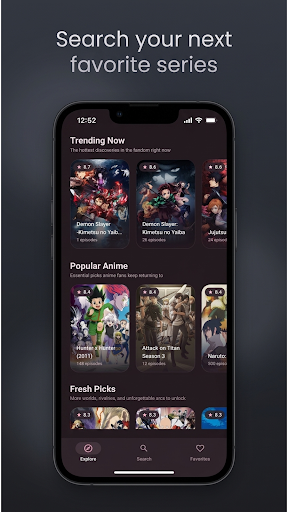
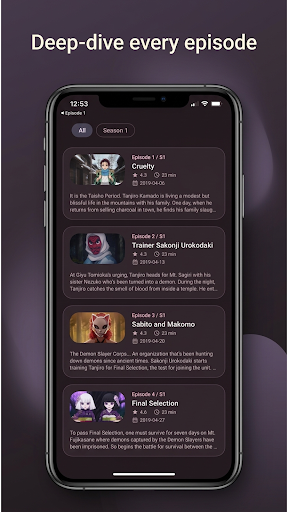
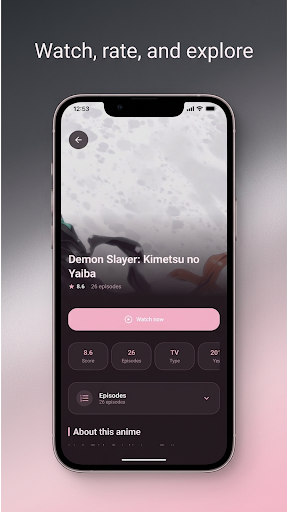
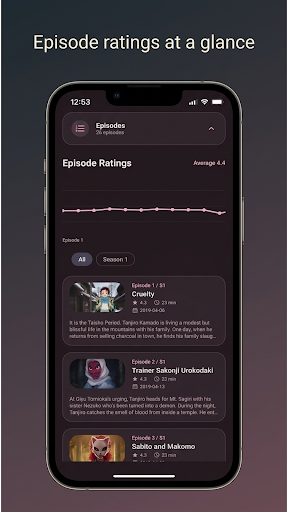
Kucing Pink is a stylish anime discovery app for fans who want a faster way to explore series, movies, OVAs, episode guides, ratings, and official trailers.
Browse a curated anime library with trending titles, popular picks, fresh discoveries, and detailed anime pages. Search by title, compare ratings, check episode counts, view release years, read story summaries, and save favorites for later.
What you can do with Kucing Pink:
Discover anime faster
Explore trending anime, popular series, anime movies, OVAs, and special releases in one clean library.
Search anime titles
Find shows and films by name with a focused search screen built for quick browsing.
View detailed anime info
Open each anime page to see ratings, episode count, type, year, runtime, age rating, popularity, status, genres, story details, characters, and related anime.
Browse episode guides
Check episode lists with names, air dates, runtimes, scores, seasons, and community rating charts when available.
Watch official trailers
Open official anime trailers through supported video links and preview a title before adding it to your watchlist.
Save your favorites
Keep track of anime you want to revisit with a simple favorites section.
Kucing Pink is designed for anime fans who enjoy discovering new shows, comparing ratings, checking episode details, and keeping a clean anime library close by. Whether you are looking for trending shonen, classic adventure series, anime films, fantasy worlds, comedy, action, romance, or hidden gems, Kucing Pink helps you explore more titles with less friction.
This app is an anime information and discovery guide. It does not provide unauthorized streaming or downloads. Trailers and media links open through supported official or public sources when available.
Show more

1. Download MEmu installer and finish the setup

2. Start MEmu then open Google Play on the desktop

3. Search Kucing Pink Id in Google Play
Install
4. Download and Install Kucing Pink Id
5. On install completion click the icon to start

6. Enjoy using Kucing Pink Id on PC with MEmu
MEmu Play is the best Android emulator, and 100 million users already enjoy its superb Android app experience. Powered by advanced virtualization technology, it lets you enjoy thousands of Android apps smoothly on your PC—including the most graphics-intensive ones.
Bigger screen with better graphics; Long duration, without limitation of battery or mobile data.
Full Keymapping support for precise control of keyboard and mouse or gamepad.
Multiple game accounts or tasks on single PC at one time with Multi-Instance manager.
Use Kucing Pink Id on PC by following steps: