Magic Earth Navigation & Maps
更新日
現在のバージョン
7.1.26.12.75EF61AE.2F65085AB
提供元

スマートフォンは不要!パソコンと同じようにキーボードとマウスで操作できます。MEmu Playは、あなたが待ち望んでいたすべての楽しみをお届けします。バッテリー残量や小さな画面を気にすることなく、Magic Earth Navigation & Mapsをご利用ください。最新のMEmu 9は、Magic Earth Navigation & MapsをPCで体験するのに最適です!完璧なキーマッピングシステムにより、PCのようなスムーズな操作性を実現します。マルチインスタンス機能により、複数のアプリケーションを同時に実行できます。独自の仮想化エンジンがPCのパフォーマンスを最大限に引き出します。アプリを使用するだけでなく、高品質な体験を得ることができます。
もっと見る
Magic Earth Navigation & MapsをPCでダウンロード!大画面でより楽しむ。電源が落ちてしまうとか通信料が足りないとかの問題を心配する必要がなく、PCの大画面でより快適にゲームを楽しましょう! 大型アップデート - このアップデートでは、よりクリーンでモダンなインターフェースにより、よりスムーズで直感的なナビゲーションを実現します。
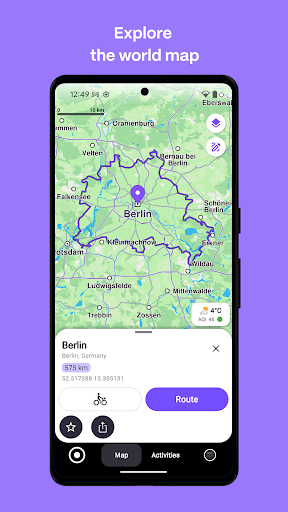
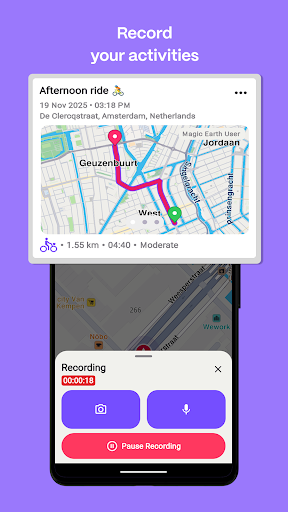
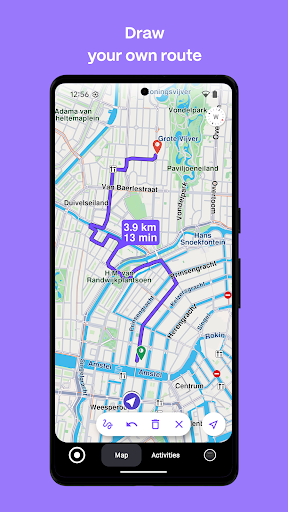
大型アップデート - このアップデートでは、よりクリーンでモダンなインターフェースにより、よりスムーズで直感的なナビゲーションを実現します。
Magic Earthはフリーミアムとなり、地図閲覧、検索、お気に入り、ターンバイターンナビゲーションなどの主要機能を誰でも無料でご利用いただけます。
さらに強力な機能をご利用いただくには、Magic Earthプレミアムサブスクリプションにご加入いただくと、以下の機能がご利用いただけます。
• 交通状況に応じたナビゲーション
• アクティビティ記録
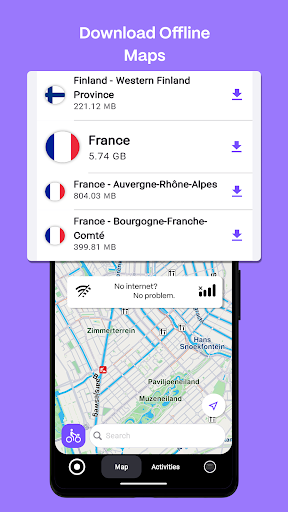
• オフラインマップ
• 地形をより鮮明に表示する標高マップスタイル
プライバシー第一!
• お客様の追跡、プロファイリング、個人データの売買は一切行いません。さらに、お客様の個人データを保有することもありません。
マップ
• OpenStreetMapを搭載したオフラインマップで、モバイルインターネットの通信料を大幅に節約し、信頼性の高いナビゲーションを実現します。233の国と地域をダウンロードできます。
• 2D、3D、衛星地図から選択できます。
• 旅行の準備を整え、路面状況、難易度、距離、標高プロファイルなど、ルートの詳細をすべて把握できます。
• 周辺の観光スポットについて、Wikipediaの記事で詳しく知ることができます。
• 近くの駐車場を見つけて、簡単に車を駐車できます。
• 常に最新の情報を入手し、定期的に無料の地図更新を利用できます。
Android Auto との互換性
• Android Auto に接続して、究極のナビゲーション体験をお楽しみください。
ナビゲーション
• 車、自転車、徒歩、公共交通機関で移動する際に、目的地までの最短または最速のルートを検索できます。
• 複数のウェイポイントを使用してルートを計画できます。
• 無料のヘッドアップディスプレイ (HUD) 機能で、車のフロントガラスに重要なナビゲーション情報を投影し、安全性を確保できます。
• 正確なターンバイターンナビゲーションとレーンアシスタンスで、どの車線を通ればよいかを事前に把握できます。
• スピードカメラの通知を受け取り、最新の速度制限情報を確認できます。
交通情報
• 毎分更新されるリアルタイムの交通情報を取得できます。
• 渋滞を回避し、時間を節約できる代替ルートを検索できます。
公共交通機関
• 街中を素早く簡単に移動できます。バス、地下鉄、ライトレール、電車、フェリーなど、あらゆる交通手段を組み合わせた公共交通機関のルートからお選びいただけます。
• 徒歩ルート、乗り換え時間、出発時刻、停車駅数、料金(利用可能な場合)を確認できます。
• 車椅子または自転車に優しい公共交通機関を検索できます。
天気
• お気に入りの場所の現在の気温と現地の天気予報を確認できます。
• 今後数時間の天気予報と、今後14日間の天気予報を確認できます。
注:
* 一部の機能は、一部の国ではご利用いただけません。
* 一部の機能はインターネット接続が必要です。
無料トライアルは、現在の期間終了の24時間前までにキャンセルされない限り、自動的に有料サブスクリプションに更新されます。料金はGoogle Playストアアカウントを通じて請求されます。サブスクリプションは、現在の期間終了の24時間前までにキャンセルされない限り、自動的に更新されます。購入後、設定でサブスクリプションの管理またはキャンセルを行うことができます。
プライバシーポリシー
https://www.magicearth.com/privacy/
免責事項
https://www.magicearth.com/disclaimer/
もっと見る

1. MEmuインストーラーをダウンロードしてセットアップを完了する

2. MEmuを起動し、デスクトップでのPlayストアを開く

3. PlayストアでMagic Earth Navigation & Mapsを検索する
Install
4. Magic Earth Navigation & Mapsをダウンロードしてインストールする
5. インストールが完了したら、アイコンをクリックしてスタート

6. MEmuを使ってパソコンでMagic Earth Navigation & Mapsを体験する
MEmu Playは現在、最高の無料Androidエミュレーターであり、5,000万人のユーザーが優れたAndroidアプリ体験を楽しんでいます。MEmuの仮想化テクノロジーにより、数千ものAndroidアプリをコンピューターでスムーズに実行できます。
大画面でより精細;無限の待機、電池とドラフィックの極限を超え
キーボード・マウス・コントローラーを全力でサポート、より快適
マルチインスタンスで複数のゲームを同時に実行
Use Magic Earth Navigation & Maps on PC by following steps: