Magic Earth Navigation & Maps
Atualizada
Versão atual
7.1.24.44.112F2A33.FF608AF0
Oferecido por

Pare de se preocupar com sobrecargas ao usar Magic Earth Navigation & Maps no seu celular, liberte-se da pequena tela e aproveite o uso do aplicativo numa tela muito maior. A partir de agora, obtenha uma experiência em tela cheia do seu aplicativo com teclado e mouse. O MEmu oferece-lhe todos os recursos surpreendentes que você esperava: instalação rápida e configuração fácil, controles intuitivos, sem mais limitações de bateria, dados móveis e chamadas perturbadoras. O novíssimo MEmu 9 é a melhor opção para usar Magic Earth Navigation & Maps no seu computador. Codificado com a nossa absorção, o gerenciador de multi-instâncias possibilita a abertura de 2 ou mais contas ao mesmo tempo. E o mais importante, nosso mecanismo de emulação exclusivo pode liberar todo o potencial do seu PC, tornando tudo suave e agradável.
Mostre mais
Download do Magic Earth Navigation & Maps no PC com MEmu Android Emulador: Divirta-se jogando na tela grande. Find the best route to your destination even without an internet connection.
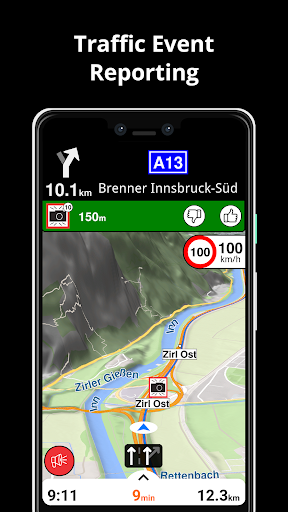
Find the best route to your destination even without an internet connection. Magic Earth uses OpenStreetMap data and a powerful search engine to offer you the optimal routes for driving, biking, hiking and public transportation.
PRIVACY FIRST!
• We do not track you. We do not profile you. We do not trade in your personal data; moreover, we do not have it.
MAPS
• Save big on mobile internet costs and navigate reliably with offline maps powered by OpenStreetMap. 233 countries and regions are ready to be downloaded.
• Choose between 2D, 3D and Satellite map views.
• Get ready for travel and know every detail of your route like surface, difficulty, distance and elevation profile.
• Learn more about the points of interest near you from Wikipedia articles.
• Spot nearby parking places to easily park your car.
• Stay up-to-date and enjoy regular free map updates.
AI DASHCAM
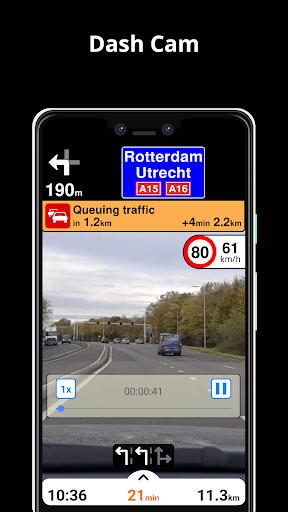
• Improve safe driving and avoid accidents. Receive alerts to potential problems on the road and record your trip.
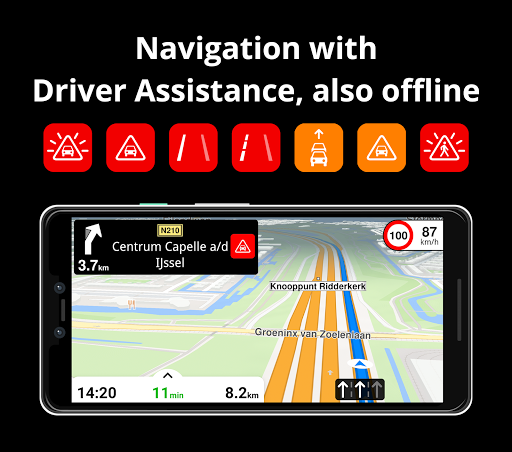
• AI DashCam features Driver Assistance warnings and Dash Cam functionality.
• Avoid collisions and accidents with Driver Assistance warnings: Headway Warning, Forward Collision Warning, Pedestrian Collision Warning, Lane Departure Warning, Leaving Lane Warning, Stop & Go Assist.
• Record the road ahead during navigation to have an aid in the event of a collision or incident.
• Driver Assistance warnings and Recordings are available when the device is on a car mount in landscape mode, with a clear view of the road ahead.
* AI DashCam (with Driver Assistance warnings and Dash Cam functionality) requires Android 7 or later.
NAVIGATION
• Find the fastest or the shortest route to your destination when you travel by car, bike, on foot or with public transport.
• Plan your route with multiple waypoints.
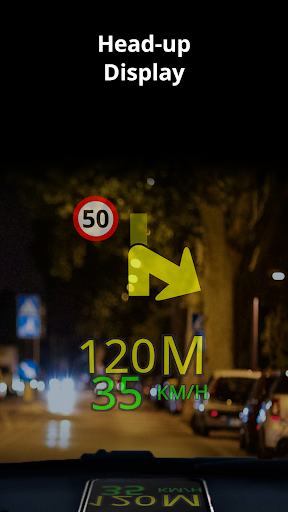
• Stay safe with the free Head-up Display (HUD) feature which projects the most important navigation info onto the windshield of your car.
• Know in advance which lane to take with precise turn-by-turn navigation and lane assistance.
• Get notified about speed cameras and stay up to date with current speed limits.
TRAFFIC INFO
• Get real-time traffic info, updated every minute.
• Discover alternative routes that avoid the traffic jams and save you time on the road.
PUBLIC TRANSPORT
• Get around town quickly and easily. Choose from public transit routes that combine all transportation modes: bus / metro / subway / light rail / train / ferry
• Get walking directions, transfer times, departure times, number of stops. And when available, the cost.
• Find wheelchair or bike friendly public transportation.
WEATHER
• View current temperature and local weather forecast for your favorite locations.
• See what weather conditions to expect in the next hours and view the forecast for the next 10 days.
NOTES:
* Some features are not available in all countries.
* Some features require internet connection.
Mostre mais

1. Faça o download do instalador do MEmu e conclua a instalação

2. Inicie o MEmu e depois abra o Google Play na página inicial

3. Pesquise Magic Earth Navigation & Maps no Google Play
Install
4. Baixe e Instale Magic Earth Navigation & Maps
5. Na conclusão da instalação, clique no ícone para iniciar

6. º Experimente o Magic Earth Navigation & Maps no PC com o MEmu.
O MEmu Play é o melhor emulador Android gratuito, com 50 milhões de utilizadores a desfrutar da sua experiência superior com aplicações Android. A tecnologia de virtualização do MEmu permite-lhe executar milhares de aplicações Android sem problemas no seu computador, mesmo as mais exigentes.
Tela maior com gráficos melhores; Longa duração e sem limitação de bateria ou dados móveis.
Suporte completo ao Mapaeamento de Teclas para controle preciso do teclado e mouse ou gamepad.
Várias contas de jogos ou tarefas em um único PC de uma só vez com o Gerenciador de várias instâncias.
Use Magic Earth Navigation & Maps on PC by following steps: